
Forked from jeroendereu/Split shapefile by attributes.ipynb
Last active
February 26, 2020 00:17
-
-
Save stijnvanhoey/e0db45e03ab2ca88e2b6995389a25d91 to your computer and use it in GitHub Desktop.
Conduct a simple split by attributes on a shapefile. Similar to tools in QGIS and ArcGIS, but much faster (especially when working with large files)! A new shapefile will be created for every (group of) unique attribute(s)
This file contains hidden or bidirectional Unicode text that may be interpreted or compiled differently than what appears below. To review, open the file in an editor that reveals hidden Unicode characters.
Learn more about bidirectional Unicode characters
| { | |
| "cells": [ | |
| { | |
| "cell_type": "code", | |
| "execution_count": 1, | |
| "metadata": { | |
| "collapsed": false, | |
| "slideshow": { | |
| "slide_type": "-" | |
| } | |
| }, | |
| "outputs": [], | |
| "source": [ | |
| "import os\n", | |
| "import tkinter.filedialog as tkfd\n", | |
| "import tkinter.simpledialog as tksd\n", | |
| "import fiona" | |
| ] | |
| }, | |
| { | |
| "cell_type": "code", | |
| "execution_count": 2, | |
| "metadata": { | |
| "collapsed": false, | |
| "slideshow": { | |
| "slide_type": "-" | |
| } | |
| }, | |
| "outputs": [], | |
| "source": [ | |
| "# locate your input shapefile\n", | |
| "infile = tkfd.askopenfilename(title = \"Select your shapefile\", \n", | |
| " initialdir = \"C:/\", \n", | |
| " filetypes = ((\"shapefile\", \"*.shp\"),(\"all files\", \"*.*\")))" | |
| ] | |
| }, | |
| { | |
| "cell_type": "code", | |
| "execution_count": 3, | |
| "metadata": { | |
| "collapsed": false | |
| }, | |
| "outputs": [], | |
| "source": [ | |
| "# define destination -folder- where output -shapefiles- will be written\n", | |
| "dest = tkfd.askdirectory(title = \"Select your output folder\", \n", | |
| " initialdir = \"C:/\")" | |
| ] | |
| }, | |
| { | |
| "cell_type": "code", | |
| "execution_count": 4, | |
| "metadata": { | |
| "collapsed": true | |
| }, | |
| "outputs": [], | |
| "source": [ | |
| "# define field to split by attributes\n", | |
| "field = tksd.askstring(\"Field\", \"Enter the name of the field to conduct the split by attributes on\")" | |
| ] | |
| }, | |
| { | |
| "cell_type": "code", | |
| "execution_count": 5, | |
| "metadata": { | |
| "collapsed": false | |
| }, | |
| "outputs": [], | |
| "source": [ | |
| "# Works fine, for both unique and non-unique attribute values!\n", | |
| "# records with the same attributes are grouped in seperate, new shapefiles...\n", | |
| "# PROPER split by attributes for shapefiles! Hell Yeh!!\n", | |
| "\n", | |
| "with fiona.open(infile) as source:\n", | |
| " meta = source.meta\n", | |
| " for f in source:\n", | |
| " outfile = os.path.join(dest, \"%s.shp\" % f['properties'][field])\n", | |
| " try:\n", | |
| " with fiona.open(outfile, 'a', **meta) as sink:\n", | |
| " sink.write(f)\n", | |
| " except:\n", | |
| " with fiona.open(outfile, 'w', **meta) as sink:\n", | |
| " sink.write(f)" | |
| ] | |
| } | |
| ], | |
| "metadata": { | |
| "kernelspec": { | |
| "display_name": "Python 3", | |
| "language": "python", | |
| "name": "python3" | |
| }, | |
| "language_info": { | |
| "codemirror_mode": { | |
| "name": "ipython", | |
| "version": 3 | |
| }, | |
| "file_extension": ".py", | |
| "mimetype": "text/x-python", | |
| "name": "python", | |
| "nbconvert_exporter": "python", | |
| "pygments_lexer": "ipython3", | |
| "version": "3.6.0" | |
| } | |
| }, | |
| "nbformat": 4, | |
| "nbformat_minor": 2 | |
| } |
This file contains hidden or bidirectional Unicode text that may be interpreted or compiled differently than what appears below. To review, open the file in an editor that reveals hidden Unicode characters.
Learn more about bidirectional Unicode characters
| import os | |
| import sys | |
| import tkinter | |
| from tkinter import Tk | |
| import tkinter.filedialog as tkfd | |
| import tkinter.simpledialog as tksd | |
| import fiona | |
| class simpleform_ap(Tk): | |
| def __init__(self, parent, options): | |
| Tk.__init__(self, parent) | |
| self.initialize(options) | |
| self.grid() | |
| self.field = None | |
| def initialize(self, options): | |
| # Dropdown Menu | |
| self.dropVar = tksd.StringVar() | |
| self.dropVar.set(options[0]) # default choice is first field name | |
| self.dropMenu1 = tksd.OptionMenu(self, self.dropVar, *options, command=self.func) | |
| self.dropMenu1.grid(column=1,row=2) | |
| self.CloseButton = tksd.Button(self, text = "Start splitting", command = self.close_window) | |
| self.CloseButton.grid(column=1, row=3) | |
| def func(self,value): | |
| self.field = value | |
| def close_window(self): | |
| self.destroy() | |
| def create_field_form(options): | |
| form = simpleform_ap(None, options) | |
| form.title('Select the field to split the shapefile') | |
| form.mainloop() | |
| print("Field used for splitting is", form.field) | |
| return(form.field) | |
| def gui_inputs(): | |
| """ | |
| """ | |
| # locate your input shapefile | |
| infile = tkfd.askopenfilename(title = "Select your shapefile", | |
| initialdir = "C:/", | |
| filetypes = (("shapefile", "*.shp"), | |
| ("all files", "*.*"))) | |
| # define destination -folder- where output -shapefiles- will be written | |
| dest = tkfd.askdirectory(title = "Select your output folder", | |
| initialdir = "C:/") | |
| # choose field to split by attributes | |
| field_options = _extract_attribute_field_names(infile) | |
| field = create_field_form(field_options) | |
| return infile, field, dest | |
| def _extract_attribute_field_names(infile): | |
| """extract the field names from a fiona compatible vector file | |
| """ | |
| with fiona.open(infile) as source: | |
| field_names = source.meta["schema"]["properties"].keys() | |
| return list(field_names) | |
| def split_shape_by_attribute(infile, field, dest): | |
| """split by attributes for shapefiles | |
| Works fine, for both unique and non-unique attribute values! Records with the | |
| same attributes are grouped in seperate, new shapefiles... | |
| Parameters | |
| ---------- | |
| infile : str | |
| filename of the input shapefile | |
| field : str | |
| name of the atrribute table field | |
| dest : str | |
| define destination -folder- where output -shapefiles- | |
| will be written | |
| """ | |
| with fiona.open(infile) as source: | |
| meta = source.meta | |
| for f in source: | |
| outfile = os.path.join(dest, "%s.shp" % f['properties'][field]) | |
| try: | |
| with fiona.open(outfile, 'a', **meta) as sink: | |
| sink.write(f) | |
| except: | |
| with fiona.open(outfile, 'w', **meta) as sink: | |
| sink.write(f) | |
| def main(argv=None): | |
| """ | |
| """ | |
| infile, field, dest = gui_inputs() | |
| print("Start splitting procedure...") | |
| split_shape_by_attribute(infile, field, dest) | |
| print("... splitting completed!") | |
| if __name__ == "__main__": | |
| sys.exit(main()) |


Author
Dear @pfrissora, this tool can be used as a stand-alone mini application and is not intended to be used from within Arcmap. I have no idea myself on how to transform this into Arcmap, I'm sorry.
Oh I see, thank you for the quick response.
…On Fri, Feb 21, 2020 at 9:49 AM Stijn Van Hoey ***@***.***> wrote:
Dear @pfrissora <https://github.com/pfrissora>, this tool can be used as
a stand-alone mini *application* and is not intended to be used from
within Arcmap. I have no idea myself on how to transform this into Arcmap,
I'm sorry.
—
You are receiving this because you were mentioned.
Reply to this email directly, view it on GitHub
<https://gist.github.com/e0db45e03ab2ca88e2b6995389a25d91?email_source=notifications&email_token=AMR7OIMWELQGDQUOJDWASH3RD7SYXA5CNFSM4KZELJVKYY3PNVWWK3TUL52HS4DFVNDWS43UINXW23LFNZ2KUY3PNVWWK3TUL5UWJTQAGCMEM#gistcomment-3184710>,
or unsubscribe
<https://github.com/notifications/unsubscribe-auth/AMR7OIK5VAITDGVOBHT7QP3RD7SYXANCNFSM4KZELJVA>
.
--
Paul Dante Frissora
paulf1210@gmail.com
(732)-546-2784
Hi Stijn-- I solved the problem-- if anybody with a similar issue contacts
you you can send them my way.
…On Fri, Feb 21, 2020 at 9:49 AM Stijn Van Hoey ***@***.***> wrote:
Dear @pfrissora <https://github.com/pfrissora>, this tool can be used as
a stand-alone mini *application* and is not intended to be used from
within Arcmap. I have no idea myself on how to transform this into Arcmap,
I'm sorry.
—
You are receiving this because you were mentioned.
Reply to this email directly, view it on GitHub
<https://gist.github.com/e0db45e03ab2ca88e2b6995389a25d91?email_source=notifications&email_token=AMR7OIMWELQGDQUOJDWASH3RD7SYXA5CNFSM4KZELJVKYY3PNVWWK3TUL52HS4DFVNDWS43UINXW23LFNZ2KUY3PNVWWK3TUL5UWJTQAGCMEM#gistcomment-3184710>,
or unsubscribe
<https://github.com/notifications/unsubscribe-auth/AMR7OIK5VAITDGVOBHT7QP3RD7SYXANCNFSM4KZELJVA>
.
--
Paul Dante Frissora
paulf1210@gmail.com
(732)-546-2784
Author
ok, nice to hear!
Sign up for free
to join this conversation on GitHub.
Already have an account?
Sign in to comment
This code is exactly what I'm looking for, but I'm having trouble turning it into a tool on ArcMap. What should my parameters be?
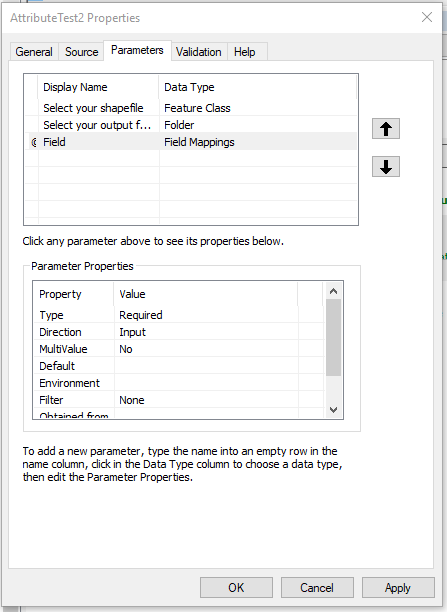
This is what I have so far but I have to be missing something, because when I input a shapefile it doesn't show me its fields.