
Bash on Ubuntu on Windows (installation instructions) is a Linux Subsystem for Windows.

To add it to the Windows right click context menu, perform the following steps:
-
Open
regeditfrom the run menuWin + R. -
Under
HKEY_CLASSES_ROOT\Directory\Background\shellcreate a key calledBash on Ubuntu on Windows. -
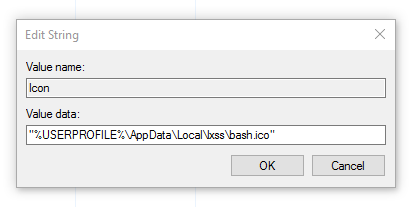
Now add a string value to this key called
Iconwith a path to the desired icon"%USERPROFILE%\AppData\Local\lxss\bash.ico"(including quotes). -
Create a new key called
CommandunderBash on Ubuntu on Windows. -
Change the default value to the path where your
bash.exeis, likeC:\Windows\System32\bash.exe.

Thanks bro, Better yet, open it with Windows Terminal:
wt -p "Ubuntu18" wsl.exe -d Ubuntu18 -u myusername --cd "%V"I couldn't find the ubuntu icon in the system, so I downloaded it from here in ico format. https://iconarchive.com/show/simply-styled-icons-by-dakirby309/OS-Ubuntu-icon.html