
- Remove desktop background (if your company enforces one)
- If you search in the start menu for Ease of Access, you'll see a result for Ease of Access brightness setting.
- Once that settings page has been opened, if you scroll down to the bottom, you’ll see an option to Show desktop background image. If you toggle this to off, it will set the background to the default black.
| Description | Shortcut | Notes |
|---|---|---|
| Switch between windows | Alt + ↹ Tab Alt + ⇧ Shift + ↹ Tab |
|
| Move windows around | ⊞ Windows + ↑ Up ⊞ Windows + → Right ⊞ Windows + ↓ Down ⊞ Windows + ← Left |
|
| Move window to different screen (without changing size of window) | ⊞ Windows + ⇧ Shift + → Right ⊞ Windows + ⇧ Shift + ← Left |
|
| Open file explorer | ⊞ Windows + E | |
| Open legacy context window in file explorer | ⇧ Shift + Right click | |
| Copy paths to files in clipboard from file explorer | Select files > ⇧ Shift + Right click > Copy as path | |
| Paste unformatted | Ctrl + ⇧ Shift + V | |
| Open Windows Emoji picker | ⊞ Windows + . | |
| Paste from clipboard history | ⊞ Windows + V | |
| Open Magnifyer | ⊞ Windows + + | |
| Switch the keyboard langauge/layout | ⊞ Windows + Space | Article |
| Open with administrator from Start menu | Start menu, search for "cmd", Ctrl + ⇧ Shift + Enter |
- Option 1: Restart File Explorer
- Go to Task Manager -> find File Explorer -> Right click -> Restart
- Option 2: Run the following bat script e.g. rebuild_icon_cache.bat
@echo off
set iconcache=%localappdata%\IconCache.db
set iconcache_x=%localappdata%\Microsoft\Windows\Explorer\iconcache*

echo.
echo The explorer process must be temporarily killed before deleting the IconCache.db file.
echo.
echo Please SAVE ALL OPEN WORK before continuing.
echo.
pause
echo.
If exist "%iconcache%" goto delete
echo.
echo The %localappdata%\IconCache.db file has already been deleted.
echo.
If exist "%iconcache_x%" goto delete
echo.
echo The %localappdata%\Microsoft\Windows\Explorer\IconCache_*.db files have already been deleted.
echo.
exit /B

:delete
echo.
echo Attempting to delete IconCache.db files...
echo.
ie4uinit.exe -show
taskkill /IM explorer.exe /F
timeout /t 2 >nul
del /A /F /Q "%iconcache%"
del /A /F /Q "%iconcache_x%"
start explorer.exePowershell script to recursively find all text files in a directory and create an LLM context. By default it will skip commonly skipped files and directories, but also accepts a -SkipDir flag to skip custom directories.
Save this script inside C:\Users\<username>\WindowsPowerShell\Microsoft.PowerShell_profile.ps1 (exact path to your Powershell profile file can be found by typing $PROFILE into a Powershell terminal.
To be able to call the script from a bash termninal, add this alias to C:\Users\<username>\.bashrc
Examples:
dir2txtdir2txt targetDirdir2txt -SkipDir "myFolderToSkip", "anotherDirToSkip"dir2txt targetDir -SkipDir "myFolderToSkip", "anotherDirToSkip"Script:
function dir2txt {
    param(
        [Parameter(Mandatory=$false)]
        [string]$Path = '.',

        [Parameter(Mandatory=$false)]
        [string[]]$SkipDir = @()  # NEW: Array for arbitrary skip directories
    )

    # --- 1. Setup Paths and Output File ---

    # 1.1. CRITICAL FIX: Ensure $Path is ALWAYS a valid string before resolution.
    if ([string]::IsNullOrWhiteSpace($Path) -or $Path -eq '$*') {
        $Path = '.'
    }

    $CurrentDir = (Get-Location).Path

    # 1.2. Safely resolve the path and extract name
    try {
        $ResolvedPath = Resolve-Path $Path -ErrorAction Stop
        $TargetDir = $ResolvedPath.Path

        # FIX: Extract the leaf directory name using string splitting, bypassing the Split-Path bug.
        $TargetDirName = $TargetDir.TrimEnd('\') -split '\\' | Select-Object -Last 1

    } catch {
        Write-Error "Could not resolve the path '$Path'. Ensure the path is valid and accessible. Details: $($_.Exception.Message)"
        return
    }

    $CurrentDate = Get-Date -Format "yyyy-MM-dd"
    $CurrentTime = Get-Date -Format "HHmmss"
    $Filename = "repo-$TargetDirName-$CurrentDate`_$CurrentTime.txt"
    $OutputFile = Join-Path -Path $CurrentDir -ChildPath $Filename

    Write-Host "Targeting directory: $TargetDir" -ForegroundColor Cyan

    # --- 2. Define and Combine Skip Patterns ---

    # A. File Patterns to Skip (File Names or Extensions)
    $SkipFilePatterns = @(
        # Files from .gitignore (normalized)
        '*.rsuser', '*.suo', '*.user', '*.userosscache', '*.sln.docstates', '*.userprefs', 'mono_crash.*',
        '*.VisualState.xml', 'TestResult.xml', 'nunit-*.xml', 'dlldata.c', 'project.lock.json',
        'project.fragment.lock.json', 'ScaffoldingReadMe.txt', 'StyleCopReport.xml', '*_i.c', '*_p.c',
        '*_h.h', '*.ilk', '*.meta', '*.obj', '*.iobj', '*.pch', '*.pdb', '*.ipdb', '*.pgc', '*.pgd',
        '*.rsp', '*.sbr', '*.tlb', '*.tli', '*.tlh', '*.tmp', '*.tmp_proj', '*_wpftmp.csproj', '*.log',
        '*.vspscc', '*.vssscc', '.builds', '*.pidb', '*.svclog', '*.scc', '_Chutzpah*', '*.aps', '*.ncb',
        '*.opendb', '*.opensdf', '*.sdf', '*.cachefile', '*.VC.db', '*.VC.VC.opendb', '*.psess', '*.vsp',
        '*.vspx', '*.sap', '*.e2e', '*.gpState', '*.[Rr]e[Ss]harper', '*.DotSettings.user', '*.dotCover',
        'coverage*.json', 'coverage*.xml', 'coverage*.info', '*.coverage', '*.coveragexml', '.*crunch*.local.xml',
        'nCrunchTemp_*', '*.mm.*', '*.HxT', '*.HxC', '*.hhc', '*.hhk', '*.hhp', '*.[Pp]ublish.xml',
        '*.azurePubxml', '*.pubxml', '*.publishproj', '*.nupkg', '*.snupkg', '*.nuget.props', '*.nuget.targets',
        '*.build.csdef', '_pkginfo.txt', '*.appx', '*.appxbundle', '*.appxupload', '*.[Cc]ache', '~$*', '*~',
        '*.dbmdl', '*.dbproj.schemaview', '*.jfm', '*.pfx', '*.publishsettings', 'orleans.codegen.cs',
        'UpgradeLog*.XML', 'UpgradeLog*.htm', '*.mdf', '*.ldf', '*.ndf', '*.rdl.data', '*.bim.layout',
        '*.bim_*.settings', '*.rptproj.rsuser', '*- [Bb]ackup.rdl', '*- [Bb]ackup (*).rdl', '*.GhostDoc.xml',
        '.ntvs_analysis.dat', '*.plg', '*.opt', '*.vbw', '*.tss', '*.jmconfig', '*.btp.cs', '*.btm.cs',
        '*.odx.cs', '*.xsd.cs', '*.binlog', '*.nvuser', 'FodyWeavers.xsd', 'Makefile.in', '*.usertasks',
        'config.make', 'config.status', 'aclocal.m4', 'install-sh', '*.tar.gz', '*.dmg', '*.app',
        '.DS_Store', '.AppleDouble', '.LSOverride', 'Icon', '._*', '.VolumeIcon.icns', 'Thumbs.db',
        'ehthumbs.db', 'ehthumbs_vista.db', '*.stackdump', '[Dd]esktop.ini', '*.cab', '*.msi', '*.msix',
        '*.msm', '*.msp', '*.lnk', '*.sln.iml', '*.tfstate', '*.tfstate.*', 'crash.log', 'crash.*.log',
        '*.tfvars', '*.tfvars.json', 'override.tf', 'override.tf.json', '*_override.tf', '*_override.tf.json',
        '.terraformrc', 'terraform.rc', '.env', 'dist', 'dist_beta',
        'bun.lock', 'package-lock.json', '.gitignore', '.dockerignore', '*.tsbuildinfo',

        # Binary and Media Extensions
        '*.png', '*.jpg', '*.jpeg', '*.gif', '*.ico', '*.svg', '*.webp', # Images
        '*.mp4', '*.avi', '*.mov', '*.webm', '*.mkv', # Videos
        '*.dll', '*.exe', '*.pdb', '*.so', '*.dylib', '*.lib', '*.obj', '*.o', # Binaries/Libs
        '*.zip', '*.tar', '*.gz', '*.7z', '*.rar', '*.iso', # Archives
        '*.pdf', '*.xlsx', '*.doc', '*.docx', '*.odt', # Documents
        '*.woff', '*.ttf', '*.eot', '*.otf' # Fonts
    )

    # B. Directory Patterns to Skip (Folders) - STATIC
    $StaticSkipDirPatterns = @(
        '*debug*', '*release*', '*x64*', '*x86*', '*win32*', '*arm*', '*arm64*', 'bld', '*bin*', '*obj*',
        '*log*', '.vs', 'Generated\ Files', '*testresult*', '*buildlog*', '*debugps*', '*releaseps*',
        'BenchmarkDotNet.Artifacts', 'artifacts', '.tye', 'ipch', '_ReSharper*', '_TeamCity*', '.axoCover*',
        '.sass-cache', '[Ee]xpress', 'DocProject/buildhelp', 'DocProject/Help/Html2', 'DocProject/Help/html',
        'publish', 'PublishScripts', '*/packages', 'csx', 'ecf', 'rcf', 'AppPackages', 'BundleArtifacts',
        'ClientBin', '_UpgradeReport_Files', 'Backup*', 'ServiceFabricBackup', 'FakesAssemblies', 'node_modules',
        'DocProject/Help', '_Pvt_Extensions', '.paket/paket.exe', 'paket-files', '.fake', '.cr/personal',
        '__pycache__', 'OpenCover', 'ASALocalRun', 'MigrationBackup', '.ionide', 'autom4te.cache',
        'tarballs', 'test-results', '.DocumentRevisions-V100', '.fseventsd', '.Spotlight-V100', '.TemporaryItems',
        '.Trashes', '.com.apple.timemachine.donotpresent', '.AppleDB', '.AppleDesktop', 'Network Trash Folder',
        'Temporary Items', '.apdisk', '$RECYCLE.BIN', '.idea', '.vscode', '*/.terraform', 'Generated_Code',
        '.git', 'dist'
    )

    # C. Combine Static list with Dynamic user-provided list
    # Convert user input ('DirA', 'DirB') to patterns ('*DirA*', '*DirB*')
    $DynamicSkipDirPatterns = $SkipDir | ForEach-Object { "*$($_)*" }

    $SkipDirPatterns = $StaticSkipDirPatterns + $DynamicSkipDirPatterns

    Write-Host "Excluding $($SkipDirPatterns.Count) directory patterns and $($SkipFilePatterns.Count) file patterns." -ForegroundColor Yellow

    # --- 3. Process Files ---
    $AllContent = New-Object System.Collections.ArrayList
    $FilesProcessed = 0

    # Get all files recursively
    Get-ChildItem -Path $TargetDir -Recurse -File -ErrorAction SilentlyContinue | ForEach-Object {
        $File = $_

        # Get the path of the file relative to the TargetDir, normalized to backslashes
        $RelativePath = $File.FullName.Substring($TargetDir.Length).TrimStart('\')

        # 1. Check Directory Skips (check if the path CONTAINS a skipped folder)
        $IsSkippedDir = $false
        foreach ($DirPattern in $SkipDirPatterns) {
            # Normalize the pattern slightly for better comparison (removes trailing slashes if they exist)
            $NormalizedPattern = $DirPattern.TrimEnd('\')

            # Use * around the pattern for "contains anywhere" matching
            if ($RelativePath -like "*$NormalizedPattern\*") {
                $IsSkippedDir = $true
                break
            }
        }
        if ($IsSkippedDir) { return } # Skip this file and continue to next

        # 2. Check File Name Skips (check if the file name matches an ignored pattern)
        $IsSkippedFile = $false
        foreach ($FilePattern in $SkipFilePatterns) {
            # Use the -like operator for standard glob matching (e.g., *.suo)
            if ($File.Name -like $FilePattern) {
                $IsSkippedFile = $true
                break
            }
        }
        if ($IsSkippedFile) { return } # Skip this file and continue to next

        # 3. Process the file
        try {
            # Standardize final relative path to forward slashes for readability
            $FinalRelativePath = $RelativePath -replace '\\', '/'

            $content = Get-Content -Path $File.FullName -Raw -Encoding UTF8 -ErrorAction Stop

            [void]$AllContent.Add("--- FILE_START: $FinalRelativePath ---")
            [void]$AllContent.Add($content)
            [void]$AllContent.Add("`n--- FILE_END: $FinalRelativePath ---`n")
            $FilesProcessed++

        } catch {
            Write-Warning "Failed to read file: '$FinalRelativePath'. Possibly a true binary or encoding issue. Skipping."
        }
    }

    # --- 4. Single-Pass Write to Disk ---
    Write-Host "Scraping complete. Processed $FilesProcessed text files." -ForegroundColor Cyan
    try {
        $ContentCount = $AllContent.Count / 3 # Each file adds 3 blocks (start tag, content, end tag)
        $AllContent -join "`n" | Set-Content -Path $OutputFile -Encoding UTF8 -Force
        Write-Host "✅ Successfully created context file at: $OutputFile (Contains $ContentCount files)" -ForegroundColor Green
    } catch {
        Write-Error "Error writing output file: $($_.Exception.Message)"
    }
}-
Set dark mode (taken from https://www.howtogeek.com/446198/how-to-force-dark-mode-on-every-website-in-google-chrome/)

-
Set Dev Tools panel layout to horizontal (Settings cog > Preferences > Panel layout).
-
Preserve console log
-
When Chrome's "ignore security warning" prompt won't reset! Delete security policy chrome://net-internals/#hsts
- If this still doesn't work, you can type thisisunsafe on the security warning screen and the page should load (read more)
-
Enable Houdini Features in Chrome - chrome://flags/#enable-experimental-web-platform-features
| Description | Shortcut |
|---|---|
| Open tab | Ctrl + T |
| Close tab | Ctrl + W Scroll wheel click the tab |
| Re-open closed tab | Ctrl + ⇧ Shift + T |
| Close all tabs | Ctrl + ⇧ Shift + W |
| Close other tabs | Right click tab > Close other tabs |
| Close tabs to the right | Right click tab > Close tabs to the right |
| Duplicate tab | Right click tab > Duplicate Ctrl + ⇧ Shift + K (Edge only) |
| Switch between tabs | Ctrl + ↹ Tab Ctrl + ⇧ Shift + ↹ Tab |
| Select all URL | Ctrl + L |
| Go to top of page | Ctrl + Home |
| Go to bottom of page | Ctrl + End |
- Move Terminal panel to the right of the editor window
- Use the gutter to find your changes
- Set User Snippets to boilerplate code you use often
- Toggle screencast mode to show clicks and keystrokes onscreen using F1 and search for "screencast"

- Search for symbols globally
- Open file search Ctrl + P and type
#then search for symbols
- Open file search Ctrl + P and type
- Search for strings globally
- Open file search Ctrl + P and type
%then search for string - Ctrl + Shift + F
- Open file search Ctrl + P and type
https://github.com/Dobby89/keyboard-shortcut-workshop
- Use VS Code key bindings - https://stackoverflow.com/a/62417446/5243574
- Open project in existing window: Tools -> Options -> Projects and Solutions -> Web Projects -> Uncheck "Stop debugger when browser window is closed"

- Organise Servers - https://www.sqlservercentral.com/articles/using-registered-servers-in-ssms
| Description | Command | Example |
|---|---|---|
| Copy the output to clipboard | <command> | clip |
ls | clip |
| Create a file | touch <filname.ext> |
touch .env |
| Copy file/directory | cp -r <pathOfFileToBeCopied> <pathToBeCopiedTo> |
cp -r ./oldDir ./newDir |
| Rename file/directrory | mv <oldFilename> <newFilename> |
mv old new |
| Find out where an NPM package is being included | npm list <package> |
npm list @babel/traverse |
- VS Code
- Ninite - Install and Update All Your Programs at Once
- https://github.com/yt-dlp/yt-dlp - Download YouTube videos
- FFMPEG
- Install the exe (try https://github.com/BtbN/FFmpeg-Builds/releases)
- Convert video to gif
ffmpeg -i input.mp4 -vf "fps=20,scale=980:-1:flags=lanczos,split[s0][s1];[s0]palettegen[p];[s1][p]paletteuse" -loop 0 output.gif - Convert video to MP3
ffmpeg -i input.aac -vn -qscale:a 0 output.mp3 - Extract video thumbnail
ffmpeg -i input.aac -ss 00:00:05 -vframes 1 thumbnail.jpg - Set MP3 thumbnail
pip install eyeD3followed byeyeD3 --add-image=thumbnail.jpg:FRONT_COVER output.mp3
- Git
- Git Fork
- Keepass
- GOG Galaxy
- Total Annihilation Forever
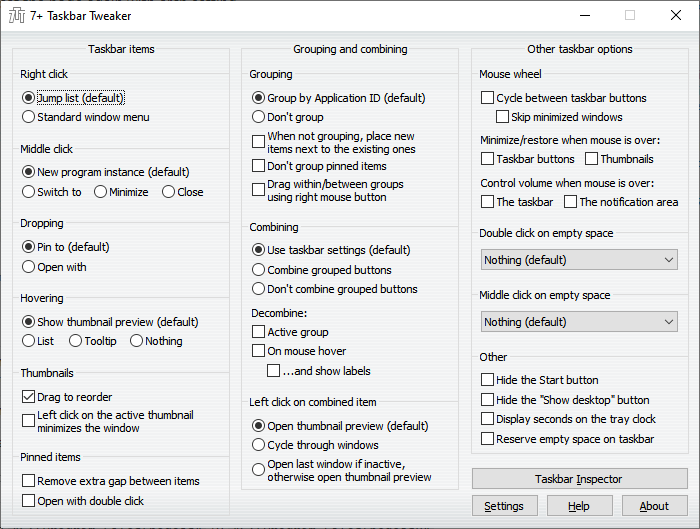
- Taskbar Tweaker
- https://windhawk.net/ (windows mods)
- Everything - Locate files and folders by name instantly
- Agent Ransack - Search files
- mremoteng - Remote Desktop alternative
- Git Fork
- ShareX
- S3 Browser
- Ditto clipboard manager
- Fiddler
- Treesize
- NVM for Windows
- Stacktracify
- Flux
- scriptkit.com - Guide https://www.youtube.com/watch?v=C14MSrJGGBg
- Windows Powertoys
- Bruno - API Client
- NVDA - Screen Reader
- https://www.sqlshades.com - Dark Mode for SQL Management Studio
- Dark Reader Chrome extension - automatically makes websites dark
- Custom Style Script Chrome extension - inject custom scripts and styles to websites (including iframes)
- https://freedium.cfd/ - Read Medium articles for free
- https://12ft.io - Remove banners / pay walls from websites
- https://dotnetfiddle.net - Run dotnet C# on the browser
- https://gchq.github.io/CyberChef - Collection of useful scripts and tools
- https://www.photopea.com - Browser-based Photoshop clone
- https://showcode.app - Good looking code snippets
- https://cobalt.tools - Download videos from social media websites
- https://bidb.uk - Broadband tool to view which providers are available
- https://www.ontimetrains.co.uk - Check historic train departure and arrival times. Useful for delay repay compenstation claims
- https://streamvi.com - Download videos from various websites
Original Issue: nfroidure/gulp-iconfont#16
- Save all the SVG files on a square canvas with a 1px gap around the edges. I personally use a canvas/artboard of 128 x 128px with the icon placed centrally. If the icon isn't square, or 1:1 width:height ratio, then just make sure the longest edge is 126px.

- When saving the SVGs out, use the following settings. The 3 decimal places contradicts the author @nfroidure's recommendations, but it helps get better results. Using just 1 decimal place made more complex SVGs render badly.

-
In the gulp task, set
fontHeight: 1001. I found this fixes badly rendered icons. -
Don't run the iconfont task directly on your source SVGs. Instead, copy them to a temporary directory first and then run it on those files. This stops the plugin renaming your files (e.g.
arrow.svgtouE001-arrow.svg), which I find is quite annoying. After the iconfont has been generated, you can delete the temporary directory since it won't be needed.
This seems to help reduce the chance of the plugin messing around with your source SVG files. Before I started doing this, I was opening them up in Illustrator and they would be repositioned and their paths slightly changed.