
My ISP (Telekom) is being belligerent and refuses to improve its peering to peers with high amount of traffic 1.
This results in practically unusable connection quality: 1–100% packet loss, and jitter up to the ranges of 100+ms.
This affects increasingly more and more websites, common and fringe: Twitter, Youtube, Twitch, and sites behind Cloudflare.
I solved this by renting a Berlin server with good peering, and routing my home network through it.
At the same time, some services I use are located in Japan and geoblocks German IP space.
Recently, I found that I could not reach my Tokyo server anymore. I have to do it through my Berlin server.
This is easy with SSH, but it turned to be quite a head-scratcher to configure Wireguard to hop through my Berlin server prior to the Tokyo server.
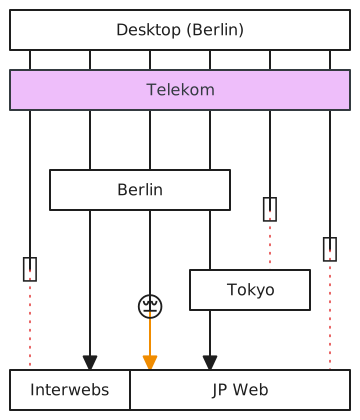
I will write this in Tutorial style in case I need to do this again in the future.
# I find this one nice to use
curl -L -O "https://github.com/hwdsl2/wireguard-install/raw/refs/heads/master/wireguard-install.sh"
chmod +x wireguard-install.sh
./wireguard-install.sh

# Run the script and generate a client that will be routed to Japan Server later
# Suppose it is saved to ~/jp-1.conf, with address 10.7.0.6/32# Use the same script
curl -L -O "https://github.com/hwdsl2/wireguard-install/raw/refs/heads/master/wireguard-install.sh"
chmod +x wireguard-install.sh
# But use a different subnet
sed -i 's/10.7.0/10.8.0/g' wireguard-install.sh
./wireguard-install.sh
# Run the script and generate a client to be used by the Berlin Server
# Suppose it is saved to ~/berlin.conf, with address 10.8.0.2/32# Create a new interface that will be a wireguard client to the Japan Server
# Use the configuration we generated above
vim /etc/wireguard/wg1.confWe make two alterations: AllowedIPs and Table = off:
[Interface]
Address = 10.8.0.2/24
DNS = [redacted]
PrivateKey = [redacted]

# Do not let wg-quick install default routes
Table = off

[Peer]
PublicKey = [redacted]
PresharedKey = [redacted]
AllowedIPs = 0.0.0.0/0, ::/0
Endpoint = [redacted]
PersistentKeepalive = 25
Afterwards:
# Activate it
systemctl enable --now wg-quick@wg1

# Test that it is working
curl --interface wg1 https://ifconfig.me/allThis is the big head-scratcher, as I never really used iptables, ip rule, and ip route directly before.
In the end, it ended up being very few changes. I can't explain it well. Use your favourite AI model to help explain it:
# Route 10.7.0.6/32 to wg1 interface
ip rule add from 10.7.0.6/32 table 100
ip route add default dev wg1 table 100

# Enable SNAT
iptables -t nat -A POSTROUTING -s 10.7.0.6/32 -o wg1 -j MASQUERADE
And that should be it.
Requests made to Berlin Server as jp-1 wireguard client should be forwarded transparently via the Japan Server.
To make it persist through reboots, add it to wg1.conf:
# Configure forwarding/routing
PostUp = ip rule add from 10.7.0.6/32 table 100
PostUp = ip route add default dev %i table 100
PostUp = iptables -t nat -A POSTROUTING -s 10.7.0.6/32 -o %i -j MASQUERADE
PostDown = ip rule del from 10.7.0.6/32 table 100
PostDown = ip route del default dev %i table 100
PostDown = iptables -t nat -D POSTROUTING -s 10.7.0.6/32 -o %i -j MASQUERADE