Skip to content

Instantly share code, notes, and snippets.

Show Gist options
  • Select an option

  • Save HimDek/e09340eae2861e1ad8b7f6bdba5ee9ff to your computer and use it in GitHub Desktop.

Select an option

Save HimDek/e09340eae2861e1ad8b7f6bdba5ee9ff to your computer and use it in GitHub Desktop.
This Guide will show you how to install and run apk files or Android apps in any Edition of Windows 11 using Windows Subsystem for Android. WSA or Windows Subsystem for Android is a Tool that allows Windows to run Android Apps directly without using any emulator.

Install Android apps or apk files in Windows using Windows Subsystem for Android

WSA or Windows Subsystem for Android is a Tool that allows Windows to run Android Apps directly without using any emulator. The problem is Windows Subsystem for Android is currently only available through preview via the Beta Channel of the Windows Insider Program. But if you follow my guide, you don't have to be in Windows Insider Program to try it out. The only thing you need is Windows 11 installed and some patience.

Prerequisites:

  • Windows Subsystem for Android or WSA must be Installed.

Click here to view the guide that shows how to install Windows Subsystem for Android in any Edition of Windows 11 (including Windows 11 Home) non Inider or stable release.

How to Install Android Apps or apk files in Windows Subsystem for Android:

  • First install Windows Subsystem for Android. Click here to know how to do that.
  • Search and run Windows Subsystem for Android Setting from Windows start menu.
  • The window shown in the screenshot below will appear. There, click on the icon in the extreme left side of the Files box. This will start Windows Subsystem for Android and open the File Manager App in Android. This can take some time so be patient.
  • Keep File Manager running otherwise Windows Subsystem for Android will terminate itself.
  • Enable Optional Diagnostic Data and Developer mode in Windows Subsystem for Android Setting Window and click the Refresh button in the IP address Section.
  • Click here to download the latest version of adb and extract the downloaded zip file.
  • Inside the extracted folder, there should be a file named adb.exe along with a plenty of other files.
  • Put the apk files of the Android apps that you want to install in this folder, and rename them to names that are easier to remember.

    Note: You can download apk files of Android apps from websites like APKPure, APKMirror or F-Droid. These are trusted websites.

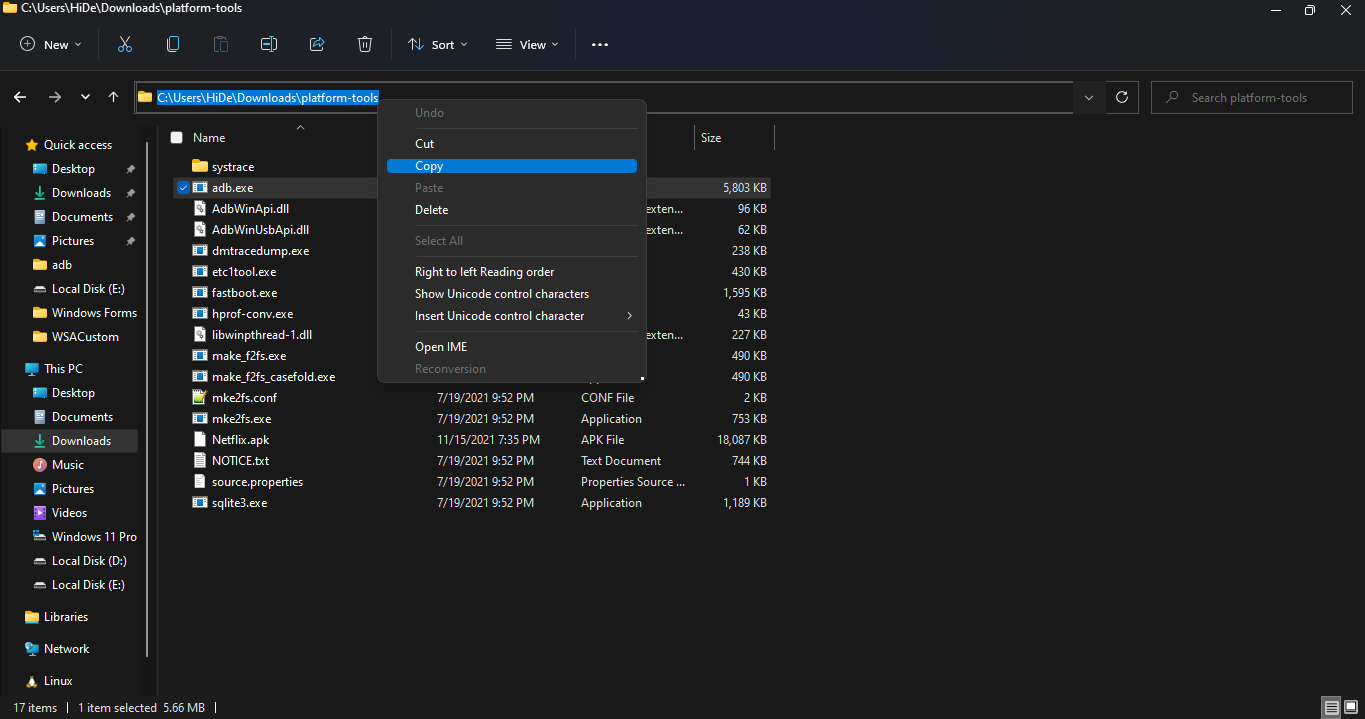
  • Copy the path of this folder from the pathbox in Windows File Explorer as shown in the screenshot below: 11
  • Search for Command Prompt in Windows Start Menu and Open it.
  • Type cd "" in the command prompt. Inside those "", paste the copied path by pressing Ctrl + V. The windows should look something like the below screenshot. Then press Enter. 12
  • Now, type adb connect 127.0.0.1:58526 in the Command Prompt Window. Press Enter and wait for the connection.
  • Once connected, type adb install "name.apk" in the Command Prompt. Replace name with the name of the apk file that you want to install and press Enter. After successful install, the installed App will appear in Windows Start Menu. Repeat this step for all the apk files that you want to install and they will appear in Windows Start Menu as well.

Thats it! Thanks for using this Guide. I hope it helped.

@m65015482-coder
Copy link

thanks

@m65015482-coder
Copy link

amazing

@madnan83233-web
Copy link

Window 11

@danialtaqi36-art
Copy link

Отличная инструкция! Установил WSA и теперь спокойно запускаю APK прямо на Windows. Даже получилось скачать нулс бравл старс последняя версия и протестировать — всё работает отлично. Спасибо за полезный материал!

@umerismaeel1998-cyber
Copy link

Windows 11 users can now easily enjoy Android games through the Windows Subsystem for Android (WSA). It’s a smooth and stable way to play mobile games right on your PC.
If you’re a fan of 8 Ball Pool, this method works perfectly — no emulator needed. You can install WSA, then grab the latest 8 Ball Pool Mod APK
to unlock all premium features, unlimited coins, and long lines. It’s a great way to enjoy the full version of the game with better visuals and performance.

@umerismaeel1998-cyber
Copy link

With the latest Android updates, you can now run streaming apps directly on PC using Windows Subsystem for Android (WSA). If you enjoy watching movies and shows without limits, Castle APK is a great option. It offers smooth playback, a clean interface, and tons of entertainment in one place.

@dildarssuet-glitch
Copy link

3 Patti Lucky gives you that real casino feeling right on your phone. The sounds, graphics, and gameplay all make it super entertaining. Plus, I love playing with my friends and challenging new players every day. download game now If you’re looking for a fun and rewarding 3 Patti experience, this game is a must-try!

@blog12233-cyber
Copy link

Great work on this code! 👏 If you’re into fun and challenging mobile games, definitely check out H555 game — smooth gameplay and cool levels. 🎮
👉 https://h555games.pk/

@sajidfaraz1212-oss
Copy link

If you're looking for an easy way to install and run Android apps on Windows without using an emulator, Windows Subsystem for Android (WSA) is a great option. It allows seamless integration of Android apps into Windows 11. If you want to enhance your experience with Lightroom Mod APK, you can follow this guide to install it on WSA. I wasn’t sure about downloading mods at first, but this one’s safe. The 8 Ball Pool Mod APK installed easily on my phone and works perfectly. The aim assist is super accurate.

@sajidfaraz1212-oss
Copy link

You can now use Android apps on Windows 11 with Windows Subsystem for Android (WSA). It's a super useful feature. By using this, you can now experience enhanced gameplay with Roblox Mod APK directly on your computer without the need for an emulator.

This setup provides smoother controls, a larger display, and overall improved performance, allowing you to fully immerse yourself in the diverse and engaging Roblox community. Follow the guide to install WSA and then download the Doraemon X APK to unlock additional features and elevate your gaming experience.

@sajidfaraz1212-oss
Copy link

I’ve been using the Snake Aim Tool v2.0.0 for my 8 Ball Pool games and it’s a game-changer. The auto aim and unlimited guidelines help me win every match. You can download here safely.

@m76493076-rgb
Copy link

Clever Portal is designed for efficient online learning. Teachers can assign tasks, track progress, and manage apps while students enjoy a simplified learning environment.

@haramali45
Copy link

As more users explore Windows Subsystem for Android to run mobile apps directly on their PCs, it also becomes easier to manage tools that rely on location-based features. For instance, certain Android apps let you view map details more conveniently when running on a larger screen, making navigation or area analysis clearer than on a smartphone. With WSA, these apps function just like they would on an Android device, giving you a more flexible and desktop-friendly experience.

@m65015482-coder
Copy link

This guide is surprisingly clear compared to most WSA tutorials out there. The step-by-step approach really helps, especially for people who aren’t comfortable with adb commands. I noticed the same thing when researching completely different topics like beauty blogs that accept guest posts the right instructions make even a technical process feel simple. Enabling Developer Mode and keeping the File Manager open were the two things I used to miss, so your explanation definitely fills the gaps.

@apkvzcom-a11y
Copy link

Roblox has evolved into a global gaming sensation, providing millions of users with endless opportunities to create, play, and explore virtual worlds. For those looking to take their gaming experience to the next level, the Roblox Mod Menu APK is the perfect solution. This powerful mod allows players to access exclusive features and customizations that are not available in the standard Roblox game. With the mod menu, users can unlock unlimited Robux, gain access to rare in-game items, and even activate cheats for faster progression and enhanced gameplay.

@dustin2123
Copy link

You can install Android apps or APK files on Windows 11 using Windows Subsystem for Android (WSA), which allows apps to run directly without an emulator. First, make sure WSA is installed and enabled, then turn on Developer Mode in the WSA settings. After that, download the latest ADB tools, place your APK files in the same folder, and use the command prompt to connect to WSA and install the apps. This process works for most Android apps, and you can even install apps like Wink Pro APK to access premium video editing features directly on your Windows PC.

@davidhammad
Copy link

Great guide on installing Android APKs on Windows via WSA! It’s a useful trick for running apps like GB WhatsApp v18.70 on your mobile. However, be cautious when using modded apps, as they may lack official updates or security features. Thanks for sharing this insightful method!

@davidhammad
Copy link

Great guide! I’m excited to try out PvZ Fusion Bahasa Indonesia Android on my PC using WSA. Your step-by-step instructions make it easy to set up and run Android apps on Windows. Thanks for sharing this!

@davidhammad
Copy link

Great walkthrough! Thanks for sharing how to use Windows Subsystem for Android (WSA) to install APK files directly in Windows 11. The step‑by‑step instructions make it much clearer. On a related note: I noticed many users looking for options like insta pro 2 apk download if you ever cover how to sideload modified apps or alternate versions safely, it would be a useful addition. Just a reminder though: always be mindful of security risks when downloading and installing APKs from unofficial sources.

@m65015482-coder
Copy link

This guide is really detailed and makes installing Android apps on Windows using WSA much easier, especially for those not in the Insider Program. One extra tip: sometimes certain APKs might have compatibility issues with WSA, so it’s helpful to try different APK sources if an app doesn’t install properly. For example, I successfully installed apps like car parking multiplayer 2 mod apk using trusted APK repositories, and it ran smoothly on Windows 11 without any extra emulators. Following these steps really streamlines running mobile apps directly on a PC!

@haramali45
Copy link

As more people experiment with Windows Subsystem for Android to run mobile apps directly on a PC, the ability to access tools without an emulator has become incredibly convenient. WSA makes multitasking easier—whether you're testing applications, playing games, or using productivity tools usually designed for phones. Just like this setup improves accessibility, users often rely on quick online services for everyday needs, such as checking their emirates id status, which provides updates instantly without needing additional apps or long processes.

Sign up for free to join this conversation on GitHub. Already have an account? Sign in to comment