
-
-
Save JustinGrote/656a01c1e047df940d577698ba62e3f2 to your computer and use it in GitHub Desktop.
| #requires -version 7 -module Microsoft.Graph.Applications | |
| using namespace Microsoft.Graph.PowerShell.Models | |
| using namespace System.Collections.Generic | |
| enum MicrosoftGraphServicePrincipalType { | |
| Application | |
| Delegated | |
| } | |
| class MgServicePrincipalPermission { | |
| [MicrosoftGraphServicePrincipal]$ServicePrincipal | |
| [string]$Id | |
| [MicrosoftGraphServicePrincipalType]$Type | |
| [string]$User | |
| [string]$ResourceName | |
| [string]$Permission | |
| [string]$PermissionDisplayName | |
| [string]$Description | |
| [Nullable[DateTime]]$CreatedDateTime | |
| } | |
| Update-TypeData -TypeName 'MgServicePrincipalPermission' -DefaultDisplayPropertySet 'ServicePrincipal', 'ResourceName', 'User', 'Permission' -Force | Out-Null | |
| function Get-MgServicePrincipalPermission { | |
| <# | |
| .SYNOPSIS | |
| Retrieves the permissions assigned to a service principal, providing a similar output to what is on the Azure Portal Screen. | |
| .EXAMPLE | |
| Get-MgServicePrincipal -Search 'displayname:MyServicePrincipal' -Con eventual -Cou count | Get-MgServicePrincipalPermission | |
| #> | |
| [CmdletBinding(DefaultParameterSetName = 'Object')] | |
| param( | |
| [Parameter(ParameterSetName = 'Id', Position = 0, Mandatory, ValueFromPipelineByPropertyName)] | |
| [Alias('Id')] | |
| [string]$ServicePrincipalId, | |
| [Parameter(ParameterSetName = 'Object', Position = 0, Mandatory, ValueFromPipeline)] | |
| [Microsoft.Graph.PowerShell.Models.MicrosoftGraphServicePrincipal]$ServicePrincipal | |
| ) | |
| begin { | |
| #We use this to cache app info for permission lookups | |
| [Dictionary[string, MicrosoftGraphServicePrincipal]]$spCache = @{} | |
| } | |
| process { | |
| $ErrorActionPreference = 'Stop' | |
| $ServicePrincipal ??= Get-MgServicePrincipal -ServicePrincipalId $ServicePrincipalId | |
| #Add a ToString to the serviceprincipal so it summarizes correctly in the formatting | |
| $ServicePrincipal | Add-Member -MemberType ScriptMethod -Name ToString -Value { $this.DisplayName } -Force | |
| #When using Mandatory above, it becomes an empty string instead of null, so null conditional cannot be used. | |
| if ([string]::IsNullOrEmpty($ServicePrincipalId)) { | |
| $ServicePrincipalId = $ServicePrincipal.Id | |
| } | |
| $appPermissions = Get-MgServicePrincipalAppRoleAssignment -ServicePrincipalId $ServicePrincipalId | |
| | Where-Object DeletedDateTime -EQ $null | |
| foreach ($app in $appPermissions) { | |
| $spCache[$app.ResourceId] ??= Get-MgServicePrincipal -ServicePrincipalId $app.ResourceId | |
| [MicrosoftGraphAppRole]$role = $spCache[$app.ResourceId].AppRoles | |
| | Where-Object Id -EQ $app.AppRoleId | |
| if (-not $Role) { throw "No matching permission found for AppRoleID $($app.AppRoleId). This is a bug" } | |
| [MgServicePrincipalPermission]@{ | |
| ServicePrincipal = $ServicePrincipal | |
| Id = $app.Id | |
| Type = 'Application' | |
| User = '[Application]' | |
| ResourceName = $app.ResourceDisplayName | |
| Permission = $role.Value | |
| PermissionDisplayName = $role.DisplayName | |
| Description = $role.Description | |
| CreatedDateTime = $app.CreatedDateTime | |
| } | |
| } | |
| $delegatedPermissions = Get-MgServicePrincipalOauth2PermissionGrant -ServicePrincipalId $ServicePrincipalId | |
| foreach ($permission in $delegatedPermissions) { | |
| if (-not $spCache[$permission.ResourceId]) { | |
| $spCache[$permission.ResourceId] = Get-MgServicePrincipal -ServicePrincipalId $permission.ResourceId | |
| | Add-Member -MemberType ScriptMethod -Name ToString -Value { $this.DisplayName } -Force -PassThru | |
| } | |
| $resource = $spCache[$permission.ResourceId] | |
| foreach ($scope in $permission.Scope.split(' ')) { | |
| $role = $resource.AppRoles | Where-Object Value -EQ $scope | |
| [MgServicePrincipalPermission]@{ | |
| ServicePrincipal = $ServicePrincipal | |
| Id = $scope.Id | |
| Type = 'Delegated' | |
| User = $permission.ConsentType -eq 'AllPrincipals' ? 'All' : $permission.PrincipalId | |
| ResourceName = $resource.DisplayName | |
| Permission = $scope | |
| PermissionDisplayName = $role.DisplayName | |
| Description = $role.Description | |
| CreatedDateTime = $null | |
| } | |
| } | |
| } | |
| } | |
| } |


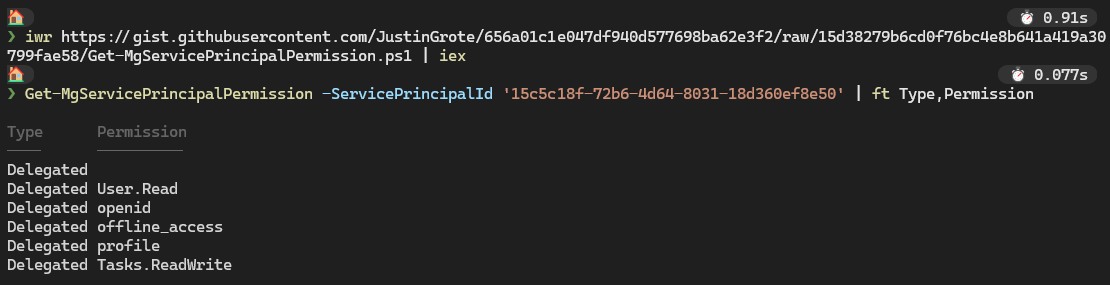
@rdantas9 works fine for me, not sure how you're invoking it that is causing the namespace errors.
@rdantas9 works fine for me, not sure how you're invoking it that is causing the namespace errors.
I was able to run your PowerShell script properly, but I've replaced line 12 from MicrosoftGraphServicePrincipal to Microsoft.Graph.PowerShell.Models.MicrosoftGraphServicePrincipal.
Thanks for your patience and support!

Hi, is 'Id = $app.Id' meant to be there in line 52 under $delegatedPermissions? If so, could you explain why?
Probably a cut/paste oopsie from the foreach loop above it, probably should be $scope.id
Thanks. Appreciate all your work.
I've updated the script to include the original service principal as a reference while still reporting the name, and use a custom type for the permissions for better formatting.


Thanks @JustinGrote :)) Saved me reinventing the wheel here. Modified it a bit to list all the permissions in a gridview so I can select and delete Application permissions.
I'm running PowerShell 7.3.5. I'm trying to run Powershell script in another VM.