
This extension plugin requires Alpha ABS Z to work.
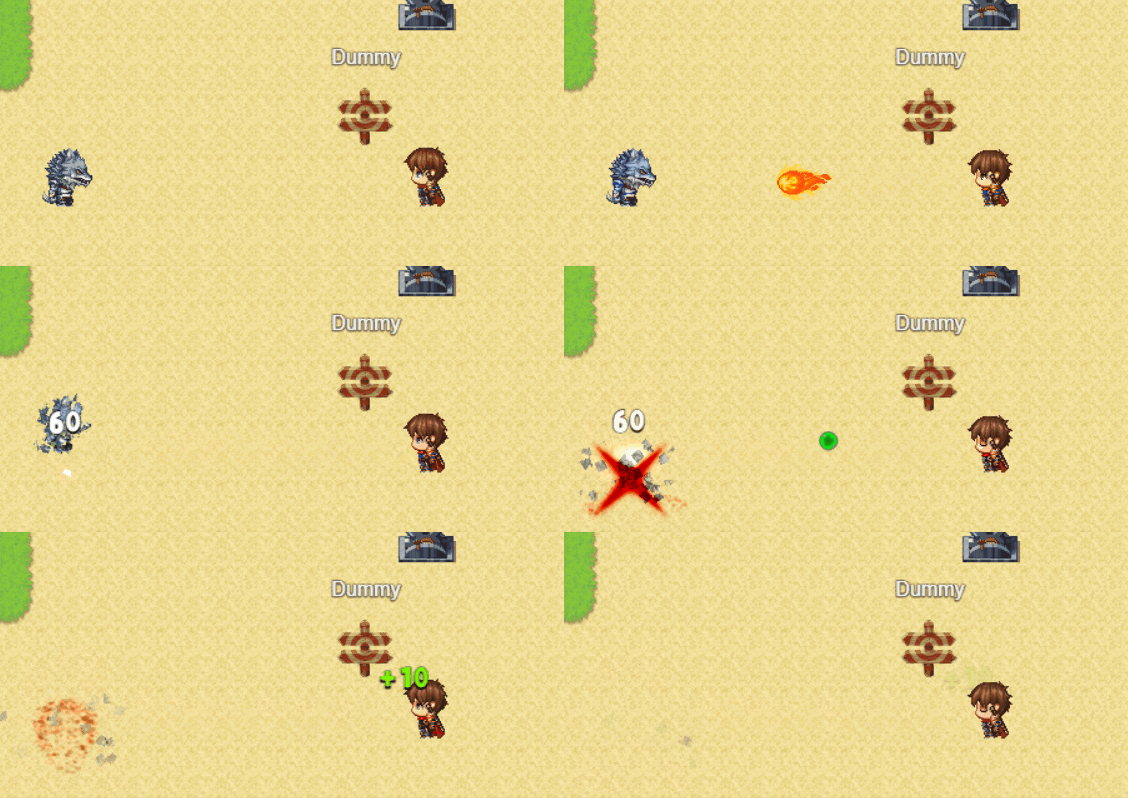
Flying Bonuses allows you to create visual, animated bonuses that fly from enemies (or events) to the player when collected. These bonuses can restore HP/MP, grant experience, gold, or trigger custom actions through script calls.
- ✨ Visual Feedback: Animated sprites that fly toward the player
- 🎵 Audio Support: Custom sound effects for spawn and collection
- ⚙️ Highly Configurable: Control appearance offset, delay, speed, and rewards
- 🎯 Multiple Reward Types: HP, MP, EXP, Gold, or custom script actions
- 🔄 Animated Images: Support for animated sprite sheets
- 🎮 Easy Integration: Simple parameter tags for enemies and script calls for events
- Creating Flying Bonuses
- Bonus Configuration Parameters
- Assigning Bonuses to Enemies
- Script API
- Advanced Features
- Examples & Use Cases
- Troubleshooting
- Open the Plugin Manager in RPG Maker MZ
- Find Alpha_ABSZ_Ext_FlyingBonuses plugin
- Navigate to
Plugin Parameters -> Flying bonuses

Click the "Add" button to create a new flying bonus configuration. Each bonus you create will have a unique Index (starting from 1).
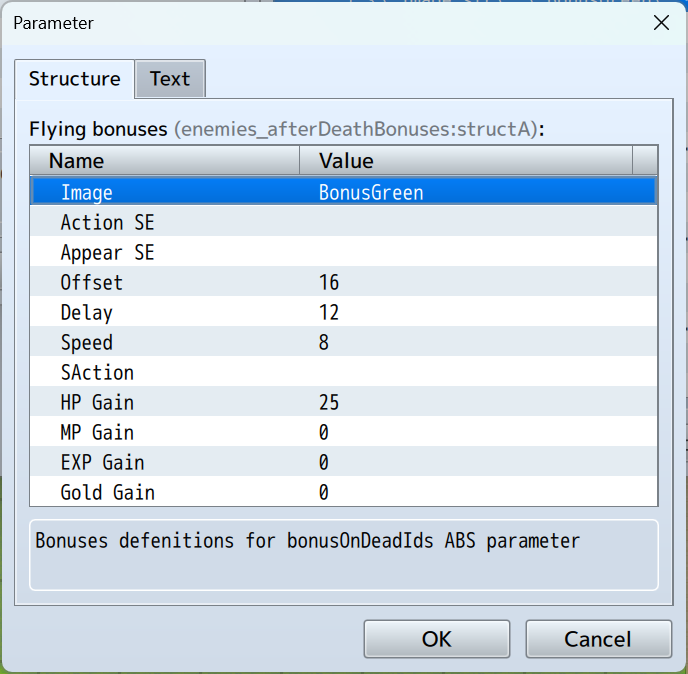
Each flying bonus can be configured with the following parameters:
| Parameter | Type | Range | Description |
|---|---|---|---|
| Image | File Path | - | Bonus sprite image from img/pictures/. Supports animated sprites (see Animated Images) |
| Offset | Number | 0-48 px | Maximum spawn position offset in pixels from the source point. Creates variety in spawn positions. Set to 0 for exact spawn position |
| Parameter | Type | Description |
|---|---|---|
| Action SE | File Path | Sound effect played when the player collects the bonus (from audio/se/) |
| Appear SE | File Path | Sound effect played when the bonus spawns/appears (from audio/se/) |
| Parameter | Type | Range | Description |
|---|---|---|---|
| Delay | Number | 0+ frames | Number of frames the bonus waits before flying toward the player. Default: 12 frames (~0.2 seconds at 60fps) |
| Speed | Number | 1-100 px | Flying speed in pixels per frame. Higher = faster. Default: 8 px/frame |
All reward parameters support EVal (evaluated expressions). Leave at 0 to disable a specific reward.
| Parameter | Type | Description |
|---|---|---|
| HP Gain | EVal | Amount of HP restored to the player. Supports formulas |
| MP Gain | EVal | Amount of MP restored to the player. Supports formulas |
| EXP Gain | EVal | Amount of experience points granted to the entire party. Supports formulas |
| Gold Gain | EVal | Amount of gold added to party inventory. Supports formulas |
| SAction | SAction | Custom script action identifier executed on the player (integrates with ABS action system) |
To make enemies drop flying bonuses when defeated, use the ABS parameter in the enemy's note field.
<bonusOnDeadIds:INDEX,...>
Where INDEX is the position of the bonus in your plugin parameters list (starting from 1).
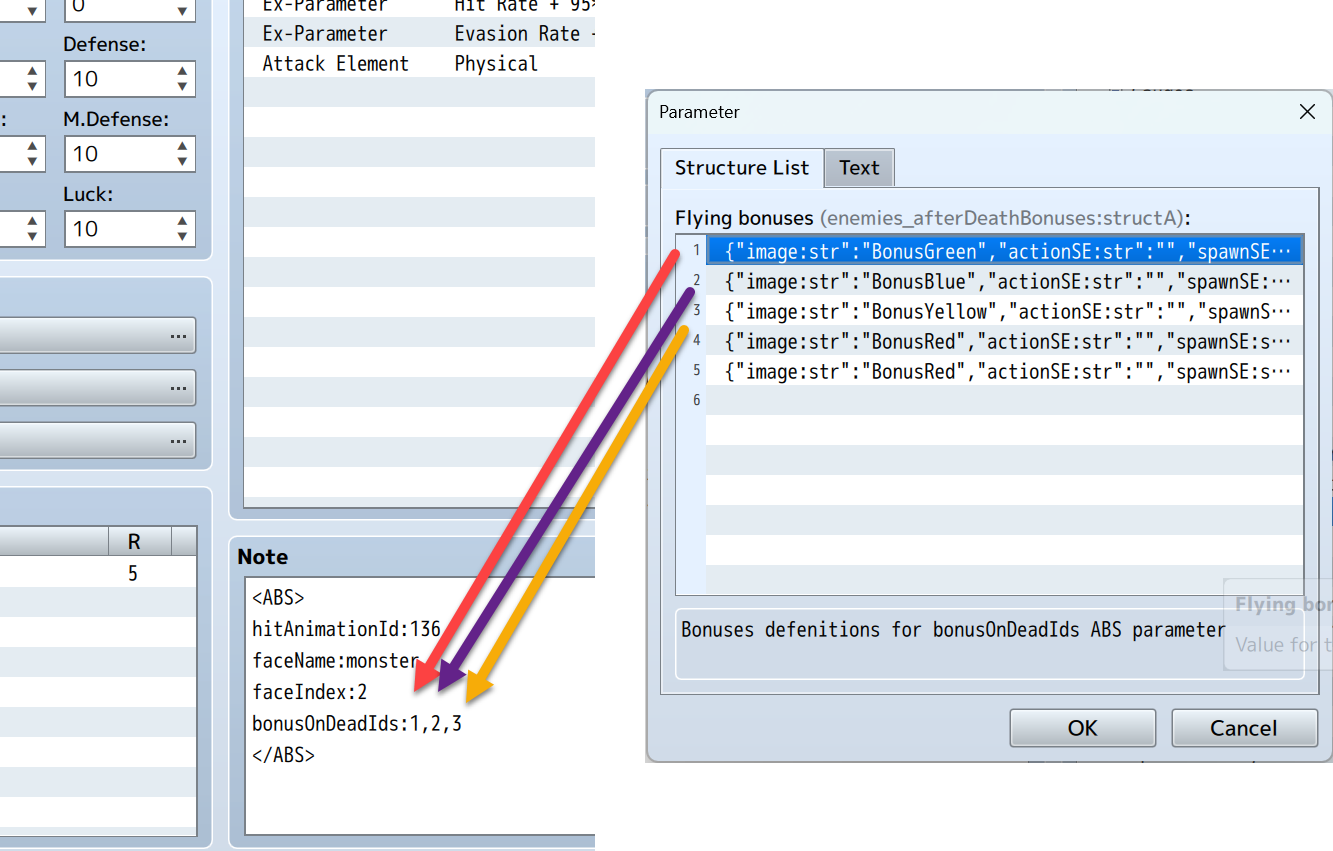
<bonusOnDeadIds:1>          // Drops bonus #1 only
<bonusOnDeadIds:1,2,3>      // Drops multiple bonuses (#1, #2, and #3)
<bonusOnDeadIds:5,5,5>      // Drops the same bonus multiple times
<bonusOnDeadIds:1,3,5,7> // Drops bonuses #1, #3, #5, and #7- When the enemy is defeated (HP reaches 0)
- All specified bonuses spawn at the enemy's position (with offset if configured)
- After the delay period, bonuses fly toward the player
- When the player "collects" the bonus (collision), rewards are applied
Manually spawn flying bonuses from any event on the map.
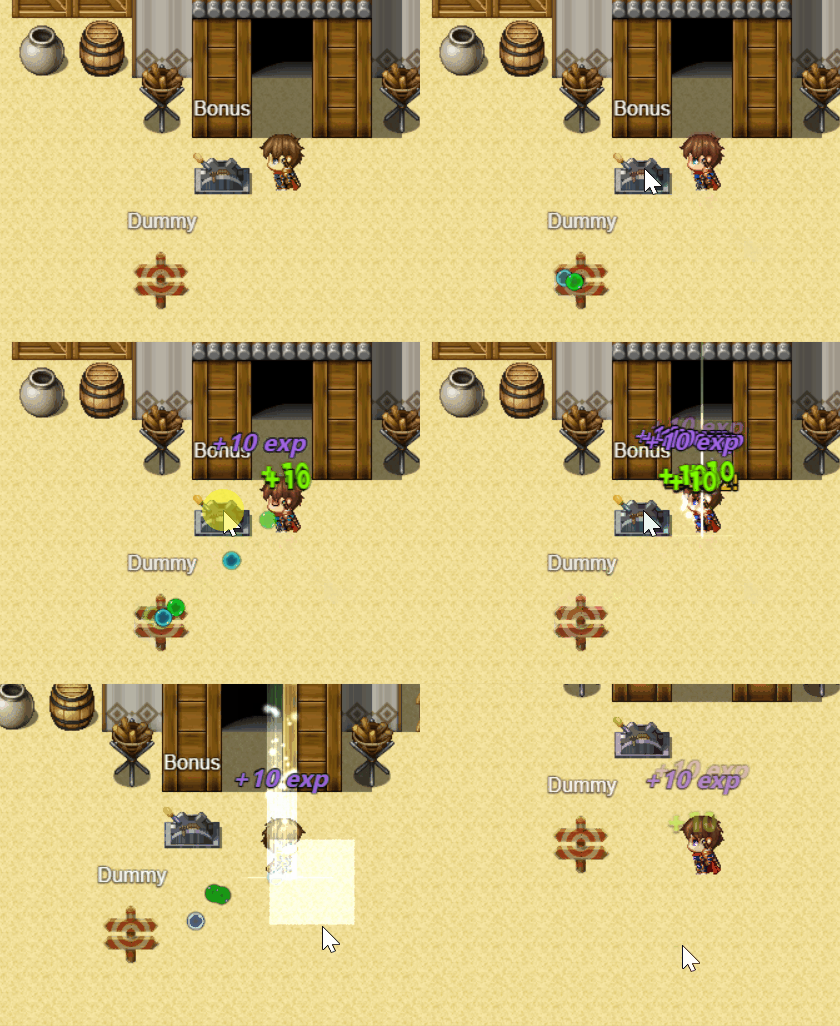
uAPI.spawnFlyingBonus(eventId, bonusIds);| Parameter | Type | Description |
|---|---|---|
eventId |
Number | The ID of the event from which bonuses will spawn |
bonusIds |
Array | Array of bonus indices to spawn (e.g., [1, 2, 3]) |
// Spawn single bonus from event ID 12
uAPI.spawnFlyingBonus(12, [1]);

// Spawn multiple different bonuses from event ID 43
uAPI.spawnFlyingBonus(43, [1, 2, 3]);

// Spawn the same bonus multiple times
uAPI.spawnFlyingBonus(20, [5, 5, 5]);

// Spawn from "this" event (use in event Script command)
uAPI.spawnFlyingBonus(this._eventId, [1, 2]);- Treasure Chests: Spawn bonuses when a chest is opened
- Interactive Objects: Breaking objects releases bonuses
- Quest Rewards: Completing objectives spawns flying rewards
- Destructible Environment: Destroying props drops bonuses
- Boss Phases: Trigger bonus waves at specific boss HP thresholds
The function includes built-in error handling:
- ✅ Invalid event IDs will show a console warning
- ✅ Invalid bonus IDs will show a console warning
- ✅ Empty bonus arrays will show a console warning
- ✅ Game continues normally even if errors occur
Create animated bonuses using sprite sheets:
Naming Convention:
imageName(frames,speed)
Example:
- File:
bonusRotating(8,10).png - Image width: 256px (8 frames × 32px)
- Image height: 32px
- Result: 8-frame rotating animation
SAction executes custom Alpha ABS Z actions when bonus is collected.
Examples:
actionSA: "ba_1"              // Trigger buff action #1
actionSA: "an_5"   // Play animation #5 on player
Refer to Alpha ABS Z documentation for available SAction commands.
{
  "image": "bonusGreen",
  "actionSE": "Heal1",
  "spawnSE": "Item1",
  "startOffsetRadiusInPx": 16,
  "stayFrames": 12,
  "flySpeed": 8,
  "actionSA": "",
  "hpGainE": 25,
  "mpGainE": 0,
  "expGainE": 0,
  "goldGainE": 0
}
✅ Restores 25 HP with healing sound effect
{
  "image": "bonusBlue",
  "actionSE": "Magic1",
  "spawnSE": "Item1",
  "startOffsetRadiusInPx": 16,
  "stayFrames": 12,
  "flySpeed": 8,
  "actionSA": "",
  "hpGainE": 0,
  "mpGainE": 25,
  "expGainE": 0,
  "goldGainE": 0
}
✅ Restores 25 MP with magic sound effect
{
  "image": "bonusYellow",
  "actionSE": "Coin",
  "spawnSE": "Item1",
  "startOffsetRadiusInPx": 16,
  "stayFrames": 12,
  "flySpeed": 8,
  "actionSA": "",
  "hpGainE": 0,
  "mpGainE": 0,
  "expGainE": 0,
  "goldGainE": "20|V"
}
✅ Grants 10-49 gold with coin sound
{
  "image": "bonusRed",
  "actionSE": "Up4",
  "spawnSE": "Item1",
  "startOffsetRadiusInPx": 16,
  "stayFrames": 12,
  "flySpeed": 8,
  "actionSA": "",
  "hpGainE": 0,
  "mpGainE": 0,
  "expGainE": 20,
  "goldGainE": 0
}
✅ Grants EXP based on player level
{
  "image": "bonusRed",
  "actionSE": "Skill2",
  "spawnSE": "Item1",
  "startOffsetRadiusInPx": 16,
  "stayFrames": 12,
  "flySpeed": 10,
  "actionSA": "ba_1",
  "hpGainE": 0,
  "mpGainE": 0,
  "expGainE": 0,
  "goldGainE": 0
}
✅ Triggers custom buff action without stat bonuses
Setup:
// Enemy Note (Boss)
<bonusOnDeadIds:1,2,3,4,5>  // Drops HP, MP, Gold, EXP, Buff on death

// Event Script (Phase Transition at 50% HP)
if ($gameTroop.members()[0].hpRate() <= 0.5) {
  uAPI.spawnFlyingBonus(10, [1, 2]);  // Spawn health OR mana from event 10
}Problem: Bonuses don't spawn when enemy dies
Solutions:
- ✅ Verify the enemy has ABS parameters configured
- ✅ Check bonus index numbers (they start from 1, not 0)
- ✅ Ensure enemy has
<bonusOnDeadIds:X>in note field - ✅ Verify image exists in
img/pictures/folder - ✅ Check browser console (F12) for error messages
Problem: Bonuses spawn but don't move
Solutions:
- ✅ Check that
flySpeedis greater than 0 - ✅ Ensure player character is on the same map
- ✅ Verify bonus isn't stuck behind map objects
Problem: Visual bonuses work but no sounds play
Solutions:
- ✅ Verify sound files exist in
audio/se/folder - ✅ Check file names match exactly (case-sensitive)
- ✅ Ensure game volume settings are not muted
- ✅ Try leaving SE fields blank if files don't exist
Problem: uAPI.spawnFlyingBonus() causes errors
Solutions:
- ✅ Ensure bonus IDs are in an array:
[1, 2, 3]not1, 2, 3 - ✅ Verify event ID exists on current map
- ✅ Check that uAPI is available (Alpha ABS Z is loaded)
- ✅ Use valid bonus indices that exist in plugin parameters
Examples can be found in the Demo Project:
- Map ID 56:
AfterDeadBonuses - Various enemy configurations
- Event-based bonus spawning examples
- Multiple bonus type demonstrations

- 🎯 Limit simultaneous bonuses on screen (10-20 max recommended)
- 🎯 Use reasonable
stayFramesvalues (10-20 frames) - 🎯 Keep image file sizes small for better performance
- 🎯 Avoid complex EVal formulas when many bonuses spawn
- 📝 Use descriptive image names:
healthPotion,manaGem, etc. - 📝 Test bonus indices before assigning to many enemies
- 📝 Start with simple configurations before adding complexity
- 📝 Document your bonus indices and their purposes
- 📝 Use consistent sound effects for similar bonus types