
Docker is a platform used to containerize our software, using which we can easily build our applications and package them, with the dependencies required, into containers, and further these containers are easily shipped to run on other machines.
There might arise a question that such tasks can also be done through virtualization, then why choose Docker over it. It might be because virtualization does not turn out to be that efficient an idea.
Why? We shall discuss this as we move along in this Docker tutorial.
Terms “Containers” and “Virtual Machines” are often used interchangeably, however, this is often a misunderstanding. But, both are just different methods to provide Operating System Virtualization.
Standard virtual machines generally include a full Operating System, OS Packages and if required, few applications. This is made possible by a Hypervisor which provides hardware virtualization to the virtual machine. This allows for a single server to run many standalone operating systems as virtual guests.
Containers are similar to virtual machines except that Containers are not full operating systems. Containers generally only include the necessary OS Packages and Applications. They do not generally contain a full operating system or hardware virtualization, that’s why these are “lightweight”.
Virtual Machines are a way to take a physical server and provide a fully functional operating environment that shares those physical resources with other virtual machines.
Whereas, a Container is generally used to isolate a running process within a single host to ensure that the isolated processes cannot interact with other processes within that same system. Containers sandbox processes from each other. For now, you can think of a container as a lightweight equivalent of a virtual machine.
Docker enables creating and working with Containers as easy as possible.
Now, what are the differences between them? Let’s check out the below table to understand the differences.
| Virtualization | Containerization |
|---|---|
| Virtualizes hardware resources | Virtualizes only OS resources |
| Requires the complete OS installation for every VM | Installs the container only on a host OS |
| A kernel is installed for every virtualized OS | Uses only the kernel of the underlying host OS |
| Heavyweight | Lightweight |
| Limited performance | Native performance |
| Fully isolated | Process-level isolation |
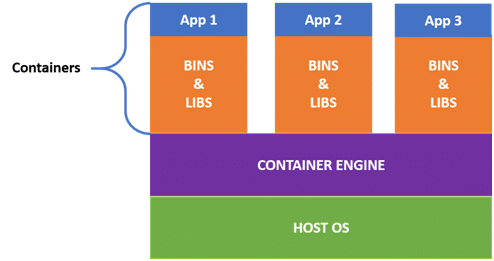
In the case of containerization, all containers share the same host operating system. Multiple containers get created for every type of application making them faster but without wasting the resources, unlike virtualization where a kernel is required for every OS and lots of resources from the host OS are utilized.
We can easily figure out the difference from the architecture of containers given below:
Docker uses a client–server architecture. The Docker client consists of Docker build, Docker pull, and Docker run. The client approaches the Docker daemon that further helps in building, running, and distributing Docker containers. Docker client and Docker daemon can be operated on the same system; otherwise, we can connect the Docker client to the remote Docker daemon. Both communicate with each other using the REST API, over UNIX sockets or a network.
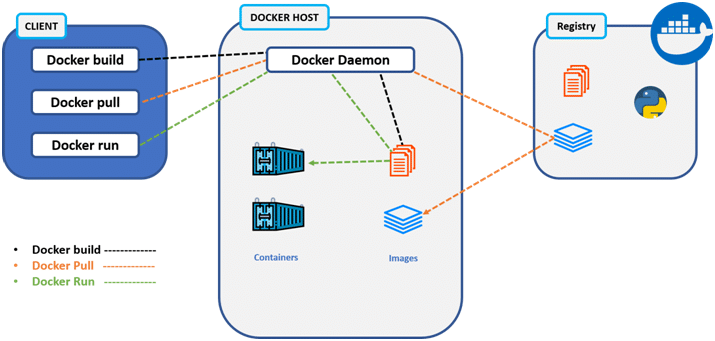
- Docker Client
- Docker Host
- Docker Registry
- It is the primary way for many Docker users to interact with Docker.
- It uses command-line utility or other tools that use Docker API to communicate with the Docker daemon.
- A Docker client can communicate with more than one Docker daemon.
In Docker host, we have Docker daemon and Docker objects such as containers and images. First, let’s understand the objects on the Docker host, then we will proceed toward the functioning of the Docker daemon.
- Docker Objects:
- What is a Docker image? A Docker image is a type of recipe/template that can be used for creating Docker containers. It includes steps for creating the necessary software.
- What is a Docker container? A type of virtual machine created from the instructions found within the Docker image. It is a running instance of a Docker image that consists of the entire package required to run an application.
- Docker Daemon:
- Docker daemon helps in listening requests for the Docker API and in managing Docker objects such as images, containers, volumes, etc. Daemon issues to build an image based on a user’s input and then saves it in the registry.
- In case we don’t want to create an image, then we can simply pull an image from the Docker hub (which might be built by some other user). In case we want to create a running instance of our Docker image, then we need to issue a run command that would create a Docker container.
- A Docker daemon can communicate with other daemons to manage Docker services.
- Docker registry is a repository for Docker images which is used for creating Docker containers.
- We can use a local/private registry or the Docker hub, which is the most popular social example of a Docker repository.
Hope Till here you now have a fair idea of why Docker and Docker Architecture .