This is a port of the LISI algorithm from harmony in python, directly from Rcpp.
It should yield identical results as the python version while showing similar performance as the Rcpp version, thanks to the power of numba JIT.


| function init_conda_envs() { | |
| local env_dir="$HOME/path/to/your/conda/dir/envs" | |
| if [[ -d "$env_dir" ]]; then | |
| export CONDA_ENVS=$(ls -1 "$env_dir" | xargs) | |
| else | |
| export CONDA_ENVS="" | |
| fi | |
| } | |
| function here() { |
| # From the paper "Multi-Label Supervised Contrastive Learning" | |
| # https://doi.org/10.1609/aaai.v38i15.29619 | |
| # https://github.com/williamzhangsjtu/MulSupCon | |
| from typing import Callable, Literal, overload | |
| import torch | |
| import torch.nn.functional as F | |
| from torch import Tensor, nn | |
| OUTPUT_FUNC_T = Callable[[Tensor, Tensor, Tensor], tuple[Tensor, ...]] |
This is a port of the LISI algorithm from harmony in python, directly from Rcpp.
It should yield identical results as the python version while showing similar performance as the Rcpp version, thanks to the power of numba JIT.
| import pandas as pd | |
| import matplotlib.pyplot as plt | |
| def draw_candlestick(data, time_axis, window_size, **kwargs) -> plt.Figure: | |
| """ | |
| Draws a candlestick chart. | |
| Parameters: | |
| data (list or np.ndarray): Continuous data points. | |
| time_axis (list or np.ndarray): Corresponding time points (timestamps or discrete steps). |
| from typing import Literal | |
| import pandas as pd | |
| def get_ensembl_mappings( | |
| genes: list[str], | |
| organism: str = "hsa", | |
| server: Literal["www", "eu", "uswest", "asia", "gprofiler"] = "asia", | |
| ) -> pd.DataFrame: |
| def ens2seq(ensembl_id: str) -> str: | |
| """Converts ensembl gene id to protein sequence | |
| @ensembl_id: str, ensembl gene id | |
| """ | |
| uri = f"https://rest.uniprot.org/uniprotkb/stream?" | |
| query = f"({ensembl_id}) AND (reviewed:true)" | |
| params = { | |
| "compressed": "false", |
We are given a virtual machine binary called run, and a custom binary for it called VM. It has 16 registers and a flat memory. Below is the opcodes of this VM.
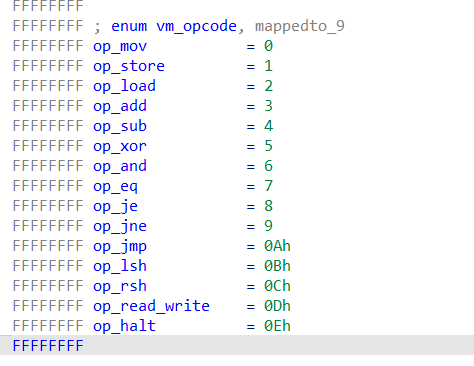
Then, we should disassemble the given program to see what's going on.
disasm.py disassembles the custom binary VM into disassembly.S. Take a look at it.
