

| Contributor | Vidhu Sarwal |
| Organization | BeagleBoard.org |
| Mentor | Jason Kridner, RobertCNelson, lorforlinux, Anuj Deshpande, Vedant Paranjape, Kumar Abhishek |
| Project | Update Beagle-Tester for Mainline Testing |
- Main Code Repository - Github Link
- Pre GSoC - Project Description and Discussion
- Proposal Link - Proposal
- Project Intro Video - Youtube Link
- Weekly Updates - Forum Thread
- Discord Discussion Link - Discord Project Thread
The objective is to enhance the Beagle-Tester framework for BeagleBoard devices by adding mikroBUS support and updating it for mainline kernel testing. This project aims to develop an automated regression test suite for Linux kernel on BeagleBoard hardware, enabling continuous validation within the OpenBeagle CI server. The approach includes developing comprehensive test cases for interfaces such as PWM, ADC, UART, I2C, SPI, and GPIO, integrating automated power cycling capabilities for test farms, building a web interface for real-time monitoring of test results, and optimizing the framework for seamless Buildroot deployment. Key deliverables include an enhanced Beagle-Tester with mikroBUS support, an automated regression testing framework for kernel updates, a GitLab CI pipeline for weekly testing, a modular test farm design with power cycling capabilities, a web-based monitoring interface, and comprehensive documentation with tutorials.
-
Extend beagle-tester to support cape detection and validation.
-
Add mikroBUS ClickID support for automated driver loading and testing.
-
Implement HDMI output validation via OpenCV-based test.
-
Provide automation hooks and web server for integration into a test farm (barcode detection, logging, reporting).
More Details in Pull Request
We define two types of barcodes:
-
Generic Barcode (Triggers Auto Detection)
- Format:
MKB001 - Purpose: Initiates automatic detection of connected Click board using ClickID EEPROM.
- Format:
-
Specific ClickID Barcode
- Format:
MKBXXXXXXX(e.g.,MKBRCCLICK,MKBTHERMOCLICK) - Purpose: Directly invokes test for a known Click board without requiring auto-detection.
- Format:
- C++ tool to scan the I2C bus and read ClickID EEPROMs.
- Location:
src/clickid_detect.cpp - Scans
/dev/i2c-2, address0x50 - Reads raw EEPROM contents and outputs ClickID string (e.g.,
RCCLICK).
- Shell script using
i2c-stubto simulate ClickID EEPROM. - Writes test strings like
RCCLICKinto virtual EEPROM.
- Added auto-detection handler to re-dispatch test based on
MKB001. - Added ClickID dispatch loop for direct matching via
click_dispatch.h.
- Defined modular dispatch entries in
click_dispatch.handclick_dispatch.c. - Example entry:
{"MKBRCCLICK", run_rtc5click_test}
- Minimal test implementation (
rtc5click_test.c). - Provides placeholder for GPIO/I2C validation logic.
include/
  click_dispatch.h
  rtc5click_test.h
src/
  beagle-tester.c
  click_dispatch.c
  clickid_detect.cpp
click_tests/
  rtc5click_test.c
- Modular build system for C and C++ sources.
- Targets:
beagle-tester,clickid_detect.
- Auto Test:
sudo ./beagle-tester MKB001
- Manual Test:
sudo ./beagle-tester MKBRCCLICK
- Modular: Easy addition of new Click tests.
- Unified: Works for auto-detection and manual barcodes.
- Clean: Keeps test logic separate from core.
More Details in Pull Request
The HDMITEST validates HDMI output on supported BeagleBoard platforms. It captures frames from a USB HDMI capture device (usually /dev/video0) using OpenCV and checks for colorful activity (red, green, blue). A detected color pattern confirms that HDMI is working.
- Integrated into the standard test sequence for HDMI-capable boards.
- Can also be run manually via CLI:
beagle-tester HDMITEST beagle-tester HDMITEST -s # save detected frame - Captures frames for up to 20 seconds.
- Detects red, green, or blue activity via HSV masks.
- Outputs result with
beagle_notice("hdmi", "pass/fail"). - Exit codes:
0→ PASS,1→ FAIL.
- Source:
src/hdmi_test.cpp - Binary:
hdmi_testinstalled to/usr/sbin/hdmi_test - Libraries: Uses OpenCV (V4L2 backend) to capture from
/dev/video0 - Integration: Added to Makefile and included in board test flow
Waiting for colorful activity (for up to 20 seconds)...
Colorful activity detected!
PASS
or
Waiting for colorful activity (for up to 20 seconds)...
Timeout: No color detected in 20 seconds.
FAIL
- Requires a USB HDMI capture device exposed as
/dev/video0. - Ensure HDMI output shows a colorful test pattern (e.g., SMPTE bars).
- Test is skipped silently on boards without HDMI hardware.
More Details in Pull Request
A lightweight HTTP interface has been added to allow real-time viewing of test results in a browser. It runs alongside the framebuffer and terminal outputs and can be accessed over the local network at:
http://<beagle-ip>:8000
- Test results are serialized to JSON at:
/tmp/results.json - Generated after test execution from the
test_resultstruct array.
- Location:
/usr/share/beagle-tester/web/ - Files:
index.html— displays results in a tablestyle.css— basic themingapp.js— fetches updated results every 2 seconds
- Implemented in:
src/web_server.cusing Mongoose v7.18 - Serves both static files and
/results.json. - Also uses
src/mongoose.cas the embedded HTTP server library. - Compilation:
gcc src/web_server.c src/mongoose.c -o web_server -lpthread
- Source location:
src/web/ - Installed to:
/usr/share/beagle-tester/web/ - Automatically polls
/results.jsonevery 2 seconds and updates the table.

- Added struct in
beagle-tester.c:struct test_result { char test[64]; char status[64]; time_t timestamp; };
- Results serialized to
/tmp/results.json. - Web server launched automatically at the end of
beagle-testerrun:system("web_server /tmp/results.json &");
include/
  web_server.h

src/
  beagle-tester.c
  web_server.c
  mongoose.c/.h
  web/
    index.html
    style.css
    app.js
- Standard:
Generates
sudo beagle-tester <code>
/tmp/results.jsonand launches web server. - Manual:
sudo ./web_server /tmp/results.json
- Real-time monitoring of test results via browser.
- JSON-based integration with external tools.
- Standalone binary decoupled from test runner.
- Works without serial console or framebuffer.
More Details in Pull Request
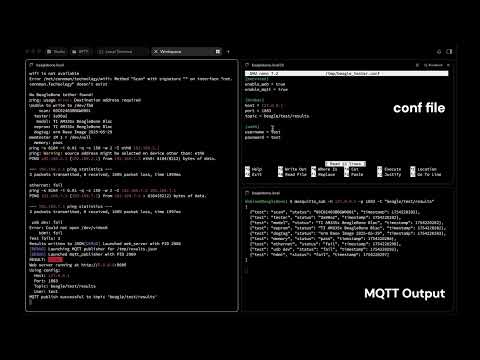
- Publishes test results to MQTT broker.
- Controlled via
/tmp/beagle_tester.conf. - Results serialized to
/tmp/results.json. - Source:
src/mqtt_publisher.c. - Uses libmosquitto for broker connection.
- Example config:
[services]
enable_mqtt = true
[broker]
host = 127.0.0.1
port = 1883
topic = beagle/test/results
- Subscribe with:
mosquitto_sub -h 127.0.0.1 -t "beagle/test/results" - Benefits:
- Integrates with dashboards.
- Portable across boards.
More Details in Pull Request
- Automated Buildroot-based OS image build for BeagleBone Black on
beagle-testerbranch updates or manual triggers. - Generated bootable
sdcard.imgwith kernel, libraries, and custombeagle-testerpackage, uploaded as CI artifact for testing and deployment.

Video Demonstrating functionality of implementation.
- Test Farm Infrastructure: Automated power cycling, CI/CD integration, and remote access.