
-
- Export data from I1 - g and h databases only
- Export data from I2 - i, j, k and l databases only
- Record the gtid_purged value that mysqldump added to each of the dump files
- Import each edited dump file into T1
- Reset Master to clear the GTID
- Execute the CHANGE MASTER TO command
- Apply Replication Filter
- Starting Multi-Source Replicas
- Verify Replication Status
Assuming you have two Cloud SQL MySQL instances, I1 and I2 with following databases:
I1: a, b, c, d, e, f, g, h
I2: i, j, k, l
You want to move database g and h from I1 to I2 with minimal downtime. So the end state should look like this:
I1: a, b, c, d, e, f
I2: i, j, k, l, g, h
Cloud SQL for MySQL doesn't support multi-source replication. So in order to achive this we need to create an intermediate MySQL instance on a VM (T1) and replicate that back to Cloud SQL as a new instance (I3). Following diagram demostrate the workflow:
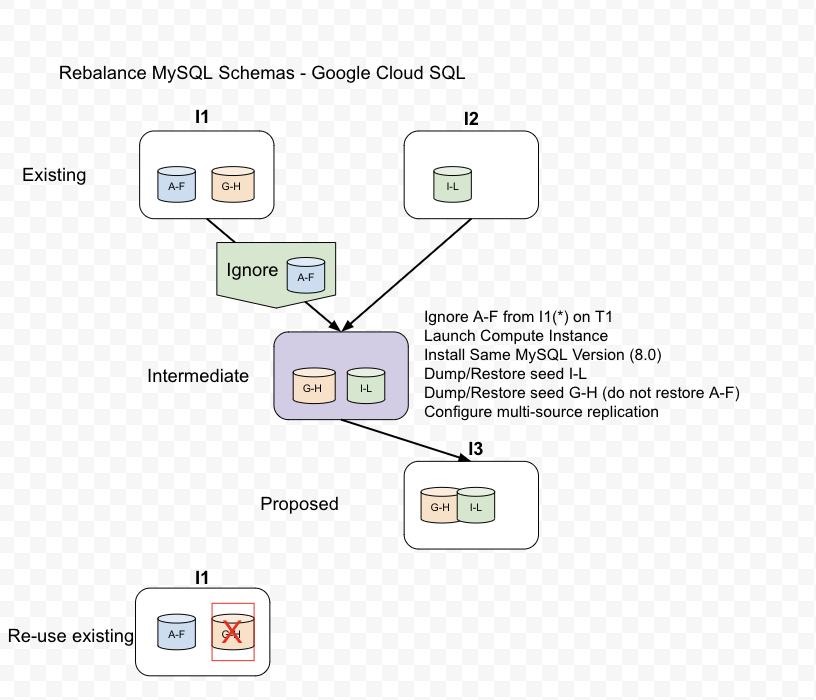
In this gist we will cover step-by-step instructions on how to perform multi-source replicaiton.
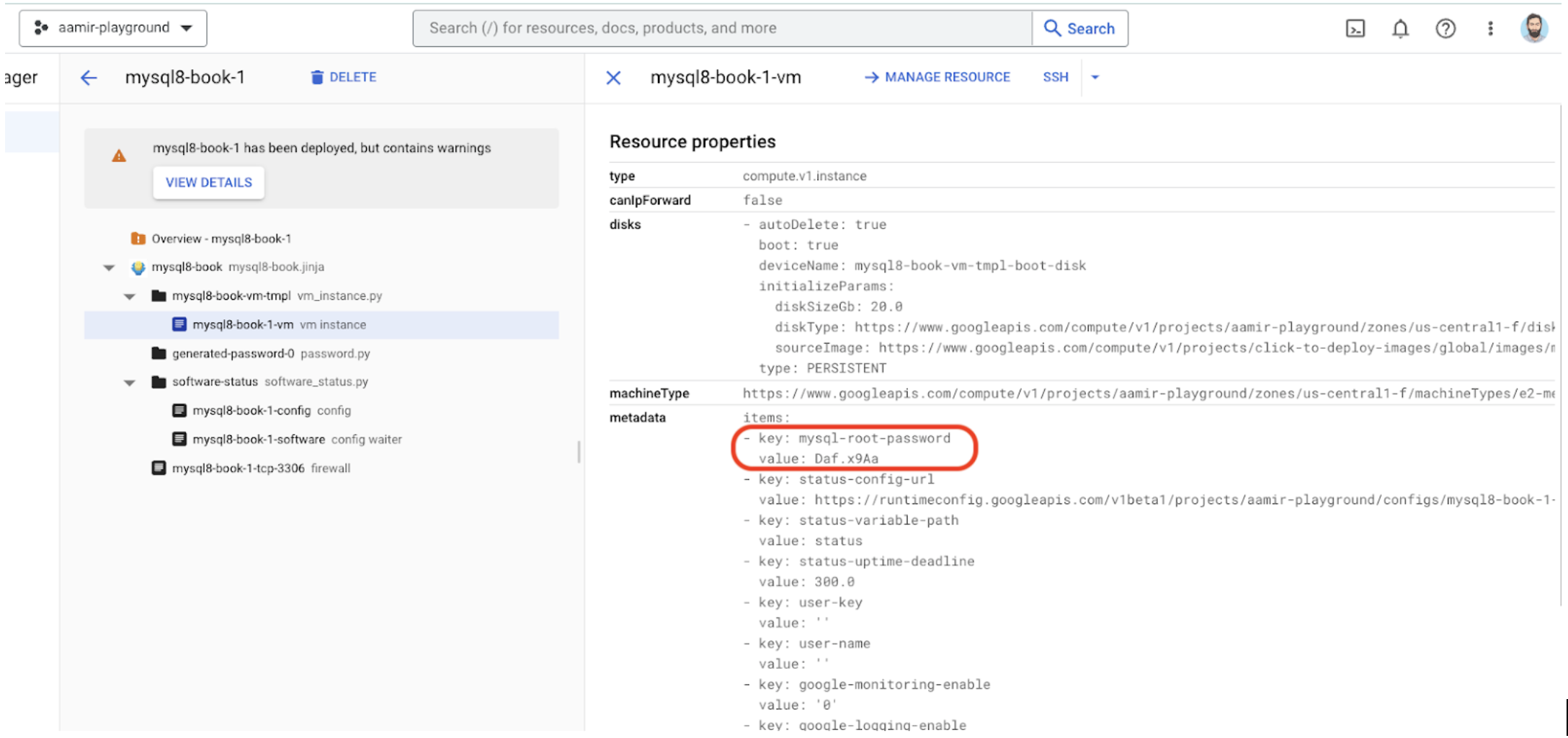
Deploy the VM on the same VPC. Also select the zone that is closest to the Cloud SQL instance.
Username: root
Password: Daf.x9Aa
#To SSH to VM run this:
gcloud compute ssh mysql8-book-1-vm --tunnel-through-iap --zone=us-central1-f

PASSWORD=Daf.x9Aa
mysql -u root -p$PASSWORD

mysql> show global variables like 'master_info%';
+------------------------+-------+
| Variable_name          | Value |
+------------------------+-------+
| master_info_repository | TABLE |
+------------------------+-------+
1 row in set (0.00 sec)

mysql> show global variables like 'relay_log_info%';
+---------------------------+----------------+
| Variable_name             | Value          |
+---------------------------+----------------+
| relay_log_info_file       | relay-log.info |
| relay_log_info_repository | TABLE          |
+---------------------------+----------------+
2 rows in set (0.00 sec)
mysql> show global variables like '%gtid%';
+----------------------------------+-------+
| Variable_name                    | Value |
+----------------------------------+-------+
| binlog_gtid_simple_recovery      | ON    |
| enforce_gtid_consistency         | OFF   |
| gtid_executed                    |       |
| gtid_executed_compression_period | 0     |
| gtid_mode                        | OFF   |
| gtid_owned                       |       |
| gtid_purged                      |       |
| session_track_gtids              | OFF   |
+----------------------------------+-------+
8 rows in set (0.00 sec)
Must run these statements in sequence.
mysql> SET @@GLOBAL.ENFORCE_GTID_CONSISTENCY = ON;
Query OK, 0 rows affected (0.00 sec)

mysql> SET @@GLOBAL.GTID_MODE = OFF_PERMISSIVE;
Query OK, 0 rows affected (0.04 sec)

mysql> SET @@GLOBAL.GTID_MODE = ON_PERMISSIVE;
Query OK, 0 rows affected (0.02 sec)

mysql> SET @@GLOBAL.GTID_MODE = ON;
Query OK, 0 rows affected (0.02 sec)
File is located in /etc/mysql/my.cnf and must be modified as root user
[mysqld]
server-id=3
gtid_mode=ON
enforce_gtid_consistency=ON
log-replica-updates=ON
replicate-ignore-db=mysql,a,b,c,d,e,f
binlog-format=ROW
log_bin=mysql-bin
binlog_expire_logs_seconds=172800
read_only=ON
root@mysql8-book-1-vm:/home/aamirharoon# service mysql stop
root@mysql8-book-1-vm:/home/aamirharoon# service mysql status
● mysql.service - MySQL Community Server
   Loaded: loaded (/lib/systemd/system/mysql.service; enabled; vendor preset: enabled)
   Active: inactive (dead) since Tue 2023-05-23 16:26:46 UTC; 4s ago
     Docs: man:mysqld(8)
           http://dev.mysql.com/doc/refman/en/using-systemd.html
  Process: 431 ExecStart=/usr/sbin/mysqld (code=exited, status=0/SUCCESS)
 Main PID: 431 (code=exited, status=0/SUCCESS)
   Status: "Server shutdown complete"

May 23 14:06:31 mysql8-book-1-vm systemd[1]: Starting MySQL Community Server...
May 23 14:06:42 mysql8-book-1-vm systemd[1]: Started MySQL Community Server.
May 23 16:26:44 mysql8-book-1-vm systemd[1]: Stopping MySQL Community Server...
May 23 16:26:46 mysql8-book-1-vm systemd[1]: mysql.service: Succeeded.
May 23 16:26:46 mysql8-book-1-vm systemd[1]: Stopped MySQL Community Server.

root@mysql8-book-1-vm:/home/aamirharoon# service mysql start

root@mysql8-book-1-vm:/home/aamirharoon# service mysql status
● mysql.service - MySQL Community Server
   Loaded: loaded (/lib/systemd/system/mysql.service; enabled; vendor preset: enabled)
   Active: active (running) since Tue 2023-05-23 16:27:05 UTC; 3min 39s ago
     Docs: man:mysqld(8)
           http://dev.mysql.com/doc/refman/en/using-systemd.html
  Process: 19026 ExecStartPre=/usr/share/mysql-8.0/mysql-systemd-start pre (code=exited, status=0/SUCCESS)
 Main PID: 19061 (mysqld)
   Status: "Server is operational"
    Tasks: 39 (limit: 4669)
   Memory: 378.3M
   CGroup: /system.slice/mysql.service
           └─19061 /usr/sbin/mysqld

May 23 16:27:04 mysql8-book-1-vm systemd[1]: Starting MySQL Community Server...
May 23 16:27:05 mysql8-book-1-vm systemd[1]: Started MySQL Community Server.
mysql> show global variables like '%gtid%';
+----------------------------------+-------+
| Variable_name                    | Value |
+----------------------------------+-------+
| binlog_gtid_simple_recovery      | ON    |
| enforce_gtid_consistency         | ON    |
| gtid_executed                    |       |
| gtid_executed_compression_period | 0     |
| gtid_mode                        | ON    |
| gtid_owned                       |       |
| gtid_purged                      |       |
| session_track_gtids              | OFF   |
+----------------------------------+-------+
8 rows in set (0.00 sec)
CREATE USER 'rep_user'@'%' IDENTIFIED BY 'DoiT1234';
GRANT REPLICATION SLAVE ON *.* TO 'rep_user'@'%';
GRANT SELECT, SHOW VIEW, EXECUTE, REPLICATION CLIENT, RELOAD, TRIGGER ON *.* TO 'rep_user'@'%';
This step is optional and duplicating existing customer setup. If you have existing Cloud SQL for MySQL instance then skip this step.
MYIP=$(dig +short myip.opendns.com @resolver1.opendns.com)
MYPROJECT=aamir-playground
I1PASSWORD=Passw0rd1234

gcloud sql instances create mysql8-i1 --database-version=MYSQL_8_0 --cpu=2 --memory=4GB --enable-bin-log --network=projects/$MYPROJECT/global/networks/default --authorized-networks=$MYIP --region=us-central1 --root-password=$I1PASSWORD
I1IP=$(gcloud sql instances describe mysql8-i1 --format='value(ipAddresses[0].ipAddress)')
mysql -h $I1IP -u root -p$I1PASSWORD

CREATE USER 'rep_user'@'%' IDENTIFIED BY 'DoiT1234';
GRANT REPLICATION SLAVE ON *.* TO 'rep_user'@'%';
This step is optional and duplicating existing customer setup. If you have existing Cloud SQL for MySQL instance then skip this step.
create database IF NOT EXISTS a;
use a;
DROP TABLE IF EXISTS a1;
CREATE TABLE IF NOT EXISTS a1 (id SERIAL PRIMARY KEY, data text);
INSERT INTO a1 (data) VALUES ('apple'), ('banana'), ('cherry');


create database IF NOT EXISTS b;
use b;
DROP TABLE IF EXISTS b1;
CREATE TABLE IF NOT EXISTS b1 (id SERIAL PRIMARY KEY, data text);
INSERT INTO b1 (data) VALUES ('apple'), ('banana'), ('cherry');


create database IF NOT EXISTS c;
use c;
DROP TABLE IF EXISTS c1;
CREATE TABLE IF NOT EXISTS c1 (id SERIAL PRIMARY KEY, data text);
INSERT INTO c1 (data) VALUES ('apple'), ('banana'), ('cherry');


create database IF NOT EXISTS d;
use d;
DROP TABLE IF EXISTS d1;
CREATE TABLE IF NOT EXISTS d1 (id SERIAL PRIMARY KEY, data text);
INSERT INTO d1 (data) VALUES ('apple'), ('banana'), ('cherry');

create database IF NOT EXISTS e;
use e;
DROP TABLE IF EXISTS e1;
CREATE TABLE IF NOT EXISTS e1 (id SERIAL PRIMARY KEY, data text);
INSERT INTO e1 (data) VALUES ('apple'), ('banana'), ('cherry');

create database IF NOT EXISTS f;
use f;
DROP TABLE IF EXISTS f1;
CREATE TABLE IF NOT EXISTS f1 (id SERIAL PRIMARY KEY, data text);
INSERT INTO f1 (data) VALUES ('apple'), ('banana'), ('cherry');

create database IF NOT EXISTS g;
use g;
DROP TABLE IF EXISTS g1;
CREATE TABLE IF NOT EXISTS g1 (id SERIAL PRIMARY KEY, data text);
INSERT INTO g1 (data) VALUES ('apple'), ('banana'), ('cherry');

create database IF NOT EXISTS h;
use h;
DROP TABLE IF EXISTS h1;
CREATE TABLE IF NOT EXISTS h1 (id SERIAL PRIMARY KEY, data text);
INSERT INTO h1 (data) VALUES ('apple'), ('banana'), ('cherry');
This step is optional and duplicating existing customer setup. If you have existing Cloud SQL for MySQL instance then skip this step.
MYIP=$(dig +short myip.opendns.com @resolver1.opendns.com)
MYPROJECT=aamir-playground
I2PASSWORD=Passw0rd1234

gcloud sql instances create mysql8-i2 --database-version=MYSQL_8_0 --cpu=2 --memory=4GB --enable-bin-log --network=projects/$MYPROJECT/global/networks/default --authorized-networks=${MYIP} --region=us-central1 --root-password=$I2PASSWORD
I2IP=$(gcloud sql instances describe mysql8-i2 --format='value(ipAddresses[0].ipAddress)')
mysql -h $I2IP -u root -p$I2PASSWORD

CREATE USER 'rep_user'@'%' IDENTIFIED BY 'DoiT1234';
GRANT REPLICATION SLAVE ON *.* TO 'rep_user'@'%';
This step is optional and duplicating existing customer setup. If you have existing Cloud SQL for MySQL instance then skip this step.
create database IF NOT EXISTS i;
use i;
DROP TABLE IF EXISTS i1;
CREATE TABLE IF NOT EXISTS i1 (id SERIAL PRIMARY KEY, data text);
INSERT INTO i1 (data) VALUES ('apple'), ('banana'), ('cherry');

create database IF NOT EXISTS j;
use j;
DROP TABLE IF EXISTS j1;
CREATE TABLE IF NOT EXISTS j1 (id SERIAL PRIMARY KEY, data text);
INSERT INTO j1 (data) VALUES ('apple'), ('banana'), ('cherry');

create database IF NOT EXISTS k;
use k;
DROP TABLE IF EXISTS k1;
CREATE TABLE IF NOT EXISTS k1 (id SERIAL PRIMARY KEY, data text);
INSERT INTO k1 (data) VALUES ('apple'), ('banana'), ('cherry');

create database IF NOT EXISTS l;
use l;
DROP TABLE IF EXISTS l1;
CREATE TABLE IF NOT EXISTS l1 (id SERIAL PRIMARY KEY, data text);
INSERT INTO l1 (data) VALUES ('apple'), ('banana'), ('cherry');
Run on VM. Use mysql8-i1 private IP
I1PIP=10.113.128.33
I1PASSWORD=Passw0rd1234

mysqldump -h $I1PIP -uroot -p$I1PASSWORD --single-transaction --triggers --routines --events --hex-blob --set-gtid-purged=COMMENTED --databases g h > dumpI1.sql
Run on VM. Use mysql8-i2 private IP
I2PIP=10.113.128.250
I2PASSWORD=Passw0rd1234

mysqldump -h $I2PIP -uroot -p$I2PASSWORD --single-transaction --triggers --routines --events --hex-blob --set-gtid-purged=COMMENTED --databases i j k l > dumpI2.sql
Following warnings can be ignored:
mysqldump: [Warning] Using a password on the command line interface can be insecure.
Warning: A partial dump from a server that has GTIDs will by default include the GTIDs of all transactions, even those that changed suppressed parts of the database. If you don't want to restore GTIDs, pass --set-gtid-purged=OFF. To make a complete dump, pass --all-databases --triggers --routines --events.
I1_POS=$(cat dumpI1.sql | grep GTID_PURGED | cut -f2 -d'+' | cut -f1 -d$'\'')
I2_POS=$(cat dumpI2.sql | grep GTID_PURGED | cut -f2 -d'+' | cut -f1 -d$'\'')
echo $I1_POS,$I2_POS
b816afbd-fa71-11ed-b1cf-42010a800fc4:1-27, c77fd021-fa71-11ed-b1dc-42010a800fc5:1-41
PASSWORD=Daf.x9Aa
mysql -uroot -p$PASSWORD < dumpI1.sql > restoreI1.log
echo $?

mysql -uroot -p$PASSWORD < dumpI2.sql > restoreI2.log
echo $?
On the replica, issue RESET MASTER to clear the GTID execution history (assuming, as explained above, that all the dump files have been imported and that there are no wanted transactions with GTIDs on the replica). Then issue a SET @@GLOBAL.gtid_purged statement to set the gtid_purged value to the union of all the GTID sets from all the dump files, as recorded in previous steps.
mysql -uroot -p$PASSWORD -e 'RESET MASTER; SET @@GLOBAL.gtid_purged = "'${I1_POS}','${I2_POS}'"'
Make source of I1 over a channel named i-1.
Make source of I2 over a channel named i-2. You can name it anything
I1PIP=10.113.128.33
mysql -uroot -p$PASSWORD -e 'CHANGE REPLICATION SOURCE TO SOURCE_HOST="'${I1PIP}'", SOURCE_USER="rep_user", SOURCE_PASSWORD="DoiT1234", SOURCE_AUTO_POSITION=1 FOR CHANNEL "i-1"';

I2PIP=10.113.128.250
mysql -uroot -p$PASSWORD -e 'CHANGE REPLICATION SOURCE TO SOURCE_HOST="'${I2PIP}'", SOURCE_USER="rep_user", SOURCE_PASSWORD="DoiT1234", SOURCE_AUTO_POSITION=1 FOR CHANNEL "i-2"';
THIS IS TEMPORARY. RESTART WILL RESET IT. To make the replica replicate only database db1 from source1, and only database db2 from source2, use the mysql client to issue the CHANGE REPLICATION FILTER statement for each channel, like this:
mysql -uroot -p$PASSWORD -e 'CHANGE REPLICATION FILTER REPLICATE_DO_DB = (g, h) FOR CHANNEL "i-1"';
mysql -uroot -p$PASSWORD -e 'CHANGE REPLICATION FILTER REPLICATE_DO_DB = (i, j, k, l) FOR CHANNEL "i-2"';
mysql -uroot -p$PASSWORD
mysql> START REPLICA FOR CHANNEL "i-1";
mysql> START REPLICA FOR CHANNEL "i-2";
mysql> SHOW REPLICA STATUS FOR CHANNEL "i-1"\G
mysql> SHOW REPLICA STATUS FOR CHANNEL "i-2"\G
The request data contains basic information about your external server in JSON format. The request data can be configured for a Cloud SQL replica on a public or private network and should contain this information:
Do not perform on VM. Should do it on local PC with gcloud auth setup
hostPort is VM IP address
cat mysql8-source.json
{
   "name": "mysql8-vm",
   "region": "us-central1",
   "databaseVersion": "MYSQL_8_0",
   "onPremisesConfiguration": {
     "hostPort": "35.232.36.120:3306",
      "username": "rep_user",
      "password": "DoiT1234"
    }
}
gcloud auth login
ACCESS_TOKEN="$(gcloud auth print-access-token)"
curl --header "Authorization: Bearer ${ACCESS_TOKEN}" \
     --header 'Content-Type: application/json' \
     --data @./mysql8-source.json \
     -X POST \
https://sqladmin.googleapis.com/sql/v1beta4/projects/aamir-playground/instances
OUTPUT:
{
  "kind": "sql#operation",
  "targetLink": "https://sqladmin.googleapis.com/sql/v1beta4/projects/aamir-playground/instances/mysql8-vm",
  "status": "DONE",
  "user": "[email protected]",
  "insertTime": "2023-05-23T22:59:54.083Z",
  "endTime": "2023-05-23T22:59:54.091Z",
  "operationType": "CREATE",
  "name": "a0da48b6-5085-434e-a8a2-099b00000032",
  "targetId": "mysql8-vm",
  "selfLink": "https://sqladmin.googleapis.com/sql/v1beta4/projects/aamir-playground/operations/a0da48b6-5085-434e-a8a2-099b00000032",
  "targetProject": "aamir-playground"
}
The request data contains basic information about your external server and Cloud SQL replica in JSON format. The request data can be configured for a Cloud SQL replica on a public or private network and should contain this information. For more information click here.
cat mysql8-i3.json
{
  "settings": {
    "tier": "db-custom-2-4096",
    "dataDiskSizeGb": "20",
    "ipConfiguration": {
        "privateNetwork": "projects/aamir-playground/global/networks/default"
     }
  },
  "masterInstanceName": "mysql8-vm",
  "region": "us-central1",
  "databaseVersion": "MYSQL_8_0",
  "name": "mysql8-i3"
}
Before you start this step, create a JSON file that contains your replica request data. Then, to create a Cloud SQL replica, open a Cloud Shell terminal and run these commands:
gcloud auth login
ACCESS_TOKEN="$(gcloud auth print-access-token)"
curl --header "Authorization: Bearer ${ACCESS_TOKEN}" \
     --header 'Content-Type: application/json' \
     --data @./mysql8-i3.json \
     -X POST https://sqladmin.googleapis.com/sql/v1beta4/projects/aamir-playground/instances
OUTPUT:
{
  "kind": "sql#operation",
  "targetLink": "https://sqladmin.googleapis.com/sql/v1beta4/projects/aamir-playground/instances/mysql8-i3",
  "status": "PENDING",
  "user": "[email protected]",
  "insertTime": "2023-05-24T14:41:18.228Z",
  "operationType": "CREATE_REPLICA",
  "name": "60b072c0-3e60-45b2-8ecd-cd0b00000032",
  "targetId": "mysql8-i3",
  "selfLink": "https://sqladmin.googleapis.com/sql/v1beta4/projects/aamir-playground/operations/60b072c0-3e60-45b2-8ecd-cd0b00000032",
  "targetProject": "aamir-playground"
}
You can use the outgoing IP address of the Cloud SQL replica to create a secure connection between the external server and the Cloud SQL replica. You won't be charged for this IP address.
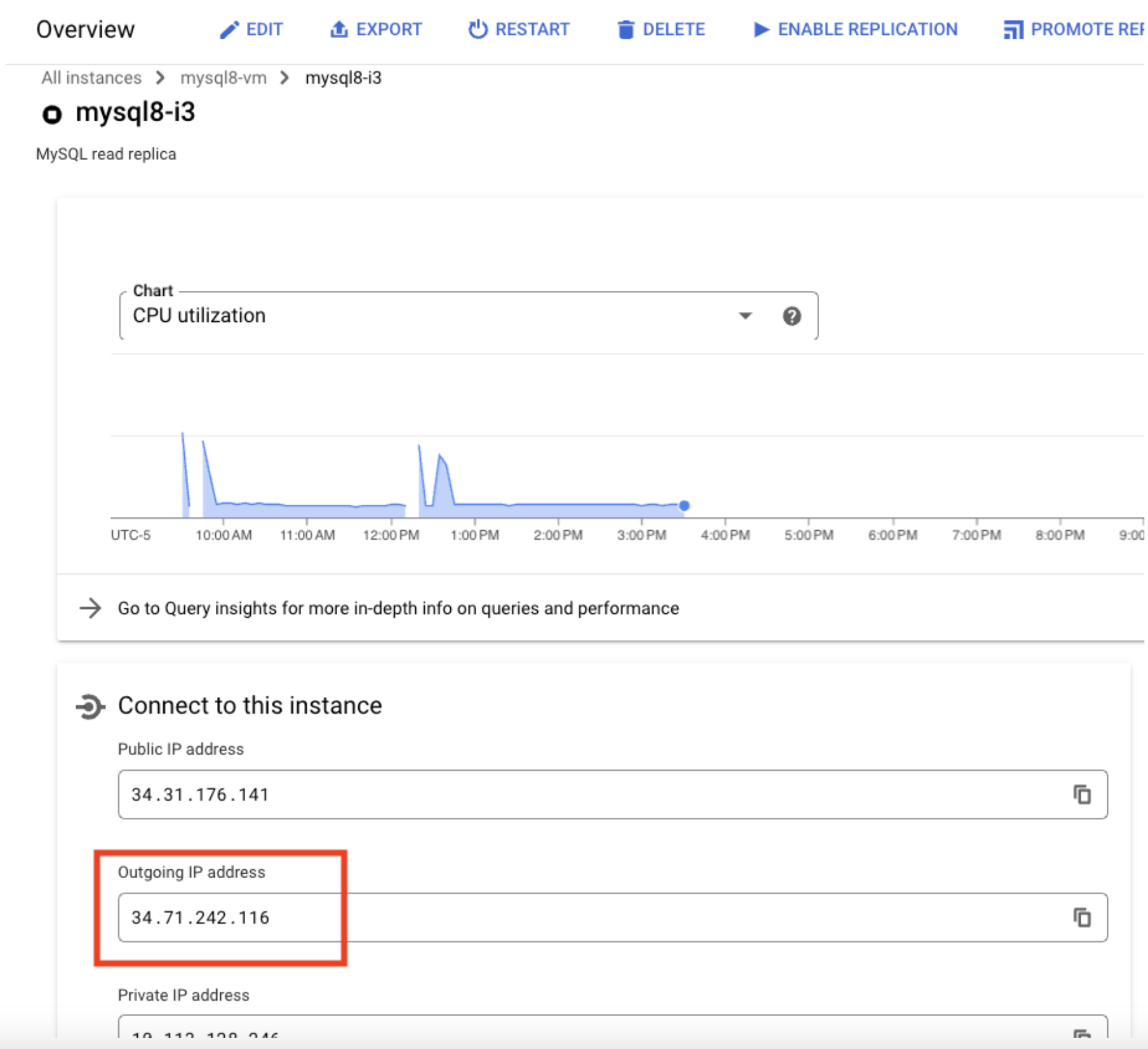
The Cloud SQL replica needs to connect to the external server for replication to succeed. You must configure the network firewall for your external server to accept connections from the Cloud SQL replica's outgoing IP address if the following conditions apply:
- The external server is behind a firewall or some other network restriction.
- Your Cloud SQL replica is using a public IP.
To connect to the Cloud SQL replica, you use the replica's primary IP address. This IP address is displayed in the Google Cloud console.
gcloud auth login
ACCESS_TOKEN="$(gcloud auth print-access-token)"
curl --header "Authorization: Bearer ${ACCESS_TOKEN}" \
     --header 'Content-Type: application/json' \
     --data '{
         "syncMode": "online"
       }' \
     -X POST \
https://sqladmin.googleapis.com/sql/v1beta4/projects/aamir-playground/instances/mysql8-i3/verifyExternalSyncSettings
OUTPUT:
{
  "kind": "sql#externalSyncSettingErrorList"
}
Using managed import service. This will start replication on the new Cloud SQL instance, i3.
gcloud auth login
ACCESS_TOKEN="$(gcloud auth print-access-token)"
curl --header "Authorization: Bearer ${ACCESS_TOKEN}" \
     --header 'Content-Type: application/json' \
     --data '{
         "syncMode": "online"
       }' \
     -X POST \
https://sqladmin.googleapis.com/sql/v1beta4/projects/aamir-playground/instances/mysql8-i3/startExternalSync
OUTPUT:
{
  "kind": "sql#operation",
  "targetLink": "https://sqladmin.googleapis.com/sql/v1beta4/projects/aamir-playground/instances/mysql8-i3",
  "status": "PENDING",
  "user": "[email protected]",
  "insertTime": "2023-05-24T17:33:35.503Z",
  "operationType": "START_EXTERNAL_SYNC",
  "name": "13c44942-c80b-4db4-9527-8c4700000032",
  "targetId": "mysql8-i3",
  "selfLink": "https://sqladmin.googleapis.com/sql/v1beta4/projects/aamir-playground/operations/13c44942-c80b-4db4-9527-8c4700000032",
  "targetProject": "aamir-playground"
}
- Stop writes to i1 & i2
- Verify t1 has all replication events
- Verify i3 has all necessary replication events
When ready to cut-over, promote replica.
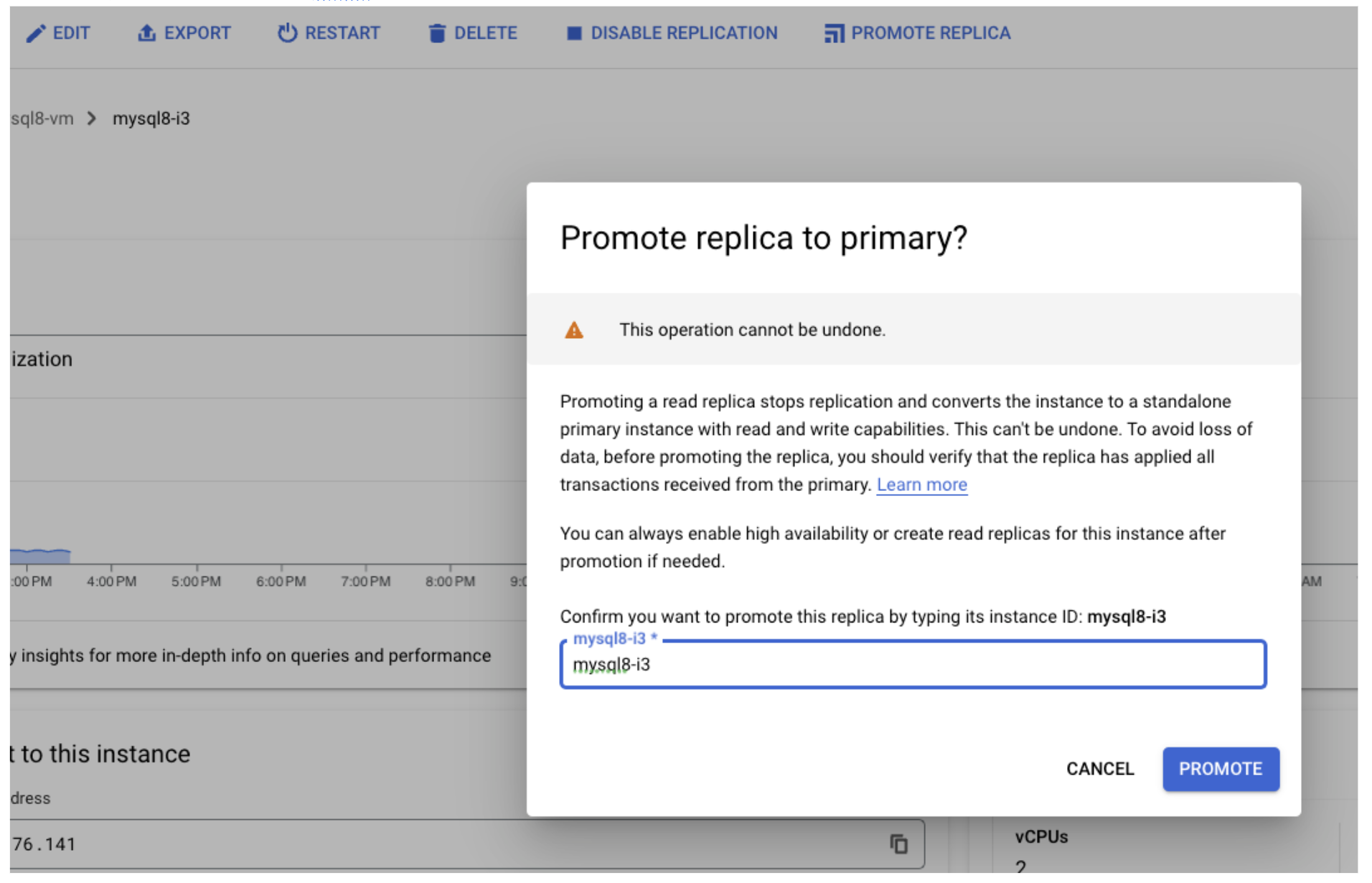
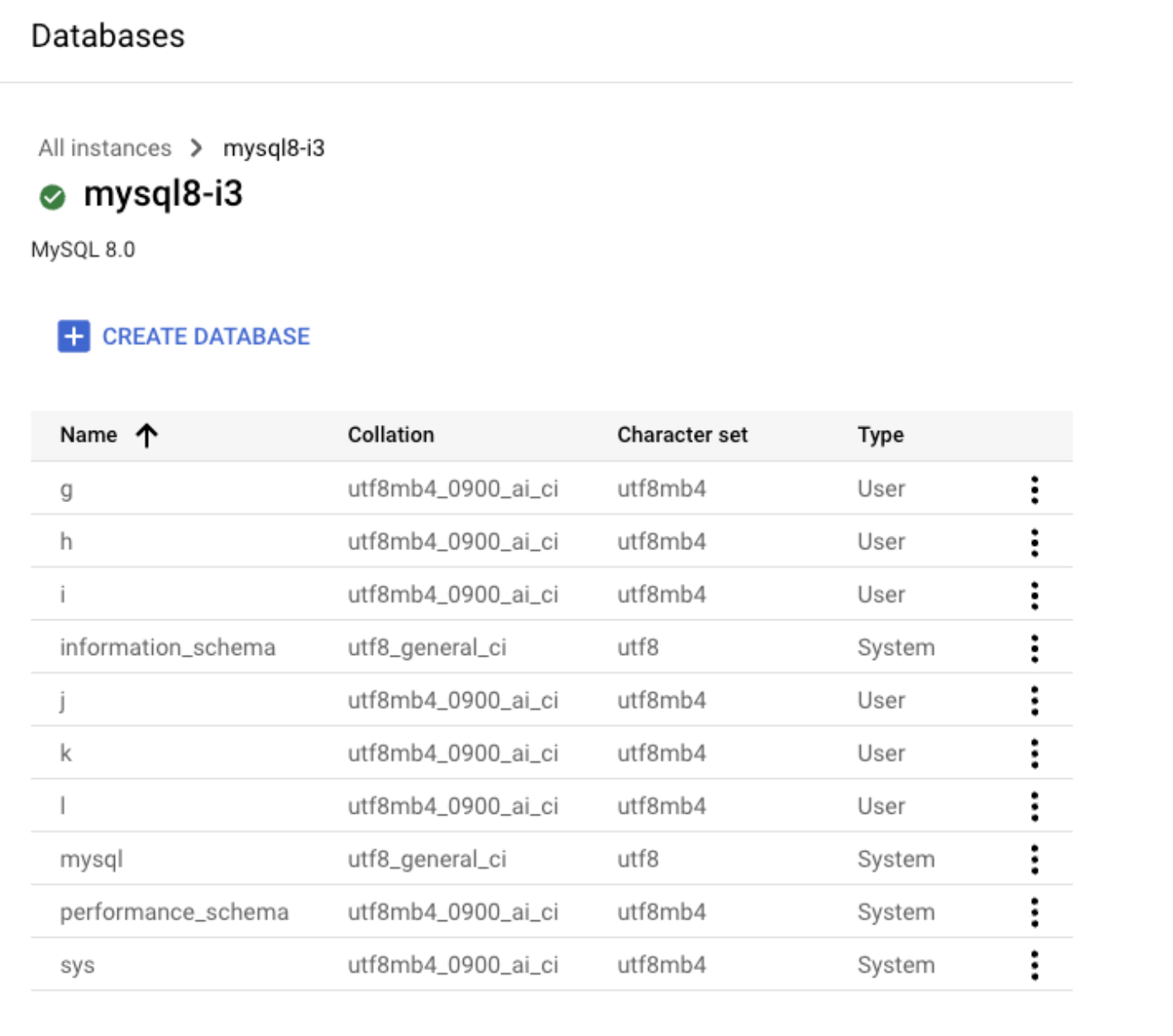
Now i3 has g, h, i, j, k and l databases
- Stop i2 or disable network access.
- Drop schemas i1 (g,h). WARNING: DO NOT DO THIS ON mysql8-i3
- Point your application for i2 traffic to the new endpoint on i3
- Point your application for i1 traffic to new endpoint of i3 for databases (g, h)
- Re-enable application writes
- Validate data being written to i1 and i3 correctly.
- Snapshot and delete i2, t1
https://dev.mysql.com/doc/refman/8.0/en/replication-multi-source.html https://cloud.google.com/sql/docs/mysql/replication/configure-external-replica#configure_the_primary_instance https://cloud.google.com/sql/docs/mysql/replication/configure-replication-from-external#setup-source-instance https://cloud.google.com/sql/docs/mysql/replication/managed-import-replication-from-external#verify-replication