
other gists
🔗 TypeScript type toolbelt
🔗 TS/JS utility functions
note: Any ambient types referenced in the code samples below are defined in global.d.ts from the TypeScript type toolbelt.
useLessFormState- Signature, minimalistic, extensible, advanced & type-safe form-state management library with referentially stable handlers. Seamlessly integrates withuseLessFormErrors.useForceUpdate- This void state manager allows to trigger a re-render of a component.useShallowState- Replace alluseStatewith this one that stores multiple keys similar tothis.setState()from React Class Components. Any state updates are shallowly merged with the old state object, replacing any old properties and keeping those that did not change.useToggle- Primitive boolean* state manager built withuseReducerwith referentially stable convenience handlers. (*also supportsnull)useQueue- This state manager operates on a queue (array), implementing custom actionspop,push,shift,unshiftandset, that trigger re-renders.useCounter- This is a simple counting state manager. Referentially stable.useMultiwaySwitch- An extension to useCounter. This counting state manager toggles betweentrueandfalseand counts the number of switches turned on. It is useful for asynchronous and concurrent actions as it can be controlled from multiple places and only turns off when every switch is turned off, e.g. when every action finishes, etc..
useLessFormErrors- Signature, minimalistic, extensible, advanced & type-safe validation library with referentially stable handlers. Seamlessly integrates withuseLessFormState.useDebugDependencies- Signature tool to analyze which hook dependencies trigger an update. Can also be used with ordinary arrays or objects to keep track or visualize changes.useOnFocusOutside- This hook is used to detect mouse events and tab navigation outside of a given element.useIsClientRendererReady- This hook detects whether the React renderer is ready on the client side. Useful for SSR applications to avoid hydration mismatches.
withRequired- Conditionally renders the wrapped component when specified props are notundefined. This is a way to avoid rules of hooks for conditional hooks usage based on props.withDebounce- Debounces the props change of a wrapped component. Useful for Charts and other heavy components when parent or the data updates too frequently.
getNodeText- Function that extracts and concatenates all text content from a React node, including nested elements.ComponentWithGenerics- Type helper that allows to pass a generic type to a component and use it in the component's props to support smarter type checking and intellisense.
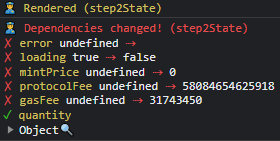
- Tool to analyze which hook dependencies trigger an update. Can also be used with ordinary arrays or objects to keep track or visualize changes.
const veryExpensiveHook =  useMemo(() => expensive(), [error, loading, mintPrice, protocolFee, ...])
const analysis = useDependencyHook(() => expensive(), [error, loading, mintPrice, protocolFee, ...])
console.log(analysis)
- Minimalistic, extensible, advanced & type-safe form-state management library with referentially stable handlers.
with useless formwithout useless formconst [formState, { onInputChange }] = useLessFormState<MyFormType>({ name: '', address: '' }) return ( <> <input name='name' value={formState.name} onChange={onInputChange} /> <input name='address' value={formState.address} onChange={onInputChange} /> </> )
const [name, setName] = useState('')
const [address, setAddress] = useState('')
const handleNameChange = useCallback((event) => setName(event.target.value), [setName])
const handleAddressChange = useCallback((event) => setAddress(event.target.value), [setAddress])
return (
  <>
    <input value={name} onChange={handleNameChange} />
    <input value={address} onChange={handleAddressChange} />
  </>
)
- Minimalistic, extensible, advanced & type-safe validation library with referentially stable handlers. It is compatible with
useLessFormState.const formState = { name: 'qwerty', confirmName: 'yolo' } const formErrors = getFormErrors( formState, { name: [ // Manual rule definition consists of a validator function and a message. [v => v.length >= 5, 'Name is too short'], [v => v.includes('green'), 'Name is not green'], ], confirmName: [ // There are plenty of pre-made rules [check.minLength(5), 'Name is too short'], // and even full reusable validation objects! validations.required, // Access the full state too. [(value, state) => state.name === value, 'Names are not same.'], ], } )
- This void state manager allows to trigger a re-render of a component.
const forceUpdate = useForceUpdate()
// later
forceUpdate() // or
return <button onClick={forceUpdate}>Force update</button>
- This state manager allows to store multiple keys similar to
this.setState()from React Class Components. Any state updates are shallowly merged with the old state object, replacing any old properties and keeping those that did not change.const [state, setState] = useShallowState({ a: 1, b: 1 }/* initial state */) setState((oldState) => ({ b: oldSate.b + 1 })) setState({ c: 3 }) // state is now { a: 1, b: 2, c: 3 }
- Primitive boolean* state manager built with
useReducerwith referentially stable convenience handlers. (*also supportsnull)const [state, toggle, , , , refState] = useToggle(/* true | false | null */) const submitForm = useCallback(() => { if (refState.current) {/* ... */} // always latest value }, [refState]) // never changes reference // ... later in the component return <button onClick={toggle}>{state ? 'ON' : 'OFF'}</button>
- This state manager operates on a queue (array), implementing custom actions
pop,push,shift,unshiftandset, that trigger re-renders.const [queue, refQueue] = useQueue(['a', 'b', 'c']) queue.push('d') const first = queue.shift() function callback() { console.log(refQueue.current) } // always latest value
- This is a simple counting state manager. Referentially stable.
const [step, next, prev, goTo, reset, refState] = useCounter()  // initial state set to `0`
const [counter, add, remove, , reset] = useCounter(2)  // initial state set to `2`

add()    // +1
remove() // -1
reset()  // =2
- An extension to useCounter. This counting state manager toggles between
trueandfalseand counts the number of switches turned on. It is useful for asynchronous and concurrent actions as it can be controlled from multiple places and only turns off when every switch is turned off, e.g. when every action finishes, etc.., causing a state change, which triggers a re-render.
- Detect mouse events and tab navigation outside of a given element.
useOnFocusOutside('Dropdown', () => closeDropdown())

useOnFocusOutside(['Sidebar', 'Table'], closeSidebar, { click: true, escapeKey: true, focus: true })
-
Hooks only run on the client side, so this hook can be used to determine:
- if the component is rendered on the client side, and
- when the renderer is ready (i.e., after the first render).
Useful for SSR applications to avoid hydration mismatches.
const isClientReady = useIsClientRendererReady()
if (!isClientReady) return <LoadingSpinner />
return <ClientOnlyComponent />
-
Higher Order Component that conditionally renders the wrapped component based on the presence of a specific prop. This aims to solve the problem of conditions before hooks in React components.
interface MyComponentProps {
  required?: string
  optional?: string
}

export MyComponent = withRequired<MyComponentProps, "required">("required")(function MyComponent({ required, optional }) {
 // required: string              // <- guaranteed to be defined
 // optional: string | undefined  // <- remains optional
})
- Higher Order Component to debounce prop changes before rerendering the wrapped component.
const DebouncedChart = withDebounce(500)(ChartComponent)
-
ComponentWithGenerics Type helper that allows to pass a generic type to a component and use it in the component's props to support smarter type checking and intellisense.
interface MyForm { name: string, address: string }
<Input<MyForm> name='name' /> // OK
<Input<MyForm> name='yolo' /> // Error - 'yolo' is not assignable to 'name' | 'address'

Resources:
Custom anchors in markdown ^