
-
-
Save backcountrymountains/0f42e73e546f527511de0718d657077d to your computer and use it in GitHub Desktop.
| // Add this to your lovelace resources as | |
| // url: /local/chart-colors.js | |
| // type: module | |
| customElements.whenDefined('ha-chart-base').then(() => { | |
| // Find the HaChartBase class | |
| const HaChartBase = customElements.get('ha-chart-base'); | |
| // Write a new color list generator | |
| function getColorList(cnt) { | |
| let retval = []; | |
| // green-blue-purple (green is around a hue angle of 150 degrees purple ends around 300 degrees) | |
| // https://mika-s.github.io/javascript/colors/hsl/2017/12/05/generating-random-colors-in-javascript.html | |
| const i=150/cnt | |
| while(cnt--) | |
| retval.push(Color().hsl(i*cnt+150,80,38)); | |
| return retval; | |
| } | |
| // Write a new color generator | |
| // Stole colors from: http://colorbrewer2.org/#type=sequential&scheme=Blues&n=9 | |
| function getColorGenerator(staticColors, startIndex) { | |
| const palette = [ | |
| "9ecae1","6baed6","4292c6","2171b5","08519c","08306b","c7e9c0","a1d99b","74c476","41ab5d","238b45","006d2c","00441b","bdbdbd","969696","737373","525252","252525","000000" | |
| ]; | |
| function getColorIndex(idx) { | |
| // Reuse the color if index too large. | |
| return Color("#" + palette[idx % palette.length]); | |
| } | |
| const colorDict = {}; | |
| let colorIndex = 0; | |
| if (startIndex > 0) colorIndex = startIndex; | |
| if (staticColors) { | |
| Object.keys(staticColors).forEach((c) => { | |
| const c1 = staticColors[c]; | |
| if (isFinite(c1)) { | |
| colorDict[c.toLowerCase()] = getColorIndex(c1); | |
| } else { | |
| colorDict[c.toLowerCase()] = Color(staticColors[c]); | |
| } | |
| }); | |
| } | |
| // Custom color assign | |
| function getColor(__, data) { | |
| let ret; | |
| const name = data[3]; | |
| if (name === null) return Color().hsl(0, 40, 38); | |
| if (name === undefined) return Color().hsl(120, 40, 38); | |
| const name1 = name.toLowerCase(); | |
| if (ret === undefined) { | |
| ret = colorDict[name1]; | |
| } | |
| if (ret === undefined) { | |
| ret = getColorIndex(colorIndex); | |
| colorIndex++; | |
| colorDict[name1] = ret; | |
| } | |
| return ret; | |
| } | |
| return getColor; | |
| } | |
| // Replace the color list generator in the base class | |
| HaChartBase.getColorList = getColorList; | |
| HaChartBase.getColorGenerator = getColorGenerator; | |
| // Force lovelace to redraw everything | |
| const ev = new Event("ll-rebuild", { | |
| bubbles: true, | |
| cancelable: false, | |
| composed: true, | |
| }); | |
| var root = document.querySelector("home-assistant"); | |
| root = root && root.shadowRoot; | |
| root = root && root.querySelector("home-assistant-main"); | |
| root = root && root.shadowRoot; | |
| root = root && root.querySelector("app-drawer-layout partial-panel-resolver"); | |
| root = root && root.shadowRoot || root; | |
| root = root && root.querySelector("ha-panel-lovelace"); | |
| root = root && root.shadowRoot; | |
| root = root && root.querySelector("hui-root"); | |
| root = root && root.shadowRoot; | |
| root = root && root.querySelector("ha-app-layout #view"); | |
| root = root && root.firstElementChild; | |
| if (root) root.dispatchEvent(ev); | |
| }); |


The list of hex values after 'palette = ' are the colors I chose.
const palette = [ "9ecae1","6baed6","4292c6","2171b5","08519c","08306b","c7e9c0","a1d99b","74c476","41ab5d","238b45","006d2c","00441b","bdbdbd","969696","737373","525252","252525","000000" ];
I took the colors from http://colorbrewer2.org
Just select your color scheme and click export.
The other place that I changed the colors is in function getColorList(cnt)
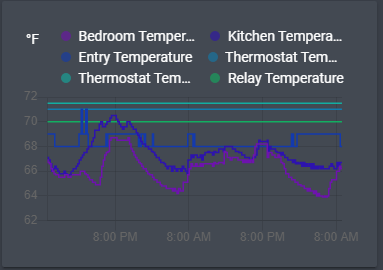
It changes the color based on the hsl hue degree and the number of items. I started the function at 150 degrees which is greenish. I wanted the colors to stop at around 300 degrees which is purplish. The total range of degrees is thus 300-150 = 150. I divided the number of degrees by the number of items const i=150/cnt so each item shifts the hue from 150 degrees up to a maximum of 300 degrees.
Hi, could you please give an example of what to put in the card configuration to define colors. Thanks