
This will give you complete intellisense and type safety within your app and CSS modules
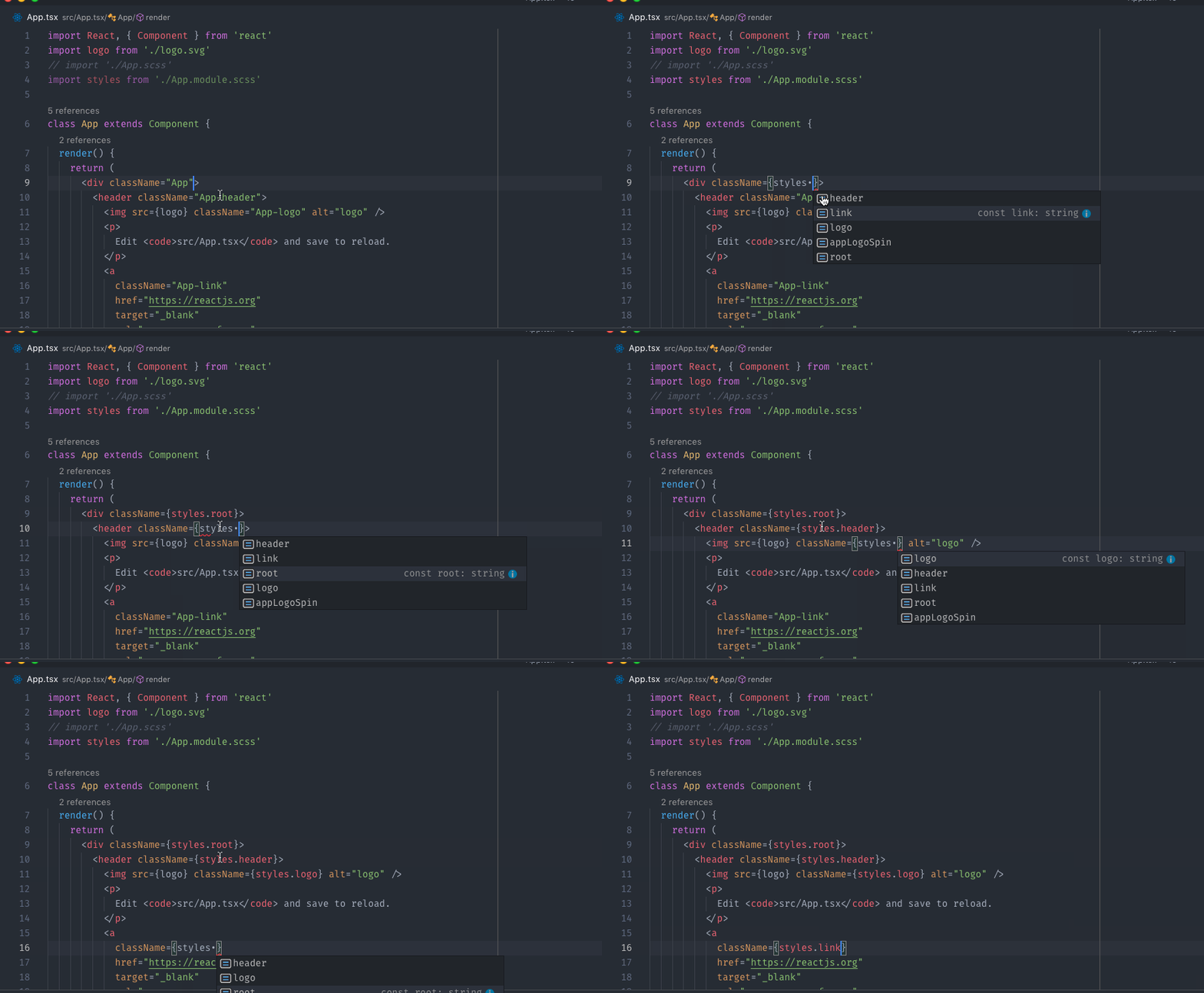
🚨 NOTE
- refactoring className from ts file wont update your css/scss className, to change class names you have to change it within your
.module.scssfile


Recently CSS has got a lot of negativity. But I would like to defend it and show, that with good naming convention CSS works pretty well.
My 3 developers team has just developed React.js application with 7668 lines of CSS (and just 2 !important).
During one year of development we had 0 issues with CSS. No refactoring typos, no style leaks, no performance problems, possibly, it is the most stable part of our application.
Here are main principles we use to write CSS for modern (IE11+) browsers:
Hi, I'm Lorna and I don't use a mouse. I have had RSI issues since a bad workstation setup at work in 2006. I've tried a number of extra hardware modifications but what works best for me is to use the keyboard and only the keyboard, so I'm in a good position and never reaching for anything else (except my coffee cup!). I rather unwisely took a job which required me to use a mac (I've been a linux user until now and also had the ability to choose my tools carefully) so here is my cheatsheet of the apps, tricks and keyboard shortcuts I'm using, mostly for my own reference. Since keyboard-only use is also great for productivity, you may also find some of these ideas useful, in which case at least something good has come of this :)
There's more detail on a few of these apps but here is a quick overview of the tools I've installed and found helpful
| Tool | Link | Comments |
|---|

| /*** | |
| Copyright (c) 2016, Alexander Choporov aka CoolCmd | |
| All rights reserved. | |
| Redistribution and use in source and binary forms, with or without modification, are permitted provided that the following conditions are met: | |
| 1. Redistributions of source code must retain the above copyright notice, this list of conditions and the following disclaimer. | |
| 2. Redistributions in binary form must reproduce the above copyright notice, this list of conditions and the following disclaimer in the documentation and/or other materials provided with the distribution. | |
| 3. Neither the name of the copyright holder nor the names of its contributors may be used to endorse or promote products derived from this software without specific prior written permission. | |
| THIS SOFTWARE IS PROVIDED BY THE COPYRIGHT HOLDERS AND CONTRIBUTORS "AS IS" AND ANY EXPRESS OR IMPLIED WARRANTIES, INCLUDING, BUT NOT LIMITED TO, THE IMPLIED WARRANTIES OF MERCHANTABILITY AND FITNESS FOR A PARTICULAR PURPOSE ARE DISCLAIMED. IN NO EVENT SHALL THE COPYRIGHT HOLDE |

Fallout 1 was originally designed to run at 640x480 resolution. I wanted to run the Mac OS X version of Fallout on my MacBook 11", which has a 1366x768 display. There is a [high resolution patch][hi-res], but it only supports the Windows version of Fallout.
Turns out that the OS X version of Fallout runs through Wine, so we can get this patch working with just a few configuration changes:
Note for Fallout 2 users: The process for Fallout 2 is essentially the same, with a different patch, and some minor pathing differences. Other than that, the process is exactly the same!
Английская версия: https://evilmartians.com/chronicles/bootstrap-an-intervention
У CSS есть несколько базовых проблем, которые позволяют очень быстро отстрелить себе ногу при неправильном использовании:
Глобальный неймспейс – в серверном программировании все что написано в файле, в файле и остается. Все же что написано в css и js засирает глобальное пространство имен со всеми вытекающими. В JS эту проблему сейчас побороли всякими модульными системами, а вот с css сложнее. В идеальном мире это должен починить Shadow DOM и настоящие Web Components, но пока их нет единственный способ с этим бороться – следовать какой-то системе именований селекторов, которая по возможности уменьшает и исключает возможные конфликты.
Каскадность – если на один элемент может сработать несколько правил, то они все и сработают последовательно. Если есть элемент h1.title, на него сработают все правила для тегов h1 и все правила для класса .title. Так как весь html состоит из тегов, то правил которые п

| #!/bin/bash | |
| # 2015 Updates to sunkid's script. chrisfcarroll | |
| # - added more quote marks to cope with e.g. spaces in volume names. | |
| # - get machine UUID from ioreg instead of parsing and system report. | |
| # - added steps to tell Time Machine to use your new backup drive. | |
| # - renamed. | |
| # Make it executable with e.g. chmod a+x tmMakeImage && mv tmMakeImage /usr/local/bin. | |
| # | |
| # A bash script to create a time machine disk image suitable for | |
| # backups with OS X 10.6 (Snow Leopard) and later. |


#Error management in gulp
Sucking at something is the first step to becoming sorta good at something
No one can assure you, that plugins will run smooth in any circumstances (except for tests - they could), so neither should you convince anyone, that your plugin will never break. Only thing, that you could possibly do (if something gone wrong) - is gracefully inform your plugin user, that something went wrong and die.
We are will use this plugin from beginning to demonstrate error management. Suppose you have a task in gulpfile.js that contains this code (we modified it a little bit to be closer to real-usage):
var coffee = require('gulp-coffee');
When the directory structure of your Node.js application (not library!) has some depth, you end up with a lot of annoying relative paths in your require calls like:
const Article = require('../../../../app/models/article');Those suck for maintenance and they're ugly.

