
Last active
July 28, 2025 16:27
-
-
Save eernstg/dd0af15107675c6fc2f09c8eb5c9109a to your computer and use it in GitHub Desktop.
Using parameter list abstraction to make both `Text` and `Text.rich` redirect to a shared `Text._` constructor.
This file contains hidden or bidirectional Unicode text that may be interpreted or compiled differently than what appears below. To review, open the file in an editor that reveals hidden Unicode characters.
Learn more about bidirectional Unicode characters
| /// A run of text with a single style. | |
| /// | |
| /// The [Text] widget displays a string of text with single style. The string | |
| /// might break across multiple lines or might all be displayed on the same line | |
| /// depending on the layout constraints. | |
| /// | |
| /// The [style] argument is optional. When omitted, the text will use the style | |
| /// from the closest enclosing [DefaultTextStyle]. If the given style's | |
| /// [TextStyle.inherit] property is true (the default), the given style will | |
| /// be merged with the closest enclosing [DefaultTextStyle]. This merging | |
| /// behavior is useful, for example, to make the text bold while using the | |
| /// default font family and size. | |
| /// | |
| /// {@tool snippet} | |
| /// | |
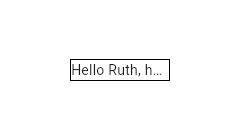
| /// This example shows how to display text using the [Text] widget with the | |
| /// [overflow] set to [TextOverflow.ellipsis]. | |
| /// | |
| ///  | |
| /// | |
| /// ```dart | |
| /// Container( | |
| /// width: 100, | |
| /// decoration: BoxDecoration(border: Border.all()), | |
| /// child: Text(overflow: TextOverflow.ellipsis, 'Hello $_name, how are you?')) | |
| /// ``` | |
| /// {@end-tool} | |
| /// | |
| /// {@tool snippet} | |
| /// | |
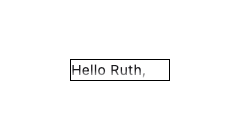
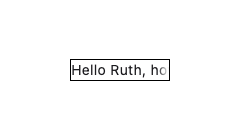
| /// Setting [maxLines] to `1` is not equivalent to disabling soft wrapping with | |
| /// [softWrap]. This is apparent when using [TextOverflow.fade] as the following | |
| /// examples show. | |
| /// | |
| ///  | |
| /// | |
| /// ```dart | |
| /// Text( | |
| /// overflow: TextOverflow.fade, | |
| /// maxLines: 1, | |
| /// 'Hello $_name, how are you?') | |
| /// ``` | |
| /// | |
| /// Here soft wrapping is enabled and the [Text] widget tries to wrap the words | |
| /// "how are you?" to a second line. This is prevented by the [maxLines] value | |
| /// of `1`. The result is that a second line overflows and the fade appears in a | |
| /// horizontal direction at the bottom. | |
| /// | |
| ///  | |
| /// | |
| /// ```dart | |
| /// Text( | |
| /// overflow: TextOverflow.fade, | |
| /// softWrap: false, | |
| /// 'Hello $_name, how are you?') | |
| /// ``` | |
| /// | |
| /// Here soft wrapping is disabled with `softWrap: false` and the [Text] widget | |
| /// attempts to display its text in a single unbroken line. The result is that | |
| /// the single line overflows and the fade appears in a vertical direction at | |
| /// the right. | |
| /// | |
| /// {@end-tool} | |
| /// | |
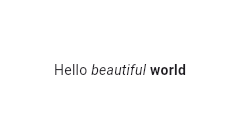
| /// Using the [Text.rich] constructor, the [Text] widget can | |
| /// display a paragraph with differently styled [TextSpan]s. The sample | |
| /// that follows displays "Hello beautiful world" with different styles | |
| /// for each word. | |
| /// | |
| /// {@tool snippet} | |
| /// | |
| ///  | |
| /// | |
| /// ```dart | |
| /// const Text.rich( | |
| /// TextSpan( | |
| /// text: 'Hello', // default text style | |
| /// children: <TextSpan>[ | |
| /// TextSpan(text: ' beautiful ', style: TextStyle(fontStyle: FontStyle.italic)), | |
| /// TextSpan(text: 'world', style: TextStyle(fontWeight: FontWeight.bold)), | |
| /// ], | |
| /// ), | |
| /// ) | |
| /// ``` | |
| /// {@end-tool} | |
| /// | |
| /// ## Interactivity | |
| /// | |
| /// To make [Text] react to touch events, wrap it in a [GestureDetector] widget | |
| /// with a [GestureDetector.onTap] handler. | |
| /// | |
| /// In a Material Design application, consider using a [TextButton] instead, or | |
| /// if that isn't appropriate, at least using an [InkWell] instead of | |
| /// [GestureDetector]. | |
| /// | |
| /// To make sections of the text interactive, use [RichText] and specify a | |
| /// [TapGestureRecognizer] as the [TextSpan.recognizer] of the relevant part of | |
| /// the text. | |
| /// | |
| /// ## Selection | |
| /// | |
| /// [Text] is not selectable by default. To make a [Text] selectable, one can | |
| /// wrap a subtree with a [SelectionArea] widget. To exclude a part of a subtree | |
| /// under [SelectionArea] from selection, once can also wrap that part of the | |
| /// subtree with [SelectionContainer.disabled]. | |
| /// | |
| /// {@tool dartpad} | |
| /// This sample demonstrates how to disable selection for a Text under a | |
| /// SelectionArea. | |
| /// | |
| /// ** See code in examples/api/lib/material/selection_container/selection_container_disabled.0.dart ** | |
| /// {@end-tool} | |
| /// | |
| /// See also: | |
| /// | |
| /// * [RichText], which gives you more control over the text styles. | |
| /// * [DefaultTextStyle], which sets default styles for [Text] widgets. | |
| /// * [SelectableRegion], which provides an overview of the selection system. | |
| class Text extends StatelessWidget { | |
| const this._( | |
| /// The text to display. | |
| /// | |
| /// This will be null if a [textSpan] is provided instead. | |
| final String? data, | |
| /// The text to display as a [InlineSpan]. | |
| /// | |
| /// This will be null if [data] is provided instead. | |
| final InlineSpan? textSpan, { | |
| super.key, | |
| /// If non-null, the style to use for this text. | |
| /// | |
| /// If the style's "inherit" property is true, the style will be merged with | |
| /// the closest enclosing [DefaultTextStyle]. Otherwise, the style will | |
| /// replace the closest enclosing [DefaultTextStyle]. | |
| final TextStyle? style, | |
| /// {@macro flutter.painting.textPainter.strutStyle} | |
| final StrutStyle? strutStyle, | |
| /// How the text should be aligned horizontally. | |
| final TextAlign? textAlign, | |
| /// The directionality of the text. | |
| /// | |
| /// This decides how [textAlign] values like [TextAlign.start] and | |
| /// [TextAlign.end] are interpreted. | |
| /// | |
| /// This is also used to disambiguate how to render bidirectional text. For | |
| /// example, if the [data] is an English phrase followed by a Hebrew phrase, | |
| /// in a [TextDirection.ltr] context the English phrase will be on the left | |
| /// and the Hebrew phrase to its right, while in a [TextDirection.rtl] | |
| /// context, the English phrase will be on the right and the Hebrew phrase on | |
| /// its left. | |
| /// | |
| /// Defaults to the ambient [Directionality], if any. | |
| final TextDirection? textDirection, | |
| /// Used to select a font when the same Unicode character can | |
| /// be rendered differently, depending on the locale. | |
| /// | |
| /// It's rarely necessary to set this property. By default its value | |
| /// is inherited from the enclosing app with `Localizations.localeOf(context)`. | |
| /// | |
| /// See [RenderParagraph.locale] for more information. | |
| final Locale? locale, | |
| /// Whether the text should break at soft line breaks. | |
| /// | |
| /// If false, the glyphs in the text will be positioned as if there was unlimited horizontal space. | |
| final bool? softWrap, | |
| /// How visual overflow should be handled. | |
| /// | |
| /// If this is null [TextStyle.overflow] will be used, otherwise the value | |
| /// from the nearest [DefaultTextStyle] ancestor will be used. | |
| final TextOverflow? overflow, | |
| /// Deprecated. Will be removed in a future version of Flutter. Use | |
| /// [textScaler] instead. | |
| /// | |
| /// The number of font pixels for each logical pixel. | |
| /// | |
| /// For example, if the text scale factor is 1.5, text will be 50% larger than | |
| /// the specified font size. | |
| /// | |
| /// The value given to the constructor as textScaleFactor. If null, will | |
| /// use the [MediaQueryData.textScaleFactor] obtained from the ambient | |
| /// [MediaQuery], or 1.0 if there is no [MediaQuery] in scope. | |
| @Deprecated( | |
| 'Use textScaler instead. ' | |
| 'Use of textScaleFactor was deprecated in preparation for the upcoming nonlinear text scaling support. ' | |
| 'This feature was deprecated after v3.12.0-2.0.pre.', | |
| ) | |
| final double? textScaleFactor, | |
| /// {@macro flutter.painting.textPainter.textScaler} | |
| final TextScaler? textScaler, | |
| /// An optional maximum number of lines for the text to span, wrapping if necessary. | |
| /// If the text exceeds the given number of lines, it will be truncated according | |
| /// to [overflow]. | |
| /// | |
| /// If this is 1, text will not wrap. Otherwise, text will be wrapped at the | |
| /// edge of the box. | |
| /// | |
| /// If this is null, but there is an ambient [DefaultTextStyle] that specifies | |
| /// an explicit number for its [DefaultTextStyle.maxLines], then the | |
| /// [DefaultTextStyle] value will take precedence. You can use a [RichText] | |
| /// widget directly to entirely override the [DefaultTextStyle]. | |
| final int? maxLines, | |
| /// {@template flutter.widgets.Text.semanticsLabel} | |
| /// An alternative semantics label for this text. | |
| /// | |
| /// If present, the semantics of this widget will contain this value instead | |
| /// of the actual text. This will overwrite any of the semantics labels applied | |
| /// directly to the [TextSpan]s. | |
| /// | |
| /// This is useful for replacing abbreviations or shorthands with the full | |
| /// text value: | |
| /// | |
| /// ```dart | |
| /// const Text(r'$$', semanticsLabel: 'Double dollars') | |
| /// ``` | |
| /// {@endtemplate} | |
| final String? semanticsLabel, | |
| /// A unique identifier for the semantics node for this widget. | |
| /// | |
| /// This is useful for cases where the text widget needs to have a uniquely | |
| /// identifiable ID that is recognized through the automation tools without | |
| /// having a dependency on the actual content of the text that can possibly be | |
| /// dynamic in nature. | |
| final String? semanticsIdentifier, | |
| /// {@macro flutter.painting.textPainter.textWidthBasis} | |
| final TextWidthBasis? textWidthBasis, | |
| /// {@macro dart.ui.textHeightBehavior} | |
| final ui.TextHeightBehavior? textHeightBehavior, | |
| /// The color to use when painting the selection. | |
| /// | |
| /// This is ignored if [SelectionContainer.maybeOf] returns null | |
| /// in the [BuildContext] of the [Text] widget. | |
| /// | |
| /// If null, the ambient [DefaultSelectionStyle] is used (if any); failing | |
| /// that, the selection color defaults to [DefaultSelectionStyle.defaultColor] | |
| /// (semi-transparent grey). | |
| final Color? selectionColor, | |
| }) : assert( | |
| textScaler == null || textScaleFactor == null, | |
| 'textScaleFactor is deprecated and cannot be specified when textScaler is specified.', | |
| ), | |
| assert( | |
| (data == null) != (textSpan == null), | |
| 'data or textSpan should be non-null, but not both', | |
| ); | |
| /// Creates a text widget. | |
| /// | |
| /// If the [style] argument is null, the text will use the style from the | |
| /// closest enclosing [DefaultTextStyle]. | |
| /// | |
| /// The [overflow] property's behavior is affected by the [softWrap] argument. | |
| /// If the [softWrap] is true or null, the glyph causing overflow, and those | |
| /// that follow, will not be rendered. Otherwise, it will be shown with the | |
| /// given overflow option. | |
| const Text(String data, {*}): this._(data, null, *:*); | |
| /// Creates a text widget with a [InlineSpan]. | |
| /// | |
| /// The following subclasses of [InlineSpan] may be used to build rich text: | |
| /// | |
| /// * [TextSpan]s define text and children [InlineSpan]s. | |
| /// * [WidgetSpan]s define embedded inline widgets. | |
| /// | |
| /// See [RichText] which provides a lower-level way to draw text. | |
| const Text.rich(InlineSpan textSpan, {*}): this._(null, textSpan, *:*); | |
| /* ... */ | |
| } |

Author
Sign up for free
to join this conversation on GitHub.
Already have an account?
Sign in to comment
This is a variant of an example showing how primary body constructors can be used to make
Texta bit more concise.It uses a hypothetical feature mentioned in dart-lang/language#3444 to abstract over similar formal parameter declaration lists.
The point is that the private constructor is optimized to express the construction of a
Textin full, and the two other constructorsTextandText.richrely onText._to do the real work, while presenting a slightly different signature to the client.The abbreviations (
{*}and*:*) are not essential, of course, but they do allow us to omit a rather large number of formal parameter declarations.In particular,
const Text(String data, {*}): this._(data, null, *:*);declares a constructor namedTextwhose formal parameters include one positional parameter (String data) as well as all the named parameters of the redirectee constructor namedText._, with the same names and types and requiredness and default values, if any. In the redirection,*:*is a concise way to specify that all the named parameters of this constructor are passed to the redirectee, using the same name (as inkey: key, style: style, strutStyle: strutStyleand so on).Similarly,
const Text.rich(InlineSpan textSpan, {*}): this._(null, textSpan, *:*);will invokeText._passingnulltodata,textSpantotextSpan, and forwarding all the named parameters with the same name.