
Result
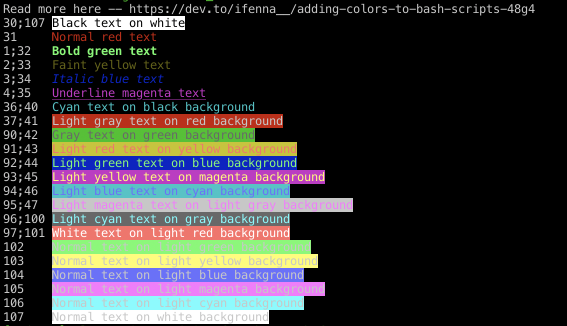
#!/bin/bash
R="\033[0m" # reset code

echo "Read more here -- https://dev.to/ifenna__/adding-colors-to-bash-scripts-48g4"

echo -e "30;107 \033[30;107mBlack text on white$R"
echo -e "31     \033[31mNormal red text$R"
echo -e "1;32   \033[1;32mBold green text$R"
echo -e "2;33   \033[2;33mFaint yellow text$R"
echo -e "3;34   \033[3;34mItalic blue text$R"
echo -e "4;35   \033[4;35mUnderline magenta text$R"
echo -e "36;40  \033[36;40mCyan text on black background$R"
echo -e "37;41  \033[37;41mLight gray text on red background$R"
echo -e "90;42  \033[90;42mGray text on green background$R"
echo -e "91;43  \033[91;43mLight red text on yellow background$R"
echo -e "92;44  \033[92;44mLight green text on blue background$R"
echo -e "93;45  \033[93;45mLight yellow text on magenta background$R"
echo -e "94;46  \033[94;46mLight blue text on cyan background$R"
echo -e "95;47  \033[95;47mLight magenta text on light gray background$R"
echo -e "96;100 \033[96;100mLight cyan text on gray background$R"
echo -e "97;101 \033[97;101mWhite text on light red background$R"
echo -e "102    \033[102mNormal text on light green background$R"
echo -e "103    \033[103mNormal text on light yellow background$R"
echo -e "104    \033[104mNormal text on light blue background$R"
echo -e "105    \033[105mNormal text on light magenta background$R"
echo -e "106    \033[106mNormal text on light cyan background$R"
echo -e "107    \033[107mNormal text on white background$R"