
-
-
Save kamsar/c3c8322c1ec40eac64c7dd546e5124de to your computer and use it in GitHub Desktop.
| # Usage: | |
| # This script is designed to be run after you have Solr running locally without SSL | |
| # It will generate a trusted, self-signed certificate for LOCAL DEV (this must be modified for production) | |
| # Notes: The keystore must be under server/etc on Solr root, and MUST be named solr-ssl.keystore.jks | |
| # The cert will be added to locally trusted certs, so no security warnings in browsers | |
| # You must still reconfigure Solr to use the keystore and restart it after running this script | |
| # | |
| # THIS SCRIPT REQUIRES WINDOWS 10 (for the SSL trust); without 10 remove the lines around trusting the cert. | |
| # License: MIT | |
| .\solrssl.ps1 -KeystoreFile C:\Solr\apache-solr\server\etc\solr-ssl.keystore.jks |
| param( | |
| [string]$KeystoreFile = 'solr-ssl.keystore.jks', | |
| [string]$KeystorePassword = 'secret', | |
| [string]$SolrDomain = 'localhost', | |
| [switch]$Clobber | |
| ) | |
| $ErrorActionPreference = 'Stop' | |
| ### PARAM VALIDATION | |
| if($KeystorePassword -ne 'secret') { | |
| Write-Error 'The keystore password must be "secret", because Solr apparently ignores the parameter' | |
| } | |
| if((Test-Path $KeystoreFile)) { | |
| if($Clobber) { | |
| Write-Host "Removing $KeystoreFile..." | |
| Remove-Item $KeystoreFile | |
| } else { | |
| $KeystorePath = Resolve-Path $KeystoreFile | |
| Write-Error "Keystore file $KeystorePath already existed. To regenerate it, pass -Clobber." | |
| } | |
| } | |
| $P12Path = [IO.Path]::ChangeExtension($KeystoreFile, 'p12') | |
| if((Test-Path $P12Path)) { | |
| if($Clobber) { | |
| Write-Host "Removing $P12Path..." | |
| Remove-Item $P12Path | |
| } else { | |
| $P12Path = Resolve-Path $P12Path | |
| Write-Error "Keystore file $P12Path already existed. To regenerate it, pass -Clobber." | |
| } | |
| } | |
| try { | |
| $keytool = (Get-Command 'keytool.exe').Source | |
| } catch { | |
| $keytool = Read-Host "keytool.exe not on path. Enter path to keytool (found in JRE bin folder)" | |
| if([string]::IsNullOrEmpty($keytool) -or -not (Test-Path $keytool)) { | |
| Write-Error "Keytool path was invalid." | |
| } | |
| } | |
| ### DOING STUFF | |
| Write-Host '' | |
| Write-Host 'Generating JKS keystore...' | |
| & $keytool -genkeypair -alias solr-ssl -keyalg RSA -keysize 2048 -keypass $KeystorePassword -storepass $KeystorePassword -validity 9999 -keystore $KeystoreFile -ext SAN=DNS:$SolrDomain,IP:127.0.0.1 -dname "CN=$SolrDomain, OU=Organizational Unit, O=Organization, L=Location, ST=State, C=Country" | |
| Write-Host '' | |
| Write-Host 'Generating .p12 to import to Windows...' | |
| & $keytool -importkeystore -srckeystore $KeystoreFile -destkeystore $P12Path -srcstoretype jks -deststoretype pkcs12 -srcstorepass $KeystorePassword -deststorepass $KeystorePassword | |
| Write-Host '' | |
| Write-Host 'Trusting generated SSL certificate...' | |
| $secureStringKeystorePassword = ConvertTo-SecureString -String $KeystorePassword -Force -AsPlainText | |
| $root = Import-PfxCertificate -FilePath $P12Path -Password $secureStringKeystorePassword -CertStoreLocation Cert:\LocalMachine\Root | |
| Write-Host 'SSL certificate is now locally trusted. (added as root CA)' | |
| Write-Host '' | |
| Write-Host '########## NEXT STEPS ##########' -ForegroundColor Green | |
| Write-Host '' | |
| Write-Host '1. Copy your keystore to $SOLR_HOME\server\etc (MUST be here)' -ForegroundColor Green | |
| if(-not $KeystoreFile.EndsWith('solr-ssl.keystore.jks')) { | |
| Write-Warning 'Your keystore file is not named "solr-ssl.keystore.jks"' | |
| Write-Warning 'Solr requires this exact name, so make sure to rename it before use.' | |
| } | |
| $KeystorePath = Resolve-Path $KeystoreFile | |
| Write-Host '' | |
| Write-Host '2. Add the following lines to your solr.in.cmd:' -ForegroundColor Green | |
| Write-Host '' | |
| Write-Host "set SOLR_SSL_KEY_STORE=etc/solr-ssl.keystore.jks" -ForegroundColor Yellow | |
| Write-Host "set SOLR_SSL_KEY_STORE_PASSWORD=$KeystorePassword" -ForegroundColor Yellow | |
| Write-Host "set SOLR_SSL_TRUST_STORE=etc/solr-ssl.keystore.jks" -ForegroundColor Yellow | |
| Write-Host "set SOLR_SSL_TRUST_STORE_PASSWORD=$KeystorePassword" -ForegroundColor Yellow | |
| Write-Host '' | |
| Write-Host 'Done!' |


Upgrading to Powershell 5.1 fixed it for me

Folks, I'm having trouble running this script. I tried at least 4 different machines. When I try to run this script, I get the following error:
Generating JKS keystore...
keytool.exe :
At D:\solrssl.ps1:50 char:1
- & $keytool -genkeypair -alias solr-ssl -keyalg RSA -keysize 2048 -key ...
  + CategoryInfo          : NotSpecified: (:String) [], RemoteException
  + FullyQualifiedErrorId : NativeCommandError
Can anyone please help?
Running into the same issue, can anyone help?

To everyone having the NativeCommandError problem, I had the same when trying to run this script inside the PowerShell ISE.
Try running it from the PowerShell command line as shown in the example:
.\solrssl.ps1 -KeystoreFile C:\Solr\apache-solr\server\etc\solr-ssl.keystore.jks

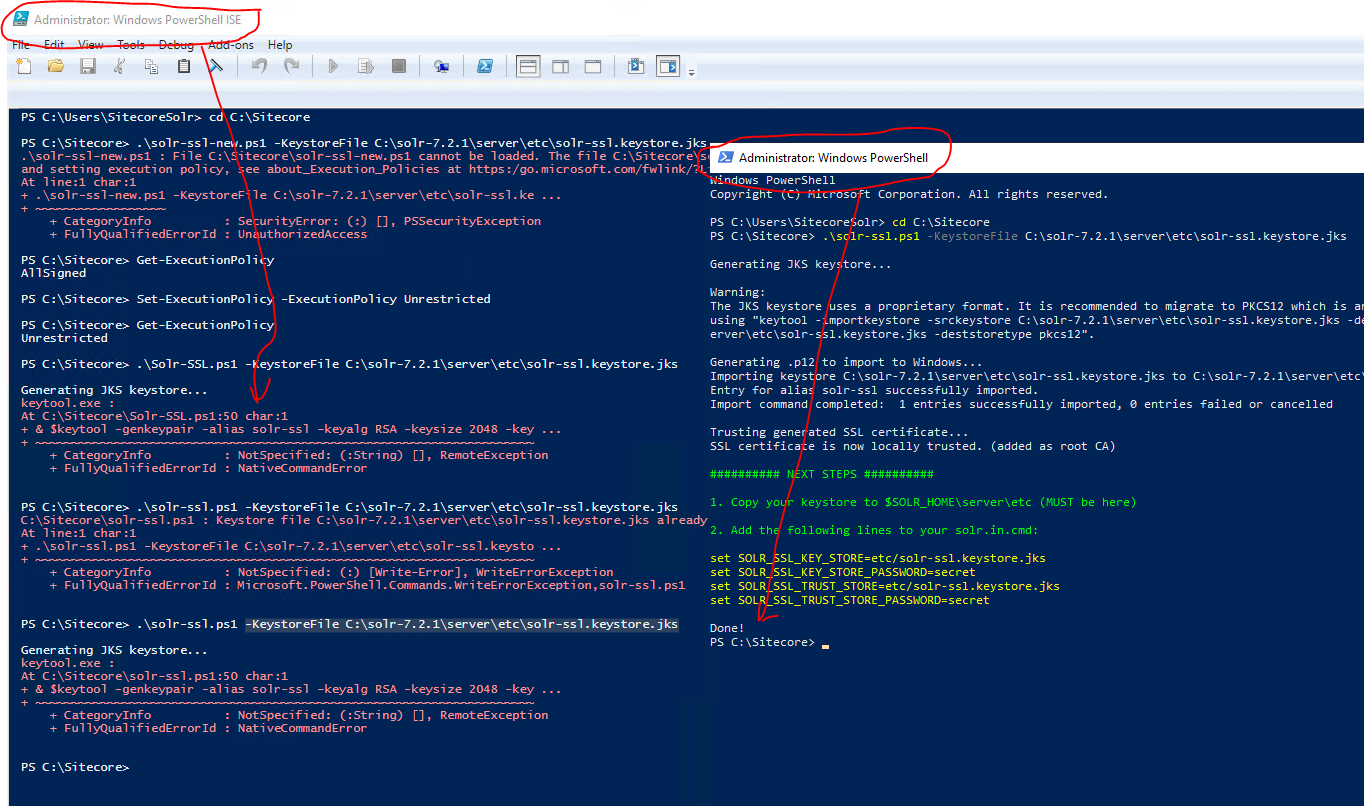
It worked for me in Windows Powershell and failed in Windows Powershell ISE

If you don't want to mess around with the java certstore you can also just use the pfx directly.
set SOLR_SSL_KEY_STORE=etc/mycert.pfx
set SOLR_SSL_KEY_STORE_PASSWORD=password
set SOLR_SSL_KEY_STORE_TYPE=PKCS12
set SOLR_SSL_TRUST_STORE=etc/mycert.pfx
set SOLR_SSL_TRUST_STORE_PASSWORD=password
set SOLR_SSL_TRUST_STORE_TYPE=PKCS12

For Solr 8.8.2 (required for Sitecore 10.2), I had to add the following to the solr.in.cmd file. Without those lines, I was getting the error "java.io.IOException: DerInputStream.getLength(): lengthTag=109, too big."
set SOLR_SSL_KEY_STORE_TYPE=jks
set SOLR_SSL_TRUST_STORE_TYPE=jks

For Solr 8.8.2 (required for Sitecore 10.2), I had to add the following to the solr.in.cmd file. Without those lines, I was getting the error "java.io.IOException: DerInputStream.getLength(): lengthTag=109, too big."
set SOLR_SSL_KEY_STORE_TYPE=jks set SOLR_SSL_TRUST_STORE_TYPE=jks
thank you so much for this! and thanks to OP, amazing job!
I had similar $keytool error as above- for me the JAVA_HOME var was not set.