Skip to content

Instantly share code, notes, and snippets.

@kRHYME7
kRHYME7 / Nvidia On Hyprland.md
Last active December 7, 2025 20:11
# Hyprland Environment Variables for NVIDIA and Intel Setups

Hyprland Environment Variables for NVIDIA and Intel Setups

I made this guide because I have a hybrid GPU. In some setup like HyDE, there is a chance that the environment variables are being set for NVIDIA ONLY setup.

Environment Variable NVIDIA Only Hybrid (NVIDIA+Intel) Intel Only Explanation / Notes
LIBVA_DRIVER_NAME,nvidia ✅ Use ❌ Avoid (use iHD or comment out) ❌ Avoid (use iHD) VA-API driver for NVIDIA. Causes issues on hybrid or Intel-only setups. Use iHD for Intel VA-API.
`LIBVA
@mikybars
mikybars / validate_dataclass.py
Last active October 16, 2025 08:39
Generic solution for `@dataclass` validation in Python with custom setters
from dataclasses import dataclass
class Validations:
def __setattr__(self, prop, val):
if (validator := getattr(self, f"validate_{prop}", None)):
object.__setattr__(self, prop, validator(val) or val)
else:
super().__setattr__(prop, val)
@sulincix
sulincix / debian-nosystemd.sh
Last active November 23, 2025 00:08
debian remove systemd
#!/bin/bash
if [[ $UID -ne 0 ]] ; then
echo "You must be root"
exit 1
fi
apt update
# Block service invoke
echo -e "#!/bin/sh\nexit 101" > /usr/sbin/policy-rc.d
chmod +x /usr/sbin/policy-rc.d
# Remove systemd preremove script.
@mbbx6spp
mbbx6spp / 00README.org
Last active July 20, 2025 04:49
A gist of the commands, metadata file (.desktop), and script I wrote to delegate web URLs to the correct sandboxed web browser inside of the appropriate user profile in Linux. Should work in all distros.

Delegating web requests in Linux to correct browser profile

A few months ago I set this up and here is the write up on it since yesterday, while talking to a fellow Linux user, they found it intriguing.

My requirements

Any URL I click in Slack, Signal desktop app, or launch via terminal actions should launch into the correct sandboxed, user-profile web browser instance (in precedence order):

  • https://github.com/<workorg>.* should open in the work Firefox profile
@Brainiarc7
Brainiarc7 / skylake-tuning-linux.md
Last active October 5, 2025 15:02
This gist will show you how to tune your Intel-based Skylake, Kabylake and beyond Integrated Graphics Core for performance and reliability through GuC and HuC firmware usage on Linux.

Tuning Intel Skylake and beyond for optimal performance and feature level support on Linux:

Note that on Skylake, Kabylake (and the now cancelled "Broxton") SKUs, functionality such as power saving, GPU scheduling and HDMI audio have been moved onto binary-only firmware, and as such, the GuC and the HuC blobs must be loaded at run-time to access this functionality.

Enabling GuC and HuC on Skylake and above requires a few extra parameters be passed to the kernel before boot.

Instructions provided for both Fedora and Ubuntu (including Debian):

Note that the firmware for these GPUs is often packaged by your distributor, and as such, you can confirm the firmware blob's availability by running:

@Misairu-G
Misairu-G / image-to-v4l2loopback.py
Created November 25, 2016 17:34 — forked from TimSC/image-to-v4l2loopback.py
Send image data to v4l2loopback using python. Remember to do "sudo modprobe v4l2loopback" first! Released under CC0 by Tim Sheerman-Chase, 2013
#Send image data to v4l2loopback using python
#Remember to do sudo modprobe v4l2loopback first!
#Released under CC0 by Tim Sheerman-Chase, 2013
import fcntl, sys, os
from v4l2 import *
import time
import scipy.misc as misc
import numpy as np
@tlasica
tlasica / photo-enhance.sh
Created September 25, 2016 15:48
enhance photos using imagemagick
mkdir enhanced
for sp in *.jpg; do
echo "Converting Image: $sp"
convert -auto-gamma -auto-level -normalize $sp "enhanced/$sp"
done
# from http://superuser.com/questions/370920/auto-image-enhance-for-ubuntu
@gtallen1187
gtallen1187 / slope_vs_starting.md
Created November 2, 2015 00:02
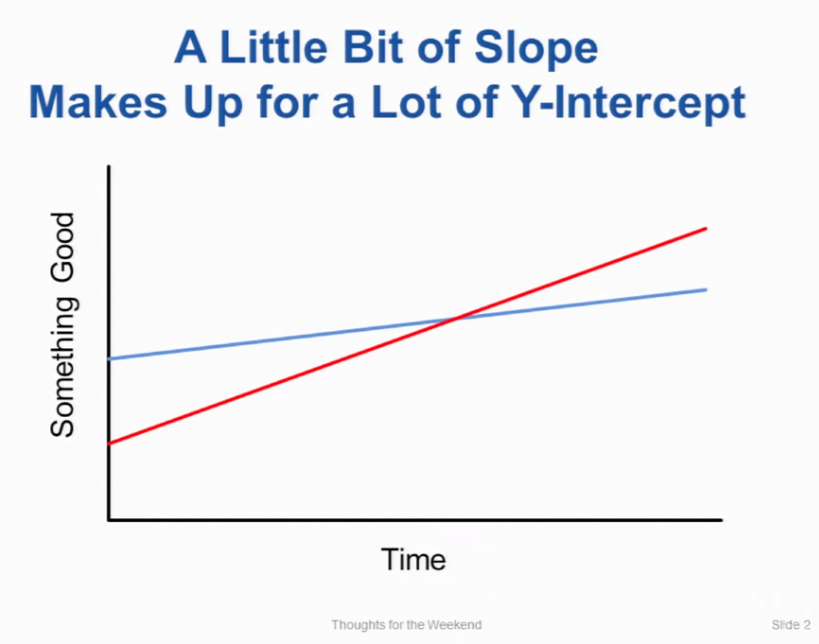
A little bit of slope makes up for a lot of y-intercept

"A little bit of slope makes up for a lot of y-intercept"

01/13/2012. From a lecture by Professor John Ousterhout at Stanford, class CS140

Here's today's thought for the weekend. A little bit of slope makes up for a lot of Y-intercept.

[Laughter]

@Chaser324
Chaser324 / GitHub-Forking.md
Last active December 2, 2025 20:05
GitHub Standard Fork & Pull Request Workflow

Whether you're trying to give back to the open source community or collaborating on your own projects, knowing how to properly fork and generate pull requests is essential. Unfortunately, it's quite easy to make mistakes or not know what you should do when you're initially learning the process. I know that I certainly had considerable initial trouble with it, and I found a lot of the information on GitHub and around the internet to be rather piecemeal and incomplete - part of the process described here, another there, common hangups in a different place, and so on.

In an attempt to coallate this information for myself and others, this short tutorial is what I've found to be fairly standard procedure for creating a fork, doing your work, issuing a pull request, and merging that pull request back into the original project.

Creating a Fork

Just head over to the GitHub page and click the "Fork" button. It's just that simple. Once you've done that, you can use your favorite git client to clone your repo or j