
Compare TCP/IP & OSI Model
| TCP/IP Model | Protocols and Services | OSI Model | Devices | Security |
|---|---|---|---|---|
| Application | HTTP, FTTP, Telnet,NTP, DHCP,PING, DNS, SMTP | 7.Application(HTTP,DNS,FTP), 6.Presentation(encryption), 5.Session(connection) | 7.Firewall, 6.Encrypt_Decryption, 5.Connection_Authentication, Stateful(3+4+5)Firewall | 6.SSL>>TLS:Encode/Encrypt, Proxy+IPS>man-in-middle. 5.RPC+Update++ |
| Transport | TCP/UDP(Port#) | 4.Transport(bit) | Heart of OSI, 4.Firewall-Circuit_Firewall | 4.Package-Filter>Port_scanner |
| Network | Ping: IP(Address), ARP, ICMP, IGMP | 3.Network(packets) | 3.Router+Switch | 3.Package-Filter> ping_Flood, IPS>Spoofing |
| Network Interface | Ethernet | 2.Data Link(Frame: protocol:802.11,802.3), 1.Physical | 2.Network_card_Swith_Bridge_ Repeater 1.Cable/Connector/Hub) | 2.IPS>Spoofing,VLAN:Trunk-/Access+, 1.Fiber+/Cat6- |
| Types | GpsxMeter |
|---|---|
| Cat5 | 100Mbpsx100 |
| Cat5e | 1Gbpsx100 |
| Cat6 | 10Gbpsx10 |
| Cat6e | 10Gbpsx100 |
| Fiber | Use |
| Multi Mode | <500Mx1 |
| Sigle Mode | x50 high Freq. |
| IEEE Standards | Year | description |
|---|---|---|
| 802.3i | 1990 | 10BASE-T: 10Mbps over UTP |
| 802.3j | 1993 | + Fiber Optic cable options |
| 802.3u | 1995 | Fast Ethernet 100 Mbpas |
| 802.3x | 1997 | Full-duplex |
| 802.3z | 1998 | 1000BASE-X:1 Gbps Fiber |
| 802.3ab | 1999 | 1000BASE-T: 1Gbps UTP |
| 802.3ae | 2000 | 10GBASE-X: 10Gbps Fiber |
| 802.3af | 2003 | PoE 15 watts |
| 802.3ak | 2004 | twinaxial cables for rack |
| 802.3an | 2006 | 10Gbps: UTP |
| 802.3bs | 2017 | 200,400Gbps over fiber-optic |
| 802.3bt | 2018 | + PoE 100W |
| IEEE Standards | Year | description |
|---|---|---|
| 802.11a | 1999 | 54 Mbps 5 Ghz |
| 802.11b | 2000 | 11 Mbps 2.4 Ghz |
| 802.11g | 2003 | 54 Mbps 2.4 Ghz |
| 802.11n | 2007 | gx4,5 Mbps MIMO |
| 802.11ac | 2013 | 433 Mbps/Signal, 1.3 Gbps in three-signal design |
| 802.11ax | 2019 | ac, Wi-Fi 6, 6Ghz, 1-10 Gbps |
- PAN: Personal Area Network
- LAN: router, switch
- WLAN: wireless router
- CAN: Campus Area Network
- MAN:
- WAN: No area limit :internet
Network Topology
- Bus [==========]: Satelite Disk
- Ring: No terminator
- Star: switch to pcs
- Mesh: highly available, redundancy
Virtualization:
- Hypervisor: ESXi
Cloud Service Models:Iaas, PaaS, SaaS
Cloud Demployment Models: Private, Public, Community, Hybrid and Multi
- Social Engineering
- Firewall not update
- Poor physical security Measures
- weak Password or Using default password
- Personal Devicess Within the Networks: BOYD
- Zero-Day: Protecting against the Unknown thread (0 day known yet)
- Vulnerability Testers : Good guy but some bad.!
- Blue, Red, White and Purple team(continuous Improvement)
- HACKER: WHITE HAT, Black Hat, Gray Hat
- Insider Threats
- Nation States
- Scripts Kiddies
- Wiretapping: packet Sniffer
- Port Scanning
- Taking Control: SQL injection, Buffer (NX-Bit enable to protect)
- Spoofing: man-in-the-middle, ARP Poisoning to Flood all traffic/every switch port(2,3)
- Distributed Denial-of-Service(DDOS: Smurf attack(victim address send to all computers to get reply) | Cat5e | 1Gbpsx100|
- Social Engineering: Impersonation, Phishing
Protection
- Honeypo: then IDS the trackert
- Proactive and Preventive Measures
- Risk Mitigation Response: Anti-Virus for rootkits, backdoor and Trojan hourses
CIA Triad
- Confidentiality
- Integrity
- Availability
- Packet Filters: OSI:3.Network address ?,4.Transport TCP/UDP port ? only check address/port
- Circuit Level Gateway: Only check: Source/Destination NAT/Port (Level 4 Transport)
- Stateful Inspection: Dynamic Rule set up to begin in H/W (3-5)
- Application or Level 7 and under Firewall : Inspect content in Proxy Server
- ------Own Network Switch -------IPS-------Internet | V IDS
- Nmap
- Traceroute
- NSLookup
- Netstat
- TRACERT
- route
- arp
- ††
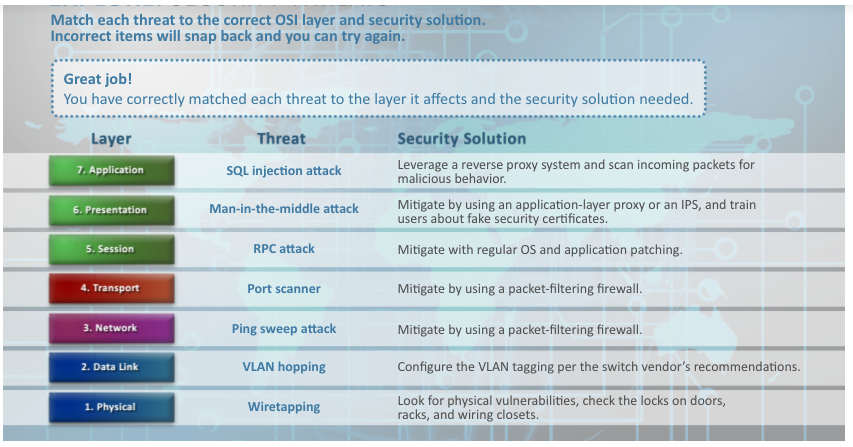
Level 1: Physical wiretapping or eavesdropping
Level 2: Data Link - Wireless attache Layer 1 Signal ========| Access point block (WAP) - Deauthen attack Level 2 (Decrypt Username/password with WAP) = Solution: WPA2 or WPA3 will help
- Wired Network Layer 2 eavesdrop all network traffic<=======> FIB flood |==== Good traffic===>Hager
    = Solution: IDS/IPS
- VLAN in trunk mode
    = Solution config to access mode
Level 3: Network - Ping Sweep attacek to gain information = packet-filtering firewall - Spoofing = IPS prevent attack
Level 4: Transport - port scanner = package filtering firewall
Level 5: Session - RPC = Upgrade OS, Application patch
Level 6: Presentation - man-in-the-middle attack = Application Layer proxy or IPS
Level 7: Application - SQL injection, buffer overrun attacks = IPS, Layer 7 Leverage Proxy System and scan income packets.
- Symmetric encryption 1 key (encrypt/decrypt same key)
- AES:
- Asymetric encryption 2 key pair
- public
- AES > DES
| AES | DES | WEP | WPA +TKIP | WPA2 CCMP | WPA3 |
|---|---|---|---|---|---|
| 128,192,256 | 56 bit only | 40,104 | variable 128-bit encription @packets | CCMP | SAE |
| Faster | Slow | replaced by WPA | 8-63 Char+packets | CCMP | 802.11W encription of management frame |
- Deauth Attack: Dos (Denial of Service): Prevent access to Network, Fake HotSpot for U/P, Capture WPA Handshake !=====> WPA3 (or WPA2) with Good Passphrase
- Fake Access: Fake hotspot =====> VPN
- AAA:
- Authentication: MFA, Fob Token, Bio, Mobile devices
- Authorization
- Accounting
Process to secure all hardwares
- Change Default Passwords
- Remove Unnecessary Logins
- Enforce Strong Password Policy
- Remove Unnecessary Services
- Keep update Patches
- Limit Physical access to the Device
- Allow Change from a Trusted Network
- Only inside Network can do
- No Wireless Access or router allow
- Require emcrption for Wireless Network
- Audit Access
- Backup: Off site
Uh oh!
There was an error while loading. Please reload this page.