
Here’s a brief explanation of the key elements you’ll see in the Apache Spark History Server:
🔹 Application A Spark application is a complete program that runs on the cluster. It includes everything from reading data to processing and writing results. Each application has its own driver and executors. 🧠 Think of it as: The entire job submitted to Spark.
🔹 Job A job is triggered by an action (e.g., collect(), save(), count()). Spark breaks down the application into one or more jobs. Each job consists of stages. 🧠 Think of it as: A unit of work triggered by a user action.
🔹 Stage A stage is a set of tasks that can be executed in parallel. Spark divides jobs into stages based on shuffle boundaries. There are typically map stages and reduce stages. 🧠 Think of it as: A phase in the job where tasks can run in parallel.
🔹 Task A task is the smallest unit of execution in Spark. Each task runs on a partition of the data. Tasks are distributed across executors. 🧠 Think of it as: One piece of work on one chunk of data.
Spark Jobs
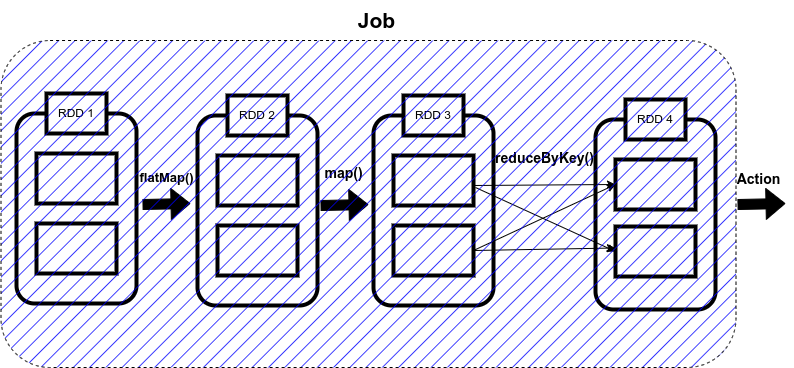
So, what Spark does is that as soon as action operations like collect(), count(), etc., is triggered, the driver program, which is responsible for launching the spark application as well as considered the entry point of any spark application, converts this spark application into a single job which can be seen in the figure below
Spark Stages
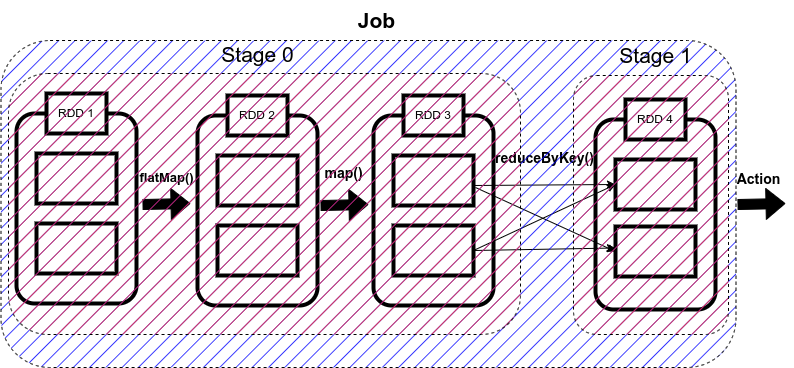
Now here comes the concept of Stage. Whenever there is a shuffling of data over the network, Spark divides the job into multiple stages. Therefore, a stage is created when the shuffling of data takes place. These stages can be either processed parallelly or sequentially depending upon the dependencies of these stages between each other.
Spark Tasks
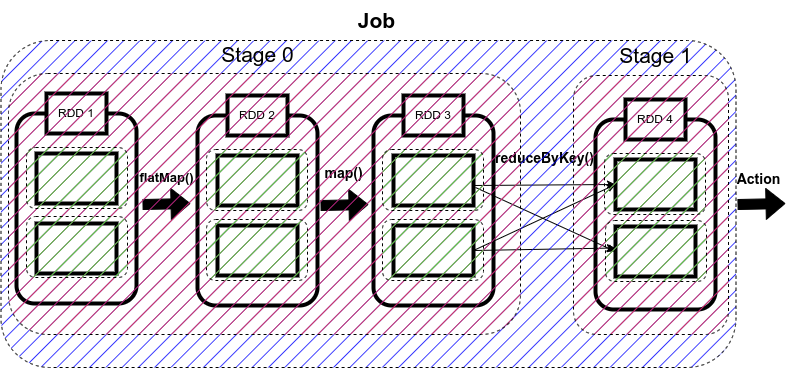
The single computation unit performed on a single data partition is called a task. It is computed on a single core of the worker node. Whenever Spark is performing any computation operation like transformation etc, Spark is executing a task on a partition of data.
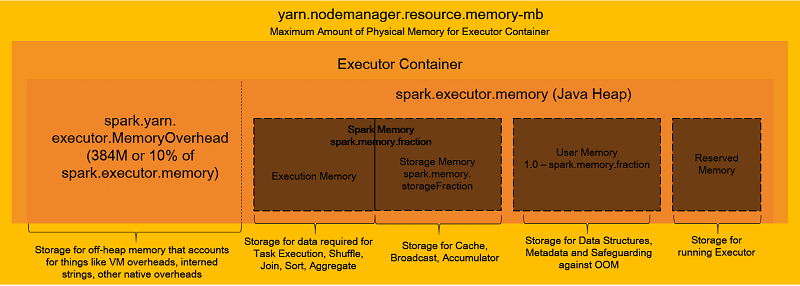
20190409 Best practices for successfully managing memory for Apache Spark applications on Amazon EMR

You can use two DataFrameReader APIs to specify partitioning:
- jdbc(url:String,table:String,partitionColumn:String,lowerBound:Long,upperBound:Long,numPartitions:Int,...)
- jdbc(url:String,table:String,predicates:Array[String],...)
