
- Windows 10 installation iso
- Windows ADK - https://docs.microsoft.com/en-us/windows-hardware/get-started/adk-install
- VirtIO windows drivers iso - https://github.com/virtio-win/virtio-win-pkg-scripts/blob/master/README.md
- Extract the
boot.wim(to a location easily accessible, C:\Temp) from windows installation media. It should be located at thesourcesdirectory inside the iso file. - Open Deployment and Imaging Tools Environment as administrator. If you don't see this is your program list then you probably don't have Windows ADK installed or you didn't include the neccessary components during installation.
- Get the index of Microsoft Windows Setup (x64) from the
boot.wimfile by executing this ommmand
DISM /get-wiminfo /wimfile:"C:\Temp\boot.wim"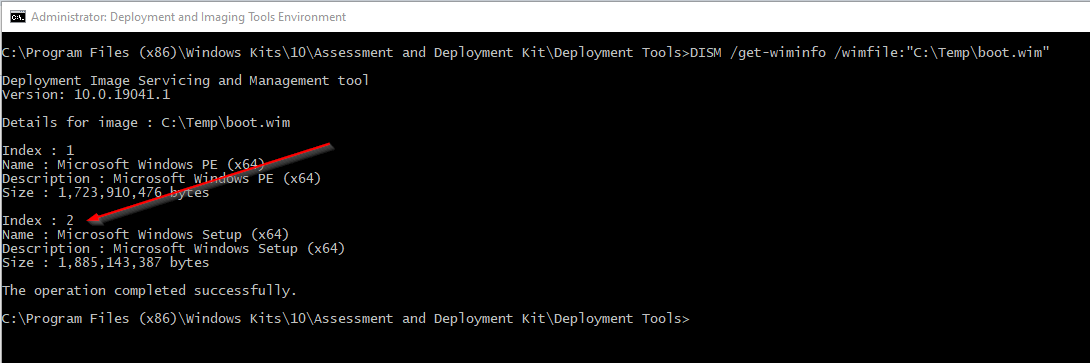 \
\
- Create a directory named wimmount in C:\Temp\
- Extract the VirtIO windows drivers to C:\Temp\virtio-win-0.1.190
- Execute the following series of commands to inject the drivers. This cover most of the drivers. Don't try to recurse the whole virtio drivers directory since it will most likely fails since some drivers are unsigned.
@REM Mount boot.wim file to C:\Temp\wimmount
DISM /Mount-Image /ImageFile:"C:\Temp\boot.wim" /index:2 /MountDir:"C:\Temp\wimmount"

@REM Inject Balloon drivers
DISM /Image:"C:\Temp\wimmount" /Add-Driver /Driver:"C:\Temp\virtio-win-0.1.190\Balloon\w10\amd64" /recurse
DISM /Image:"C:\Temp\wimmount" /Add-Driver /Driver:"C:\Temp\virtio-win-0.1.190\Balloon\2k19\amd64" /recurse
DISM /Image:"C:\Temp\wimmount" /Add-Driver /Driver:"C:\Temp\virtio-win-0.1.190\Balloon\2k16\amd64" /recurse

@REM Inject NetKVM drivers
DISM /Image:"C:\Temp\wimmount" /Add-Driver /Driver:"C:\Temp\virtio-win-0.1.190\NetKVM\w10\amd64" /recurse
DISM /Image:"C:\Temp\wimmount" /Add-Driver /Driver:"C:\Temp\virtio-win-0.1.190\NetKVM\2k19\amd64" /recurse
DISM /Image:"C:\Temp\wimmount" /Add-Driver /Driver:"C:\Temp\virtio-win-0.1.190\NetKVM\2k16\amd64" /recurse

DISM /Image:"C:\Temp\wimmount" /Add-Driver /Driver:"C:\Temp\virtio-win-0.1.190\amd64\w10" /recurse
DISM /Image:"C:\Temp\wimmount" /Add-Driver /Driver:"C:\Temp\virtio-win-0.1.190\amd64\2k19" /recurse
DISM /Image:"C:\Temp\wimmount" /Add-Driver /Driver:"C:\Temp\virtio-win-0.1.190\amd64\2k16" /recurse

@REM Unmount boot.wim and commit the changes
DISM /UnMount-Image /MountDir:"C:\Temp\wimmount" /Commit- Voila, you now copy C:\Temp\boot.wim to your WDS server and replace your existing image.