
#iOS Testing
###Matrix
Tool | CLI? |Coffee?|Mocks?|Unit?|VC?|BDD?|Visual Regressions? ------------| Xcode |almost | × | ✓ | ✓ | ✓ | ?* | × Specta |almost | × | ✓ | ✓ | ✓ | × | × OS X Server| N/A | × | ✓ | ✓ | ✓ | ? | × Zucchini |✓ | ✓ | ? | ? | × | ✓ | ✓ Bwoken/Tuneup|✓ | ✓ | ? | × | × | ✓ | ×
(*) trying to figure out if it can be run without instruments or whether the command line can be integrated visually
###Xcode Xcode can be used to run unit tests.
These can be written in Specta and Expecta - tutorials here:
TDD View Controllers with Specta and OCMock
OCMock can be used to mock classes.
Fakeweb can mock server calls with
[FakeWeb registerUri:mockUri method:@"GET" body:response];
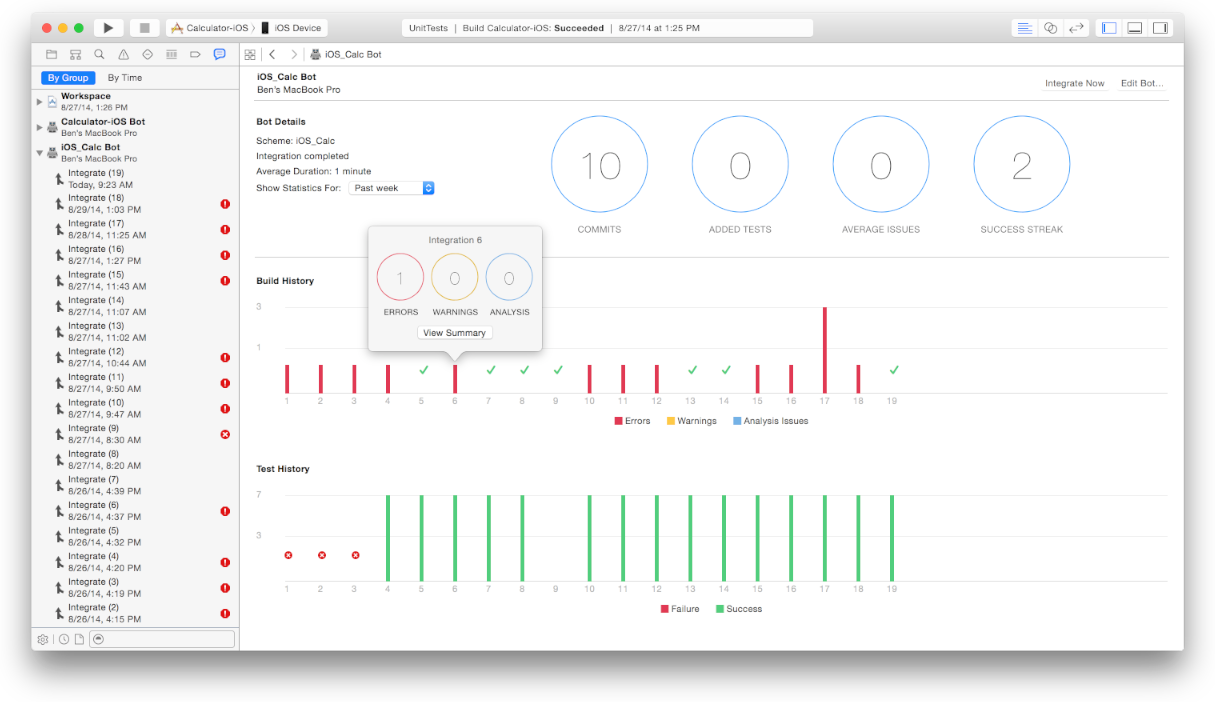
####CI With OS X Server
** NEEDS MAVERICKS RUNNING ON SERVER **
###Xctool
- prettifies output from Xcode tests run on the command line
- could be used to integrate with Jenkins etc… via JUnit output
- I had CC set to gcc in my .zshrc which made builds fail weird derived data file not found errors
###UIAutomation
UIAutomation tests are run in Instruments and written in JavaScript.
Running Instruments from command line
A blog post I found on Apple dev forums
Mechanic is a tool for UIAutomation that lets you write CSS-style selectors like $('#MyScrollView')
######Features
Can perform gestures on arbitrary UI elements.
Can use UIALogger.logPass() and UIAlogger.logFail() to do tests.
Can handle alerts with UIATarget.onAlert.
######Useful things Put app in background
UIATarget.localTarget().deactivateAppForDuration(10);
######Problems Xcode (where you can have API completion) doesn't play well with Instruments (lots of 'file changed on disk' errors)
Sometimes something weird happens and tests no longer run. "An error occurred while trying to run the script". I don't know how to reliably recover from this yet.
####Zucchini


- screenshot comparisons for regression testing
- html output (and I think another format)
- sparsely documented
Forked, working version of demo app
####Tuneup.js and Bwoken
Tuneup is a good way to organise UIAutomation tests, and Bwoken lets you write them in CoffeeScript and helps to run them.
test("Login screen", function(target, app) {
  var window = app.mainWindow();

  // tap the left button in the navigation bar
  window.navigationBars()[0].leftButton().tap();

  // now assert that the app has navigated into a sub-view controller
  assertEquals("Settings", window.navigationBars()[0].value());
});
Install by adding gem 'bwoken' to Gemfile.

Run with
bwoken test
###RubyMotion It might be possible to test this in Ruby via RubyMotion.
####Homegrown idea An OCR-based visual testing framework could be created.
Tesseract is an open-source OCR library.
####Other things Mother May UI
Might be possible to access command line arguments in the iOS simulator through NSProcessInfo...

http://alexvollmer.com/posts/2010/09/06/uiautomation-test-fixtures-redux/