
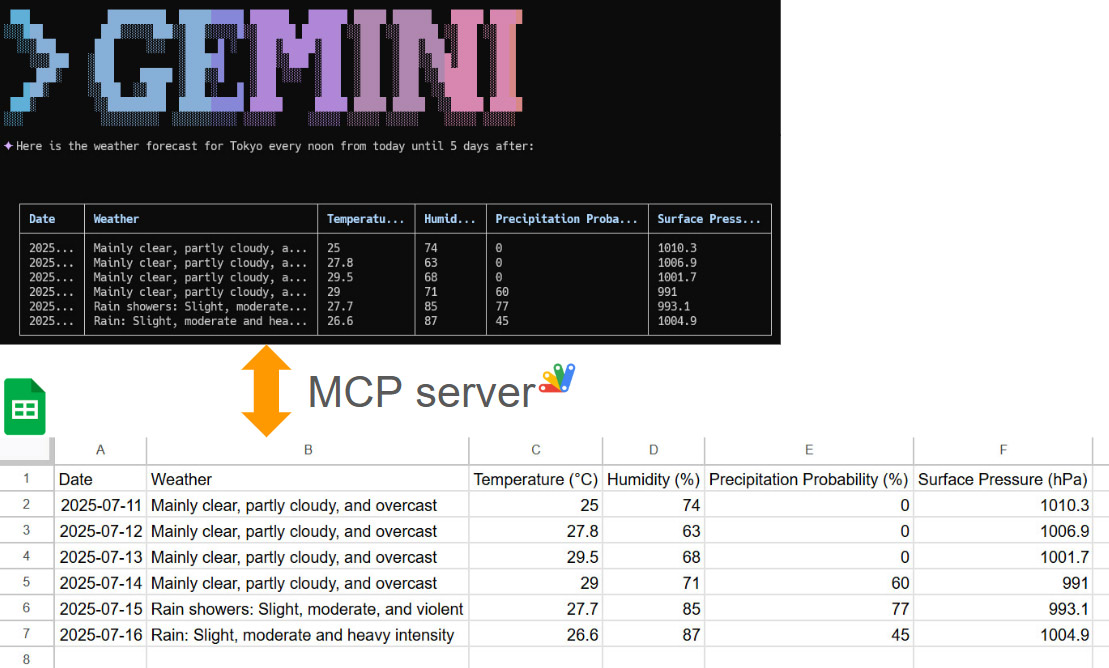
This article explores the integration of the Gemini Command-Line Interface (CLI) with Google Sheets using the Model Context Protocol (MCP). It demonstrates how to leverage the open-source projects MCPApp and ToolsForMCPServer to create a bridge between the Gemini CLI and Google Workspace. This enables users to perform powerful data automation tasks, such as creating, reading, and modifying tables in Google Sheets directly from the command line, using natural language prompts. The article provides practical examples and sample prompts to illustrate the seamless workflow and potential for building sophisticated, AI-powered applications within the Google Cloud ecosystem.

... ottograjeda

imthenachoman
/ Developing a GAS Powered Google Workspace Add-on And Launching It To The Marketplace.md
Last active
January 22, 2026 11:22
Developing a GAS Powered Google Workspace Add-on And Launching It To The Marketplace
This guide will walk you through creating a public Google Workspace Add-on, and launching it in the Google Workspace Marketplace for as free as possible.
This guide was written as I developed and launched my first add-on: Nacho Auto Vacation for Gmail™.

idarek
/ minimal-analytics-4-min.js
Last active
January 17, 2026 22:52
Read more on: https://dariusz.wieckiewicz.org/en/minimal-google-analytics-4-snippet/
This file contains hidden or bidirectional Unicode text that may be interpreted or compiled differently than what appears below. To review, open the file in an editor that reveals hidden Unicode characters.
Learn more about bidirectional Unicode characters
| /* https://go.tacodewolff.nl/minify */ | |
| enScroll=!1,enFdl=!1,extCurrent=void 0,filename=void 0,targetText=void 0,splitOrigin=void 0;const lStor=localStorage,sStor=sessionStorage,doc=document,docEl=document.documentElement,docBody=document.body,docLoc=document.location,w=window,s=screen,nav=navigator||{},extensions=["pdf","xls","xlsx","doc","docx","txt","rtf","csv","exe","key","pps","ppt","pptx","7z","pkg","rar","gz","zip","avi","mov","mp4","mpe","mpeg","wmv","mid","midi","mp3","wav","wma"];function a(e,t,n,o){const j="G-XXXXXXXXXX",r=()=>Math.floor(Math.random()*1e9)+1,c=()=>Math.floor(Date.now()/1e3),F=()=>(sStor._p||(sStor._p=r()),sStor._p),E=()=>r()+"."+c(),_=()=>(lStor.cid_v4||(lStor.cid_v4=E()),lStor.cid_v4),m=lStor.getItem("cid_v4"),v=()=>m?void 0:enScroll==!0?void 0:"1",p=()=>(sStor.sid||(sStor.sid=c()),sStor.sid),O=()=>{if(!sStor._ss)return sStor._ss="1",sStor._ss;if(sStor.getItem("_ss")=="1")return void 0},a="1",g=()=>{if(sStor.sct)if(enScroll==!0)return sStor.sct;else x=+sStor.getItem("sct")+ +a,sSto |

thealchen
/ loading_bar.js
Created
April 13, 2021 18:19
Create a loading bar while you're retrieving results from an API with Google Apps Script
This file contains hidden or bidirectional Unicode text that may be interpreted or compiled differently than what appears below. To review, open the file in an editor that reveals hidden Unicode characters.
Learn more about bidirectional Unicode characters
| // Create a loading bar in your Google Sheet using Google Apps Script | |
| // Author: Al Chen (al@coda.io) | |
| // Last Updated: April 13th, 2021 | |
| // Notes: Assumes you are using the V8 runtime (https://developers.google.com/apps-script/guides/v8-runtime) | |
| // Example Google Sheet: https://docs.google.com/spreadsheets/d/1ngvYKEMunqCVufR10rlK42iENAERp-uyiPN_aiq-MKo/edit?usp=sharing | |
| SOURCE_SHEET_ID = 'YOUR_GOOGLE_SHEETS_ID' | |
| SOURCE_WORKSHEET_NAME = 'YOUR_WORKSHEET_NAME' | |
| function loop() { |
At March 15, 2021, one endpoint is created for one deployment. Ref By this, when you redeploy "Web Apps", the endpoint is changed. Because the deployment ID is changed. It seems that this it the new specification. In this report, I would like to introduce the method for redeploying Web Apps without changing the URL of Web Apps for new IDE.
-
Open "New deployment" dialog with "Deploy" -> "New deployment".
-
Select "Web app" for "Select type".
This is a sample script for copying the protections for Spreadsheet using Google Apps Script. When several protections of the sheet protection and the range protection are set to a Google Spreadsheet and the Spreadsheet is copied using the script and the manual copy with the browser, unfortunately, the protections of ranges are not copied. And also, the protections of sheets can be copied. But, the editor emails are not included. It seems that this is the current specification.
In this post, I would like to introduce a sample script for copying all protection conditions.
Please add the following function to your script. And, please enable Sheets API at Advanced Google services.

kurokobo
/ docker-compose-installer-for-container-optimized-os-on-gce.md
Last active
December 8, 2025 18:50
Simple Installer for Docker Compose on Container-Optimized OS on Google Computing Engine
The easiest way to make Docker Compose available on Container-Optimized OS on Google Compute Engine (GCE) on Google Cloud Platform (GCP).
This is minimal Bash script version of Community Tutorial.
Simply, download installer.sh, run it, and then reload bash by source ~/.bashrc or re-login.

daolf
/ attribution.js
Last active
November 18, 2024 11:51
This file contains hidden or bidirectional Unicode text that may be interpreted or compiled differently than what appears below. To review, open the file in an editor that reveals hidden Unicode characters.
Learn more about bidirectional Unicode characters
| https://jennamolby.com/how-to-use-cookies-to-capture-url-parameters/ | |
| let YOUR_DOMAIN = "YOUR_DOMAIN.TLD" // ex: scrapingbee.com | |
| function getParameterByName(name) { | |
| name = name.replace(/[\[]/, "\\[").replace(/[\]]/, "\\]"); | |
| var regex = new RegExp("[\\?&]" + name + "=([^&#]*)"), | |
| results = regex.exec(location.search); | |
| return results === null ? "" : decodeURIComponent(results[1].replace(/\+/g, " ")); | |
| } |
These are the sample scripts by the various languages for requesting to Web Apps created by Google Apps Script.

This file contains hidden or bidirectional Unicode text that may be interpreted or compiled differently than what appears below. To review, open the file in an editor that reveals hidden Unicode characters.
Learn more about bidirectional Unicode characters
| local FooBar = {} | |
| FooBar.__index = FooBar | |
| function FooBar.new() | |
| local this = { | |
| _privateVariable = 137, | |
| } | |
| return setmetatable(this, FooBar) | |
| end |
NewerOlder