Skip to content

Instantly share code, notes, and snippets.

@p0unter
Created August 17, 2025 15:54
Show Gist options
  • Select an option

  • Save p0unter/13772d6db7bf700f7c866d265b32534f to your computer and use it in GitHub Desktop.

Select an option

Save p0unter/13772d6db7bf700f7c866d265b32534f to your computer and use it in GitHub Desktop.
Be Super User on the Kali Linux.

Switch to root user

sudo passwd root 

The root user of give new password.

su root

(Switch User) Change active user.

Switch to root at interface

nano /etc/lightdm/lightdm.conf

And you find #greeter-show-manual-login=false later just remove # letter and set false to true (finnaly you should press CTRL + S).

To use Desktop

Temp Method

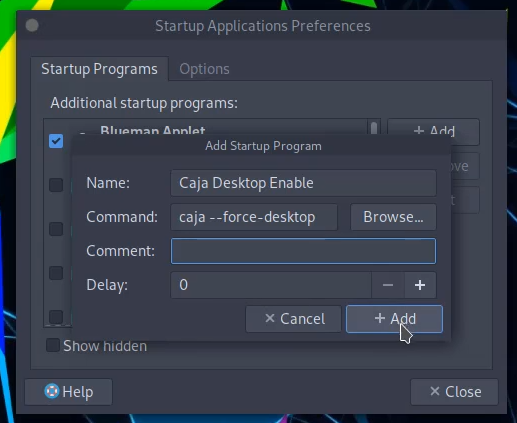
caja --force-desktop

Permanent Method

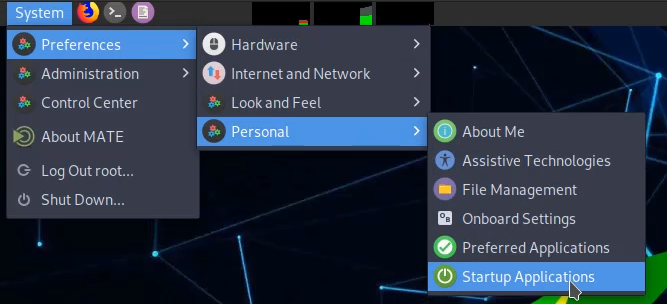
Step 1 - Open startup applications.
alt text

Step 2 - Add startup program. (like this)
alt text

Delete user

userdel -r -f username
-r : remove-f : force
Sign up for free to join this conversation on GitHub. Already have an account? Sign in to comment