
Recently, during the migration to React 17, I had a problem between event listeners handled by React and one added document manually. It was due to this part on the React 17 release note.
At this moment I understood that I had a misconception of how React handles event listener. So I decided to explore the React code to understand how it works.
Before going deep in the React codebase, I would like to explain what was in my head about the management of event listeners.
For example when I write this simple code:
function App() {
  return (
     <button onClick={() => console.log('Click on the button')}>
        Click me
     </button>
  );
}
In my head, React was doing under the hood, something like:
// `buttonRef` an imaginary reference added by React on the button
buttonRef.addEventListener('click', onClick);After reading the React 17 release note. I was like "What? React was attaching event handlers on document and now on rootNode.
Ps: All link to github will be based on the v17.0.2 of React.
React has lists of native events that are handled presents here.
// There is also the arrays:
// - `userBlockingPairsForSimpleEventPlugin`
// - `continuousPairsForSimpleEventPlugin`
const discreteEventPairsForSimpleEventPlugin = [
  ('cancel': DOMEventName), 'cancel',
  ('click': DOMEventName), 'click',
  ('close': DOMEventName), 'close',
  ('contextmenu': DOMEventName), 'contextMenu',
  ('copy': DOMEventName), 'copy',
  ('cut': DOMEventName), 'cut',
  ('auxclick': DOMEventName), 'auxClick',
  ('dblclick': DOMEventName), 'doubleClick', // Careful!
  ...
];
From these lists, at runtime, some objects are initialized here and are:
topLevelEventsToReactNamesThis is a map containing the React event properties corresponding to native events.
// Example with object format
const topLevelEventsToReactNames = {
   'click': 'onClick',
   'dblclick': 'onDoubleClick',
   ...
}
This map is filled by this process.
registrationNameDependenciesThis is an object coresponds totopLevelEventsToReactNameswhich has been inverted and containing also captured events.
const registrationNameDependencies = {
  'onClick': ['click'],
  'onClickCapture': ['click'],
  'onMouseEnter': ['mouseout', 'mouseover'],
  ...
};allNativeEventsThis is a set of native events that are handled by React.
// Example with array format
const allNativeEvents = ['click', 'dblclick', ...];eventPrioritiesThis is a map of priority by event.
// Example with object format
const eventPriorities = {
  'click': 0, // DiscreteEvent
  'drag': 1,  // UserBlockingEvent
  'load': 2,  // ContinuousEvent
  ...
};
The event priority constants are visible here.
Actually the event handlers registrations, are made during the creation of the root (also named container) node fiber.
Let's look at the entry point in your application, where React is initialized:
import { StrictMode } from "react";
import ReactDOM from "react-dom";

import App from "./App";

const rootElement = document.getElementById("root");
ReactDOM.render(
  <StrictMode>
    <App />
  </StrictMode>,
  rootElement
);
The render method, in the react-dom code, is here.
Going in the legacyRenderSubtreeIntoContainer method, we can see that there is a different process if it's:
- the creation
- or just an update
How does React know if it needs to create the fiber tree?
Actually React store in the root dom node, a key named _reactRootContainer.You can get it in your browser by typing:
// In my example m, my container id is `root`
document.getElementById('root')._reactRootContainer
From here following the path: Root creation > legacyCreateRootFromDOMContainer > createLegacyRoot > ReactDOMBlockingRoot > createRootImpl
We come to where the listeners are added to the root node.
We finaly see where listeners are added to the root node, looping through the allNativeEvents object that were filled previously. (here)
allNativeEvents.forEach(domEventName => {
      if (!nonDelegatedEvents.has(domEventName)) {
        listenToNativeEvent(
          domEventName,
          false,
          ((rootContainerElement: any): Element),
          null,
        );
      }
      listenToNativeEvent(
        domEventName,
        true,
        ((rootContainerElement: any): Element),
        null,
      );
    });
  }
Note: We can see that not all events are added with capture mode.
What are the added event listeners?
By going a little deeper in the code, we can see that the listener is created by the method createEventListenerWrapperWithPriority. We can then see it depends on the priority:
let listenerWrapper;
  switch (eventPriority) {
    case DiscreteEvent:
      listenerWrapper = dispatchDiscreteEvent;
      break;
    case UserBlockingEvent:
      listenerWrapper = dispatchUserBlockingUpdate;
      break;
    case ContinuousEvent:
    default:
      listenerWrapper = dispatchEvent;
      break;
  }
But all these listeners call the dispatchEvent method.
Which will then call the attemptToDispatchEvent function. This is the method that interests us :)
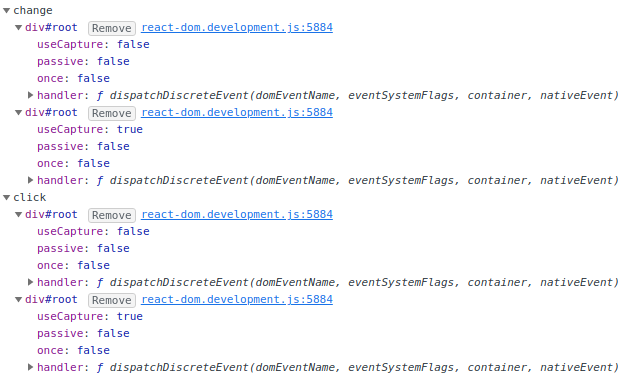
And now we can see in the browser that React added the listener to the root DOM node in developer console:
Now that we know how and where React add event listeners. The question we can ask to ourself is: _How the callback I put on the onClick property of my button is called.
We need to know some magic that React does on DOM nodes.
Actually React put on DOM nodes a reference to the Fiber node under a key which is dynamic internalInstanceKey and props under internalPropsKey.
**Note: ** If you want to know the value of
internalInstanceKeyandinternalPropsKeyyou will have to add a debug point onreact-domcode to get it.
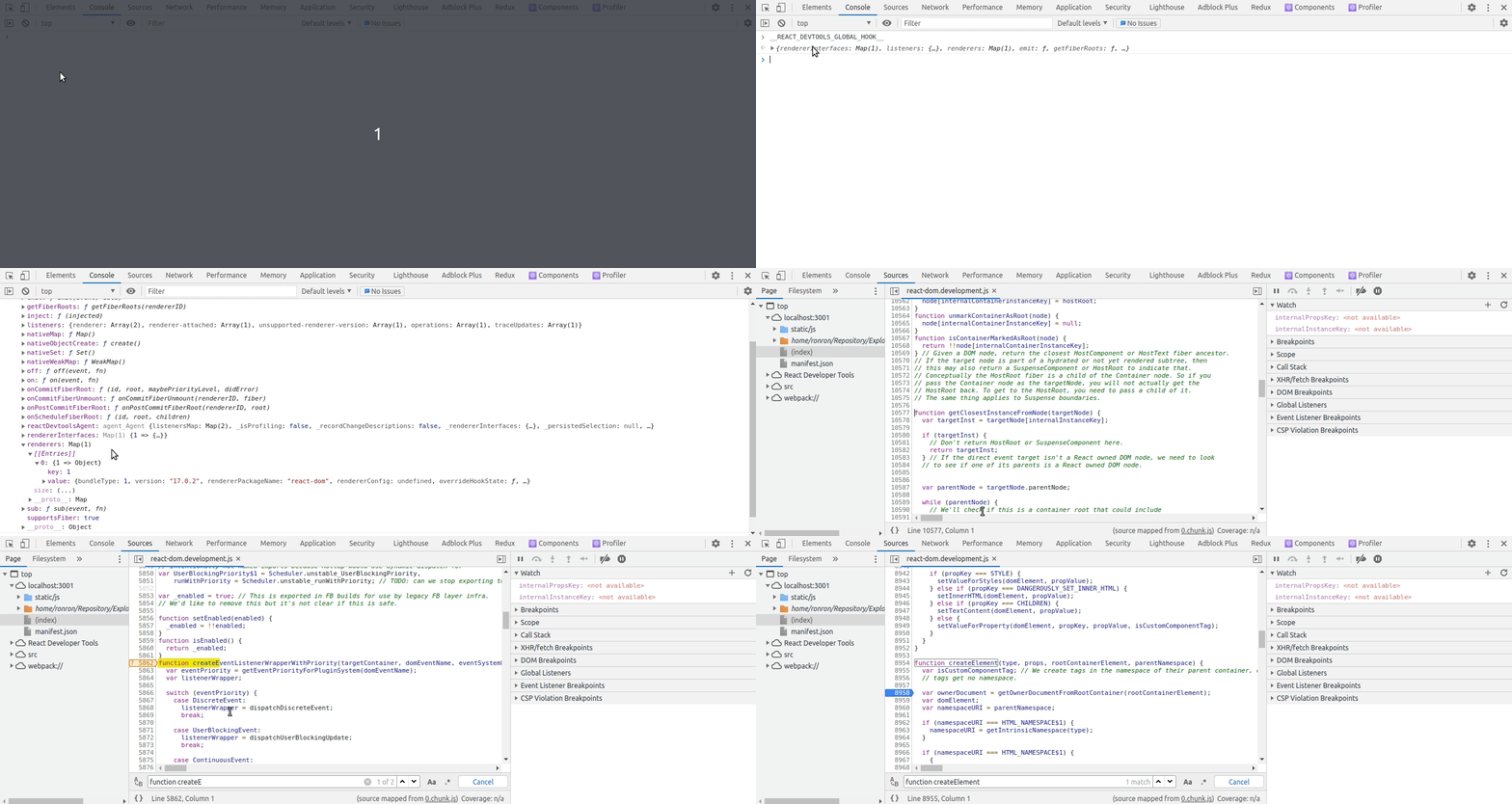
How to go into the react-dom code?
You will need to install the React Developer Tools and then follow this little gif:
Then after refresh, we finally can get the wanted values:
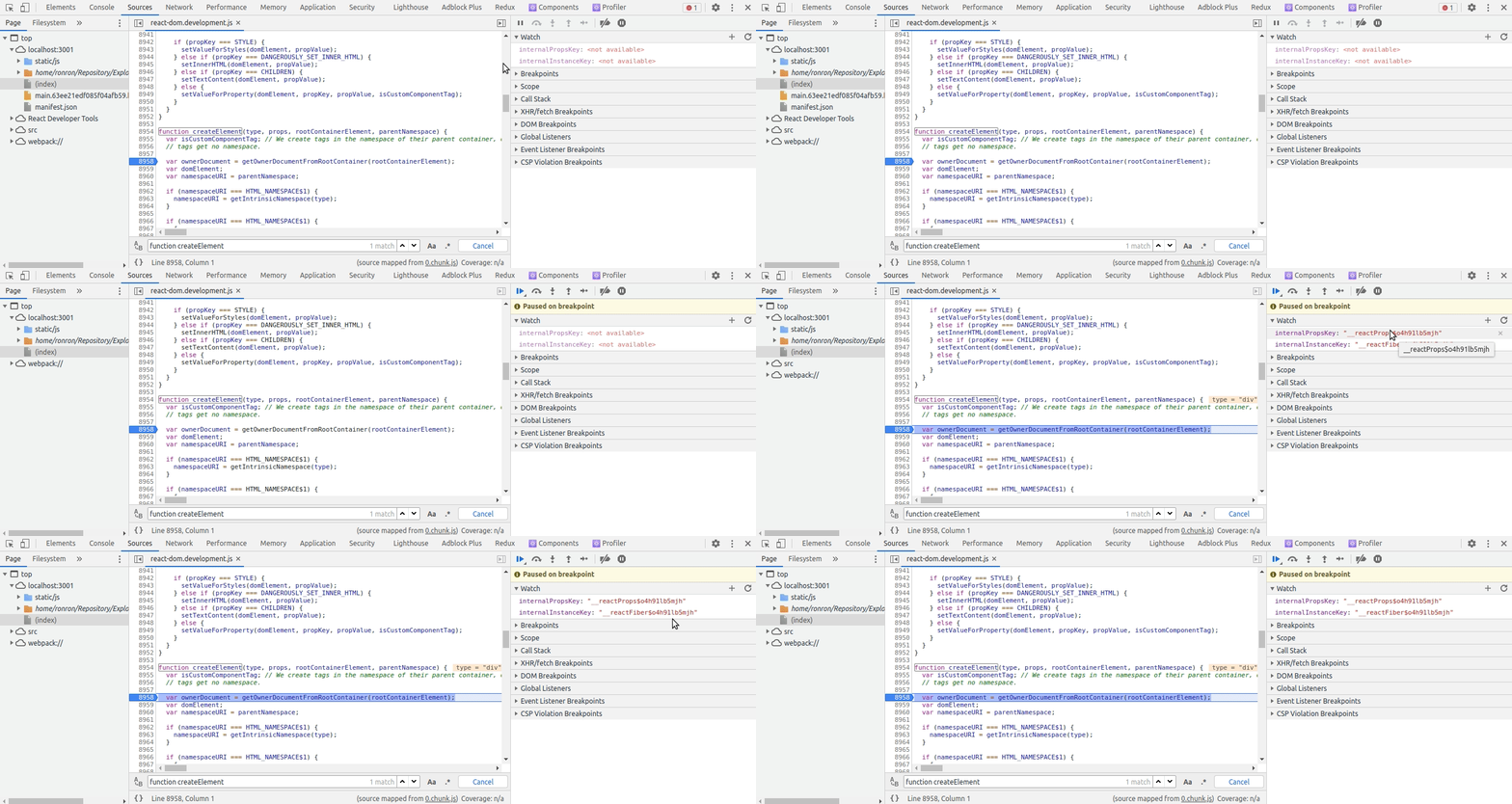
Warning: If you refresh again the page, it will not be the same values!
With the following example, what does it happen when clicking on the button:
function App() {
  return (
     <button onClick={() => console.log('Click on the button')}>
        Click me
     </button>
  );
}
We have seen previously that the listener added by React will call the method attemptToDispatchEvent.
From the event, we can have the target dom node and thanks to the key internalInstanceKey we can have the fiber node instance. (In fact it seems that it can happen that the dom node is not one created by React, in this it will the parent of the node until it's one created by React).
Note: The
targetwill be the clicked element and thecurrentTargetthe root DOM node element (on which the event listener is applied).
Then it calls dispatchEventsForPlugins that will finally extractEvents. These event with their listeners will be put in a DispatchQueue which is an Array of DispatchEntry:
type DispatchEntry = {|
  event: ReactSyntheticEvent,
  listeners: Array<DispatchListener>,
|};

type DispatchListener = {|
  instance: null | Fiber,
  listener: Function,
  currentTarget: EventTarget,
|};
Then this dispatchQueue will processed by executing these listeners in order in the processDispatchQueueItemsInOrder method which do basically something like:
for (const dispatchEntry of dispatchQueue) {
  const { event, listeners } = dispatchEntry;

  listeners.forEach(listener => listener(event));
}
Note: As you can it's a special event type that is stored in the
DispatchQueue:ReactSyntheticEventthat we will talk later.
But how and what is put in the DispatchQueue?
The events with their listeners are extracted here. From the domEventName, we a ReactSyntheticEvent which will wrap the nativeEvent:
type ReactSyntheticEvent = {
  _reactName: string | null,
  isPersistent: () => boolean,
  isPropagationStopped: () => boolean,
  _dispatchInstances?: null | Array<Fiber | null> | Fiber,
  _dispatchListeners?: null | Array<Function> | Function,
  _targetInst: Fiber,
  nativeEvent: Event,
  target?: mixed,
  relatedTarget?: mixed,
  type: string,
  currentTarget: null | EventTarget,
};
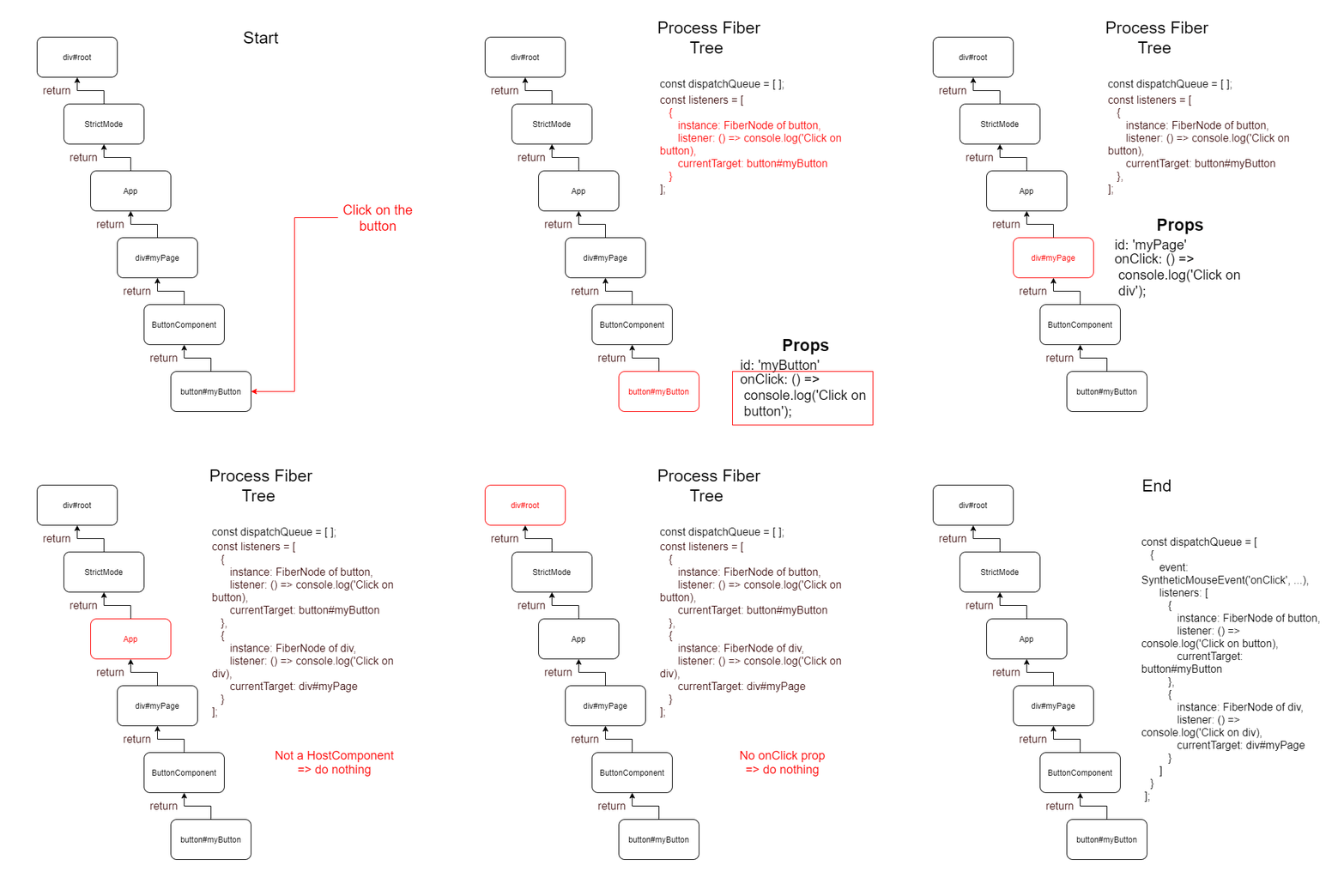
Then the listeners are accumulated. The process is basically:
- Is the current node a
HostComponentand has it got thereactEventNamein its props? Then add the listener in an Array - Get the parent
node.returnand redo the step above while it's not null
Note: Basically it traverses the fiber tree node, from the
targetnode to therootnode element.
Why are nativeEvent wrapped? It helps reducing cross-browser inconsistencies.
Here is a little gif to understand the process to get listeners and fill the dispatchQueue:
So to conclude React does not add event handlers on each DOM element on which we put a event handler like onClick, but only the root node have all event listeners that React knows handle the event.
Then when the user trigger the event, the event listener is called. From the target of the event, React can get the Fiber node because it puts reference to Fiber nodes in DOM nodes into a dynamic key. From that Fiber node, React goes up in the tree, to get all listener that match the React event name and put them in an array (a dispatch queue). Then all the callback from that dispatch queue are executed.
If you want to see more:
- go to my website https://rainbowapps.io/
- follow me on twitter: https://twitter.com/romain_trotard