
When exporting your game with TIC-80, a binary specific to your scripting language is downloaded, and your game is injected into it. If you'd like to to fork and customize TIC-80 itself, you need to build those binaries yourself, and host them on your own http server.
This process will explain the steps specific to build TIC-80, but you will have to install some dependencies yourself. It is a step-by-step process that can largely be automated — and actually is through this project's build.yml.
- Clone TIC-80 and make your changes
- Change the
TIC_WEBSITE&TIC_HOSTstatics- The new host MUST be accessible through
http, and MUST NOT redirect tohttps. It can be a subdomain.
- The new host MUST be accessible through
- #define TIC_WEBSITE "https://" TIC_HOST
- #define TIC_HOST "tic80.com"
+ #define TIC_WEBSITE "https://tic80.com"
+ #define TIC_HOST "www.yourunsafedomain.com"- Build the custom editor for your system (see here)
Follow these steps to build the smaller language-specific binaries.
- Execute the following commands:
$ cd <path-to-tic>/build
$ cmake -G "Visual Studio 16 2019" -DBUILD_SDLGPU=On -DCMAKE_BUILD_TYPE=MinSizeRel -DBUILD_STUB=On ..
$ cmake --build . --config MinSizeRel --parallel- Upload those binaries to
yourunsafedomain.com/export/1.1-dev/- The folder name must correspond to TIC-80's version
- The files must be named
tic80[lang] - The uploaded binaries must not have a file extension
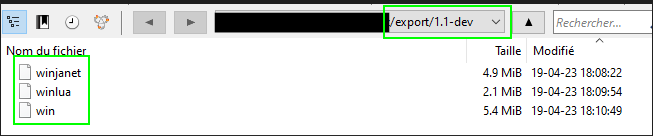
- Follow these steps to build the .js/.wasm/.html files.
- Note: this does not work on Windows
- You'll need
makeandcmake, there are several resources on internet on how to install these. - Download and unzip https://github.com/emscripten-core/emsdk/archive/main.zip on your disk
$ ./emsdk update
$ ./emsdk install latest
$ ./emsdk activate latest- Read the instructions to setup env vars for future builds
- Like the export binaries, build the html files.
- If the process hangs for too long, try to set a small value to the
--paralleloption.
$ cd <path-to-tic>/build/
$ emcmake cmake -DBUILD_SDLGPU=On -DCMAKE_BUILD_TYPE=MinSizeRel -DBUILD_STUB=On ..
$ cmake --build . --config MinSizeRel --parallel
$ mkdir bin/html-export && cp html/export.html bin/html-export/index.html && cp bin/tic80*.js bin/html-export/ && cp bin/tic80*.wasm bin/html-export/-
To make a web build, just put in the same folder
index.htmltic80<lang>.js> renamed totic80.jstic80<lang>.wasm(not renamed)cart.tic, you game
-
If you want to make a downloadable bundle, zip together:
index.htmltic80<lang>.js> renamed totic80.jstic80<lang>.wasm(not renamed)
-
Rename the zip
html<lang>(without the extension) -
Upload the bundle to
yourunsafedomain.com/export/1.1-dev/