
First rule of proxmarking read the datasheets
Second rule of proxmarking search the forum
Third rule of proxmarking learning is hard and takes time
now go and read the following
Over at the offical Proxmark3 repo, in the wiki, there are some more interesting how to / cheat sheets that are easy to miss.
They are good starting points regardless.
- Generic ISO14443 Operations
- Mifare Tag Operations
- Mifare Short HOW-TO
- Generic ISO15693 Operations There is a need to have a roadmap, where people who wants to contribute can get an easy overview of vision and functions that needs some fix'in. If you have and idea of a feature, do look at the wishlist
- Look at oversampling the ADC to get 10bit resolution by removing quantization effects. Successful
- Improve the LF signal demodulation.
- [in progress] Add support for FeliCa.
- Improve iClass key recovery with using device onboard flash memory.
- [in progress] Improve LF HITAG2 code to use ADC path
- Finish frame API transition to use
SendCommandNGeverywhere - [in progress] Chase compilation warnings, when aggressively enabled especially with clang, head-overflows, memory leaks,
- External flash signature is using hardcoded RSA params, let's support PEM cert & key files with mbedtls
- All HF 15 commands needs a redesign. They are not structured like the rest and e.g.
hf 15 info uis leaving the HF field on - See if compressing raw LF samples would speed up BT communication
- HF reader identification: listen to 14a/14b/15/iclass/... reader requests and show what reader supports in its polling sequence
- Investigate if there is some gain moving more code from ARM to Thumb, slurdge started looking at it...
- Support 14a anticollision to detect several tags
- Forge collision in 14a simulation to simulate several tags at once
- Support all iso14443a speeds (support also 212 kbit/s, 424 kbit/s, and 848 kbit/s in reader/sim/sniff modes)
- [in progress] Support Mifare Desfire Light
- [in progress] LIBPM3 - separate cli /gui from functions, in order to make a libary. This will help Webgui, gui, cli implementations.
- Incorporate the amiibo tool into
hf mfucommands nicely. - Implement wipe commands for cards. Like
hf mf wipehf mfu wipehf 14b wipehf 15 wipehf felica wipe
Have some testbed with a bunch of cards to semi-automate regression tests on most of the featuresMAKE INSTALL - enable easyness for package installers / maintainers on pentoo / kali / nethunter to ship proxmark3 binariesFix reflashing with images > 256k. Current only way is with a JTAG programmerRefactorfileutilout ofloclassas it's used elsewhere as wellAdd ECC signature verification tohf mfu info"script run e" is broken on 64b platformsReveng was broken on != WIN32, fixed.Add support for Thinfilm NFC barcodesAdd alf t55xx clone: read t55xx then program another t55xxImplementedhf plot- from offical repoImplementedhf mf staticnestedImplement HITAG2 known attacksMakefile pimp-up to ease the choice of compiler and compilation flagsLooking getting the device to communicate with sim module in a standalone modePort HF FPGA improvements from the official repo to this repoImplement tear-off (cutting abruptly power when an RFID is operating). Works on MFUL, needs to be generalized
- Long range antennas
- Quadrature Signals: Complex, But Not Complicated
- I/Q Data for Dummies
- MIT OpenCourseWare: Signals and Systems (Spring 2011), Prof Alan V. Oppenheim
- Complete GPS/GLONASS Receiver Design
- Software Radio for Experimenters with GNU Radio, Octave and Python by Michel Barbeau
- Let's Assume the System Is Synchronized by Fredric J. Harris
- Presentati1. ons:
- Multirate Digital Signal Processing by Fredric J. Harris
- Videos:
- Books:
- Understanding Digital Signal Processing by Richard G. Lyons
- Software Receiver Design: Build Your Own Digital Communication System In Five Easy Steps by C. Richard Johnson, Jr., William A. Sethares, & Andrew G. Klein
- Application Notes:
This information came from the excellent wiki of BladeRF
The most curious concept of Proxmark3 is the standalone mode functionalities.
With a battery power option, your device can enter a custom standalone function. You don't need a PC/Laptop with the Proxmark3 client software. The standalone mode is usually limited to a certain function, e.g. reading and then emulating a Legic Prime RFID tag. This also means the user interaction with the device is limited to the LEDs and the button.
| LEDS | BUTTONPRESS |
|---|---|
| 4 leds (A,B,C,D) | short, long or multiple (twice) |
All standalone modes uses this differently and is hard to find out what is what. Looking at the source code might help.
To enter the currently flashed standalone mode, press and hold the button until the LEDs play a short animation.
Remember for all standalone modes that targets all Proxmark3 devices that they will loose of data on the device if you cut the power or drain the battery. This is a serious limit to all NON-RDV4 devices. Standalone modes that takes advantage of RDV4 specific features overcomes this limit.
You can implement your own mode or you can use others already implemented modes. Have a look at https://github.com/RfidResearchGroup/proxmark3/blob/master/armsrc/Standalone/readme.md
For any iceman based repo the current most popular public standalone modes is quite easy to compile and install. In this repo its even easier than before. The default standalone mode is HF_MSDSAL.
Table of built-in standalone modes:
| STANDALONE | DESCRIPTION | AUTHOR | DEVICE TARGET |
|---|---|---|---|
| LF_SKELETON | Standalone mode skeleton | Iceman1001 | All |
| LF_EM4100EMUL | Simulate predefined EM4100 tags | Artyom Gnatyuk | All |
| LF_EM4100RSWB | Read/simulate/brute/clone EM4100 tags | Monster1024 | All |
| LF_EM4100RWC | Read/simulate/clone EM4100 tags | Artyom Gnatyuk | All |
| LF_HIDBRUTE | HID corporate 1000 bruteforce | Federico dotta & Maurizio Agazzini | All |
| LF_ICEHID | LF HID / IOprox / AWID / EM4100 collector to flashmem | Iceman1001 | RDV4 |
| LF_PROXBRUTE | HID ProxII bruteforce | Brad Antoniewicz | All |
| LF_SAMYRUN | HID26 read/clone/sim | Samy Kamkar | All |
| HF_14ASNIFF | HF 14a sniff with to flashmem | Michael Farrell | RDV4 |
| HF_AVEFUL | MIFARE Ultralight read/simulation | Ave Ozkal | All |
| HF_BOG | HF 14a sniff with ULC/ULEV1/NTAG auth to flashmem | Bogito | RDV4 |
| HF_COLIN | MIFARE ultra fast sniff/sim/clone to flashmem | Colin Brigato | RDV4 |
| HF_ICECLASS | iCLASS 4-1 mode sim/read & dump/loclass/glitch & config to flashmem | Iceman1001 | RDV4 |
| HF_LEGIC | Read/simulate Legic Prime tags (RDV4: + save to flashmem) | Stefanie Hofmann & Uli Heilmeier | All / RDV4 * |
| HF_MATTYRUN | MIFARE sniff/clone | Matías A. Ré Medina | All |
| HF_MSDSAL (def) | Read and emulate MSD Visa cards | Salvador Mendoza | All |
| HF_TCPRST | IKEA Rothult ST25TA, Standalone Master Key Dump/Emulation | Nick Draffen | Yes |
| HF_YOUNG | MIFARE sniff/simulation | Craig Young | Yes |
* take notice, that some standalone modes takes advantage of RDV4 specific features which may or may not allow for a generic non-rdv4 device to use the mode. You will most likely read the source code to understand what is supported.
The standalone modes can be switched in the file Makefile.platform. Only one standalone mode can be chosen at a time.
- Rename
Makefile.platform.sample->Makefile.platform - Edit the "STANDALONE" row inside
Makefile.platform. You need to uncomment it and chose a standalone mode.
A valid Makefile.platform could look like this:
PLATFORM=PM3RDV4
#PLATFORM_EXTRAS=BTADDON
STANDALONE=LF_EM4100RWC
After changing your standalone mode, don't forget to build and flash the code to the Proxmark3.
make cleanmake -j./pm3-flash-fullimage
Some community efforts has been done to document these.
@Hacker warehouse did a nice video on youtube.
Troy also has a nice image of the leds for LF SAMY_RUN.
A forum user detailed some modes.
The user @Tinker wrote a blogpost about badge cloning by Tinker.
Iceman, @herrmann1001, made a walkthru of the HF legic standalone mode and HF iceclass standalone mode.
The user @quentynblog made a nice video about the HF ST rothult standalone mode.
If you want to write and implement your own standalone mode, the best starting point is to read and understand the readme document found here.
Region
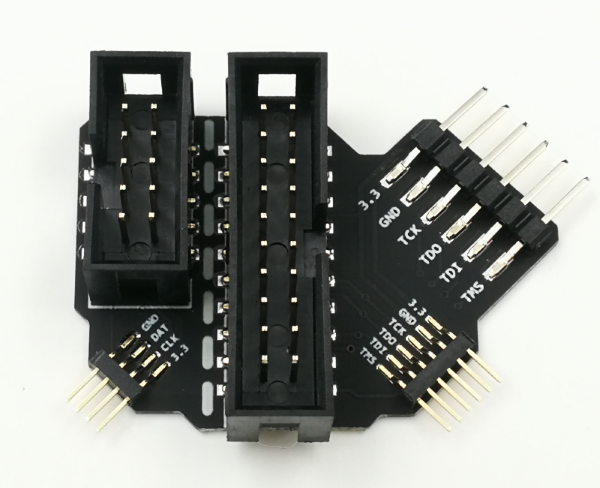
Proxgrind has created a neat little adapter which exposes the jtag pins which makes it simple procedure to flash.
Webshop: Adaptor on sneaktechnology.com
for all of you who has an wish of a feature but you are lacking the will and interest to commit to contribute but the idea is a good one and we don't want to loose track of it. Then this list is for you.
You can edit and enter a line below. For discussions about your idea, we urge you to use the Proxmark3 forum. Start a thread and see if you can spark some interest!
- MITM / Relay attacks using two Proxmark3
- Emulate a smart card with sim module
- Project Walrus support