Some notes, tools, and techniques for reverse engineering macOS binaries.

Dee Mann vdeemann

0xdevalias
/ reverse-engineering-macos.md
Last active
February 10, 2026 21:02
Some notes, tools, and techniques for reverse engineering macOS binaries

FranciscoG
/ tt-export-playlist.js
Last active
June 25, 2025 20:12
This file contains hidden or bidirectional Unicode text that may be interpreted or compiled differently than what appears below. To review, open the file in an editor that reveals hidden Unicode characters.
Learn more about bidirectional Unicode characters
| (function (turntable) { | |
| const modal = ` | |
| <div class='playlistFeatures'> | |
| <p>Deep-Cut to Queup exporter</p> | |
| <button type="button" class='exportPlaylist'>Export Playlist: <span id="exporting-playlist"></span></button> | |
| <hr /> | |
| <p>Experimental: Export all playlists at once</p> | |
| <p>Warning: this can be slow and will lock up the UI while processing, do not do this if you are DJ-ing</p> | |
| <button type="button" class='exportPlaylistAll'>Export All Playlists</button> | |
| <div id="pluginTT-loading"> |

theprojectsomething
/ Firefox Pretty Tree Style Tab.md
Last active
February 3, 2026 20:10
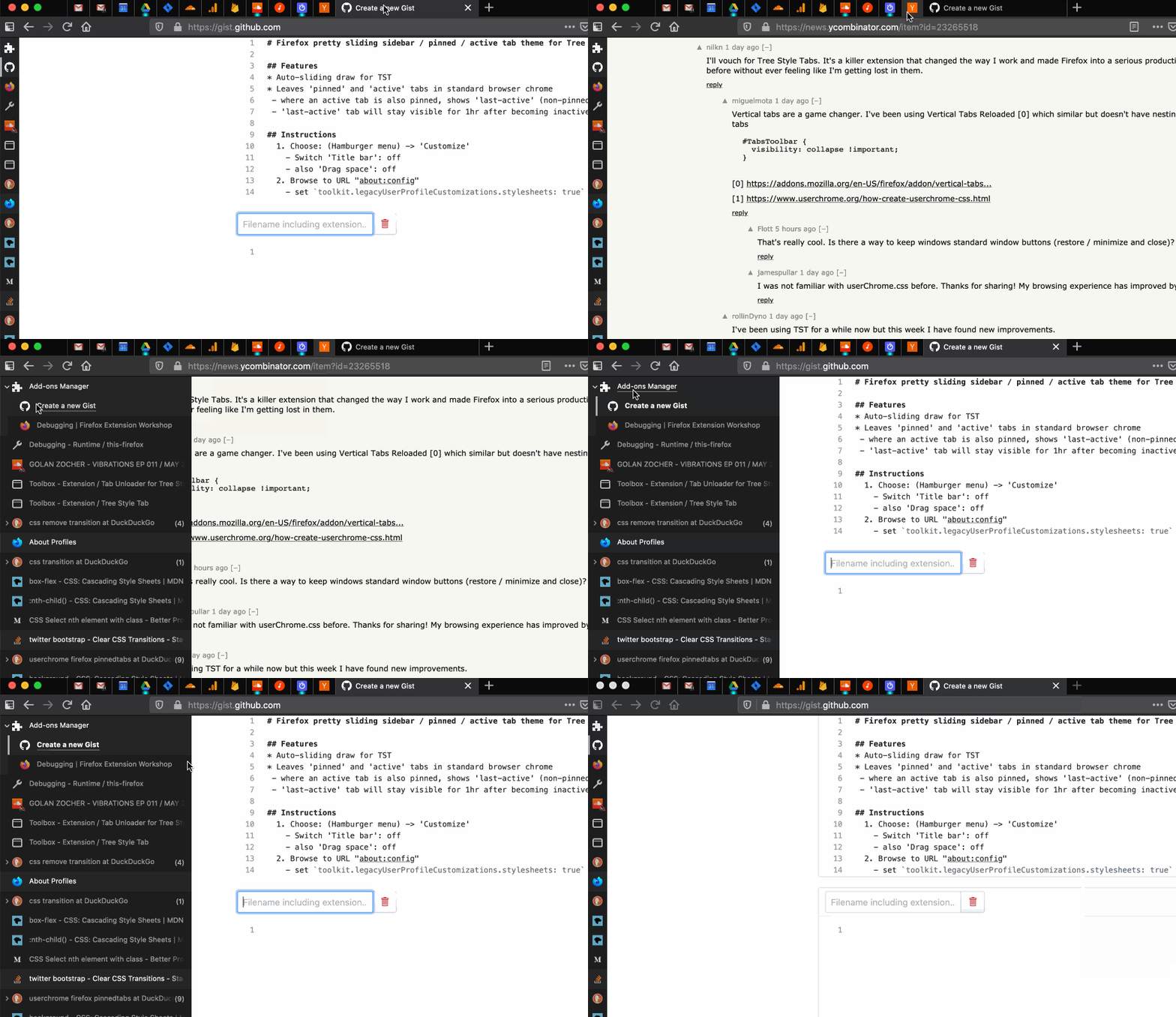
Tree Style Tab: Sliding sidebar / pinned + active tabs
- Auto-sliding draw for TST
- Leaves 'pinned' and 'active' tabs visible in standard browser chrome
- Leaves 'last-active' tabs visible for 3 minutes after becoming inactive
- Where an active tab is pinned, leaves 'last-active' tab (x1) visible for 1hr

szepeviktor
/ Wistia-download-videos.md
Last active
March 14, 2026 02:47
Download Wistia videos - Please do not misuse it!
- right-click on the playing video, select Copy link
- find Wistia video ID in the copied link e.g.
wvideo=tra6gsm6rl- alternative: look for e.g.
hashedId=tra6gsm6rlin the page source
- alternative: look for e.g.
- load
http://fast.wistia.net/embed/iframe/+ video ID in your browser - look for
"type":"original"in the page source and copy the URL from the next line e.g."url":"http://embed.wistia.com/deliveries/129720d1762175bcd8e06dcab926ec76ad38ff00.bin"
- alternative: look for
"type":"hd_mp4_video"

carakan
/ Readme.md
Last active
April 1, 2024 10:22
— forked from alexshagov/install-universal-ctags-with-gtags-osx.md
How to install GNU Global with universall ctags support on mac OS
Unfortunately, homebrew does not support --with-universal-ctags option for global (on the state of April 2018)
The reason is that universal-ctags is not officially released yet.
Run brew install --HEAD universal-ctags/universal-ctags/universal-ctags
(See https://github.com/universal-ctags/homebrew-universal-ctags repo)
If you're on macOS, you might have an old ctags installed with command line tools for XCode.
To fix this, simply run alias ctags="`brew --prefix`/bin/ctags"

scottashipp
/ softwareengineering
Last active
January 23, 2025 04:27
Software Engineering Quotes for fortune
This file contains hidden or bidirectional Unicode text that may be interpreted or compiled differently than what appears below. To review, open the file in an editor that reveals hidden Unicode characters.
Learn more about bidirectional Unicode characters
| # from https://codeburst.io/how-i-hacked-my-terminal-so-a-happy-whale-would-spout-software-quotes-at-me-6791e6c74fc6 | |
| % | |
| Simple things should be simple, complex things should be possible. | |
| The Wiki Way: Quick Collaboration on the Web, Bo Leuf, Ward | |
| Cunningham | |
| % | |
| Simplicity is the soul of efficiency. | |
| Austin Freeman | |
| % |

pyed
/ libtorrent and rtorrent on mac.sh
Last active
January 14, 2023 20:39
— forked from doctorpangloss/libtorrent and rtorrent on mac.sh
Compiling rtorrent on a mac
This file contains hidden or bidirectional Unicode text that may be interpreted or compiled differently than what appears below. To review, open the file in an editor that reveals hidden Unicode characters.
Learn more about bidirectional Unicode characters
| #!/bin/bash | |
| # Installs the XCode command line tools if you don't have them | |
| xcode-select --install | |
| # Installs brew if you don't have it | |
| /usr/bin/ruby -e "$(curl -fsSL https://raw.githubusercontent.com/Homebrew/install/master/install)" | |
| # Makes your account the owner of /usr/local, which is preferred on single user Macs | |
| sudo chown -R `whoami` /usr/local | |
| # Installs all the dependencies for building libtorrent and rtorrent | |
| brew install automake libtool boost curl lzlib libsigc++ openssl pkg-config xmlrpc-c | |
| # Uninstall libtorrent-rasterbar if you already have it |

enpassant
/ vimwiki2html.md
Last active
December 9, 2025 23:02
Convert VimWiki to HTML (markdown, mediawiki)
With this wiki2html.sh bash script and pandoc program, you can convert markdown to html.
Usage: In the vim list section of the .vimrcfile, include options:
let g:vimwiki_list = [{'path': ‘your_wiki_place',
  \ 'path_html': ‘wiki_html_location’,
  \ 'syntax': 'markdown',
 \ 'ext': '.md',
This file contains hidden or bidirectional Unicode text that may be interpreted or compiled differently than what appears below. To review, open the file in an editor that reveals hidden Unicode characters.
Learn more about bidirectional Unicode characters
| None of the steps that were here are required any more. The kernel has had support for this | |
| (now otherwise end of support) device since 2020thanks to the following commit: | |
| https://github.com/torvalds/linux/commit/470757f5b3a46bd85741bb0d8c1fd3f21048a2af | |
| If you want, you can still see the old notes if you view the gist history, | |
| but please do not act on them, they are outdated and will break the functioning system. |