
Picking the right architecture = Picking the right battles + Managing trade-offs
- Clarify and agree on the scope of the system
- User cases (description of sequences of events that, taken together, lead to a system doing something useful)
- Who is going to use it?
- How are they going to use it?
- Constraints
- Mainly identify traffic and data handling constraints at scale.
- Scale of the system such as requests per second, requests types, data written per second, data read per second)
- Special system requirements such as multi-threading, read or write oriented.
- High level architecture design (Abstract design)
- Sketch the important components and connections between them, but don't go into some details.
- Application service layer (serves the requests)
- List different services required.
- Data Storage layer
- eg. Usually a scalable system includes webserver (load balancer), service (service partition), database (master/slave database cluster) and caching systems.
- Component Design
- Component + specific APIs required for each of them.
- Object oriented design for functionalities.
- Map features to modules: One scenario for one module.
- Consider the relationships among modules:
- Certain functions must have unique instance (Singletons)
- Core object can be made up of many other objects (composition).
- One object is another object (inheritance)
- Database schema design.
- Understanding Bottlenecks
- Perhaps your system needs a load balancer and many machines behind it to handle the user requests. * Or maybe the data is so huge that you need to distribute your database on multiple machines. What are some of the downsides that occur from doing that?
- Is the database too slow and does it need some in-memory caching?
- Scaling your abstract design
- Vertical scaling
- You scale by adding more power (CPU, RAM) to your existing machine.
- Horizontal scaling
- You scale by adding more machines into your pool of resources.
- Caching
- Load balancing helps you scale horizontally across an ever-increasing number of servers, but caching will enable you to make vastly better use of the resources you already have, as well as making otherwise unattainable product requirements feasible.
- Application caching requires explicit integration in the application code itself. Usually it will check if a value is in the cache; if not, retrieve the value from the database.
- Database caching tends to be "free". When you flip your database on, you're going to get some level of default configuration which will provide some degree of caching and performance. Those initial settings will be optimized for a generic usecase, and by tweaking them to your system's access patterns you can generally squeeze a great deal of performance improvement.
- In-memory caches are most potent in terms of raw performance. This is because they store their entire set of data in memory and accesses to RAM are orders of magnitude faster than those to disk. eg. Memcached or Redis.
- eg. Precalculating results (e.g. the number of visits from each referring domain for the previous day),
- eg. Pre-generating expensive indexes (e.g. suggested stories based on a user's click history)
- eg. Storing copies of frequently accessed data in a faster backend (e.g. Memcache instead of PostgreSQL.
- Load balancing
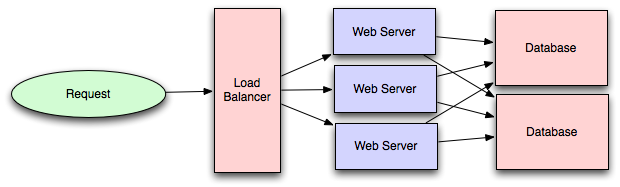
- Public servers of a scalable web service are hidden behind a load balancer. This load balancer evenly distributes load (requests from your users) onto your group/cluster of application servers.
- Types: Smart client (hard to get it perfect), Hardware load balancers ($$$ but reliable), Software load balancers (hybrid - works for most systems)
- Database replication
- Database replication is the frequent electronic copying data from a database in one computer or server to a database in another so that all users share the same level of information. The result is a distributed database in which users can access data relevant to their tasks without interfering with the work of others. The implementation of database replication for the purpose of eliminating data ambiguity or inconsistency among users is known as normalization.
- Database partitioning
- Partitioning of relational data usually refers to decomposing your tables either row-wise (horizontally) or column-wise (vertically).
- Map-Reduce
- For sufficiently small systems you can often get away with adhoc queries on a SQL database, but that approach may not scale up trivially once the quantity of data stored or write-load requires sharding your database, and will usually require dedicated slaves for the purpose of performing these queries (at which point, maybe you'd rather use a system designed for analyzing large quantities of data, rather than fighting your database).
- Adding a map-reduce layer makes it possible to perform data and/or processing intensive operations in a reasonable amount of time. You might use it for calculating suggested users in a social graph, or for generating analytics reports. eg. Hadoop, and maybe Hive or HBase.
- Platform Layer (Services)
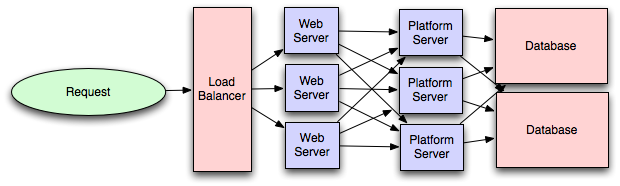
- Separating the platform and web application allow you to scale the pieces independently. If you add a new API, you can add platform servers without adding unnecessary capacity for your web application tier.
- Adding a platform layer can be a way to reuse your infrastructure for multiple products or interfaces (a web application, an API, an iPhone app, etc) without writing too much redundant boilerplate code for dealing with caches, databases, etc.
- Concurrency
- Do you understand threads, deadlock, and starvation? Do you know how to parallelize algorithms? Do you understand consistency and coherence?
- A thread is one path of execution inside a process. Multiple threads can run at once and share memory.
- A deadlock is when two or more threads wait on each other forever. A simple example is thread A holds lock 1 and waits for lock 2, while thread B holds lock 2 and waits for lock 1.
- Starvation is when one thread never gets enough CPU time or access to a resource because other threads keep winning.
- To parallelize an algorithm, split work into independent pieces that can run at the same time, then combine the results. This works well when tasks do not depend on each other too much.
- Consistency means different parts of a system see the same data. In distributed systems, this is about whether every read sees the latest write.
- Coherence is more of a shared-memory hardware idea. It means different CPU cores agree on the value of the same memory location.
- Networking
- Do you roughly understand IPC and TCP/IP? Do you know the difference between throughput and latency, and when each is the relevant factor?
- IPC means inter-process communication. It is how processes on the same machine talk to each other, like pipes, sockets, or shared memory.
- TCP/IP is the basic internet communication stack. IP moves packets between machines. TCP adds reliability, ordering, and retransmission.
- Latency is how long one request takes. Throughput is how much total work gets done over time.
- Latency matters for user-facing actions like loading a page or placing a trade. Throughput matters for batch jobs, logging, and systems processing huge volumes.
- Abstraction
- You should understand the systems you’re building upon. Do you know roughly how an OS, file system, and database work? Do you know about the various levels of caching in a modern OS?
- An OS manages processes, memory, files, and hardware access.
- A file system organizes data on disk into files and directories, and tracks where bytes live physically.
- A database stores and retrieves data efficiently using structures like indexes, plus concurrency control and recovery logic.
- For caching, know the big layers. CPU caches are fastest. RAM is next. Then OS page cache. Then app caches like Redis. Then disk. The main idea is simple. The closer data is to the CPU, the faster it is.
- Real-World Performance
- You should be familiar with the speed of everything your computer can do, including the relative performance of RAM, disk, SSD and your network.
- Fastest to slowest is usually CPU cache, RAM, SSD, disk, network. The interview point is not exact numbers. It is knowing that memory is much faster than disk, and local access is much faster than remote access. That helps you explain why caches, batching, and avoiding network hops matter.
- Estimation
- Estimation, especially in the form of a back-of-the-envelope calculation, is important because it helps you narrow down the list of possible solutions to only the ones that are feasible. Then you have only a few prototypes or micro-benchmarks to write.
- Back-of-the-envelope estimation helps you reject bad ideas quickly. You should be able to estimate requests per second, storage needs, bandwidth, and whether something fits in memory. For instance, if each item is 1 KB and you have 100 million items, that is about 100 GB before replication. That already tells you one machine cache will not hold it.
- Availability & Reliability
- Are you thinking about how things can fail, especially in a distributed environment? Do know how to design a system to cope with network failures? Do you understand durability?
- In distributed systems, networks fail, machines crash, messages arrive late, and retries can duplicate work. You should be able to talk about timeouts, retries, backoff, idempotency, replication, and failover.
- Durability means data is not lost after you say a write succeeded. Usually that means writing to persistent storage, often with replication or logs.
- The best interview mindset is this. Every design choice answers two questions. What makes it fast, and what happens when it fails?
Security and CORS CORS is a browser rule that controls which websites can call your backend from JavaScript. In interviews, you should say you allow only trusted origins, only the methods you need, and never use wide open * unless the API is truly public.
Using a CDN A CDN is usually the default for static assets like images, JS, CSS, and video. It reduces latency by serving content from servers close to the user, lowers load on your origin, and helps absorb traffic spikes.
Full text search Use a search engine like Elasticsearch, Solr, or Lucene-based systems when you need keyword search, ranking, filtering, or fuzzy matching. The key idea is that search is fast because you query an inverted index instead of scanning raw text every time.
Offline support and progressive enhancement The default mindset is graceful degradation. Core features should still work on weak networks or older devices, and offline support is a bonus layer for apps that need it.
Service Workers Service workers sit between the browser and the network. They can cache assets, support offline reads, and enable background sync, but they add complexity around cache invalidation and stale content.
Web Workers Web workers are for CPU heavy work in the browser so the UI does not freeze. Use them for parsing, image processing, or big computations, not for normal API calls.
Server side rendering SSR helps first page load and SEO because the server sends HTML that is already filled in. The tradeoff is more backend complexity and server cost, so it is most useful for content heavy or SEO sensitive pages.
Lazy loading Lazy loading is a strong default for images, long lists, and non critical components. It improves initial load time by only fetching what the user is likely to need soon.
Minimizing network requests This mostly comes down to reducing round trips and payload size. HTTP 2 helps by multiplexing requests on one connection, and bundling or compression can help, but over bundling can hurt caching.
Developer productivity and tooling This matters because teams ship and debug faster with good build tooling, testing, observability, and deployment workflows. In interviews, mention it briefly unless the question is specifically about internal platform design.
Accessibility You should treat accessibility as a core requirement, not polish. The basics are keyboard navigation, semantic HTML, screen reader support, color contrast, and clear focus states.
Internationalization Design for i18n early if the product is global. Text expansion, date and currency formatting, right to left layouts, and translation workflows all affect frontend and backend design.
Responsive design Responsive design means one product works across screen sizes. The main system design angle is that mobile users often have weaker networks and less CPU, so lighter pages matter.
Browser compatibility The safe answer is progressive enhancement. Start with broadly supported features, add fallbacks where needed, and avoid making the core flow depend on one modern browser feature.
- Code
- HTML5/WAI-ARIA
- CSS/Sass Code standards and organization
- Object-Oriented approach (how do objects break down and get put together)
- JS frameworks/organization/performance optimization techniques
- Asset Delivery - Front-end Ops
- Documentation
- Onboarding Docs
- Styleguide/Pattern Library
- Architecture Diagrams (code flow, tool chain)
- Testing
- Performance Testing
- Visual Regression
- Unit Testing
- End-to-End Testing
- Process
- Git Workflow
- Dependency Management (npm, Bundler, Bower)
- Build Systems (Grunt/Gulp)
- Deploy Process
- Continuous Integration (Travis CI, Jenkins)
Links
Introduction to Architecting Systems for Scale
Scalable System Design Patterns
Scalable Web Architecture and Distributed Systems
What is the best way to design a web site to be highly scalable?