
- Go to your
vite.config.jsfile. And add your base url to it.
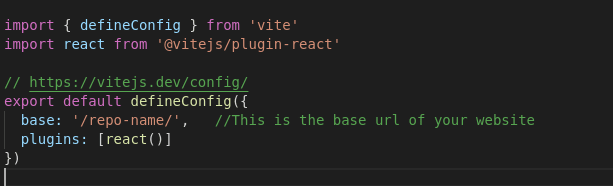
- If your repo name is
Kool-Vite, then your bsae URL is/Kool-Vite/.
-
Go to your root
package.jsonfile. Addhomepageanddeployscripts. ```json "homepage": "https://yourGitHubUserName.github.io/repoName/",... your other settings ... "scripts":{ "predeploy": "npm run build", "deploy": "gh-pages -d dist", "dev": "vite", "start": "vite", "build": "vite build", "lint": "eslint src --ext js,jsx --report-unused-disable-directives --max-warnings 0", "preview": "vite preview", } ```yourGitHubUserNameis... well your GitHub username, for example my yet to existKool-Vitehomepagewill behttps://ronin1702.github.io/Kool-Vite/
-
PROPER ROUTING is important. Make sure your root route is set to /<repo_name>/ in your root path. For example below is how my
main.jsxset the routes with React-DOM:import ReactDOM from 'react-dom/client'; import { createBrowserRouter, RouterProvider } from 'react-router-dom'; import 'bootstrap/dist/js/bootstrap.bundle.min.js'; import 'bootstrap/dist/css/bootstrap.min.css'; import './index.css'; import './css/style.css'; import App from './App'; import ErrorPage from './pages/ErrorPage'; import AboutPage from './pages/AboutPage'; import PortfolioPage from './pages/PortfolioPage/PortfolioPage'; import ContactPage from './pages/ContactPage'; import ResumePage from './pages/ResumePage'; const router = createBrowserRouter([ { path: '/kool-vite/', element: <App />, errorElement: <ErrorPage />, children: [ { index: true, element: <AboutPage />, }, { path: 'about', element: <AboutPage />, }, { path: 'portfolio', element: <PortfolioPage />, }, { path: 'contact', element: <ContactPage />, }, { path: 'resume', element: <ResumePage />, }, ], }, ]); ReactDOM.createRoot(document.getElementById('root')).render( <RouterProvider router={router} /> );
Make sure you git push all of your changes first
then
npm i gh-pages && npm run deployThe command above installed gh-pages package and then npm run deploy your vite app to GitHub Pages.
For more information, please visit GitHub Pages on npmjs.com

This is awesome! Thank you! 💪🏻