Environment variables are a way to store configuration settings for your applications. They are key-value pairs that are outside of the application code. Although environment variables work in a similar fashion in both frontend and backend applications, there are some specific considerations for each.

KodeBear Ronin1702

Ronin1702
/ Environment_Variables_Frontend_vs_Backend.md
Created
October 29, 2023 13:03
Environment Variables in Frontend vs Backend
Ronin1702
/ AccessingLocalhostfromiPhone.md
Last active
December 16, 2025 00:30
Accessing Localhost from iPhone
If you are developing a web application and want to test it on your iPhone, you can access your localhost development server directly from your iPhone. Here's how to do it:
- Ensure both your development machine and iPhone are connected to the same local network (e.g., the same WiFi).
- Go to your
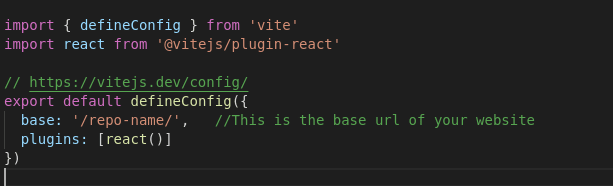
vite.config.jsfile. And add your base url to it.
- If your repo name is
Kool-Vite, then your bsae URL is/Kool-Vite/.
- Go to your root
package.jsonfile. Addhomepageanddeployscripts. ```json "homepage": "https://yourGitHubUserName.github.io/repoName/",
Ronin1702
/ package.json-update.md
Last active
September 26, 2023 12:12
Update All dependencies in `package.json` at once
As a developer, you may or may not have set up VMs (Virtual Machines).
Developing cross platform we will need to tell our shell such as brew, bash, powershell, or zsh to which path they shall export the command to.
So that the shell can translate what you wanted to do from the command line to a language that your machine can understand and execute.
For most developers we use the good old Bash instead of zsh, both of them works. To check which shell you're using:
Ronin1702
/ remove-node_modules.md
Last active
September 26, 2023 11:45
Delete `node_modules` folder from your directory
Ronin1702
/ xcode-uninstall.sh
Created
September 3, 2023 10:50
— forked from oxlb/xcode-uninstall.sh
SH file to uninstall Xcode from MacOS
This file contains hidden or bidirectional Unicode text that may be interpreted or compiled differently than what appears below. To review, open the file in an editor that reveals hidden Unicode characters.
Learn more about bidirectional Unicode characters
| killall Xcode | |
| xcrun -k | |
| xcodebuild -alltargets clean | |
| rm -rf "$(getconf DARWIN_USER_CACHE_DIR)/org.llvm.clang/ModuleCache" | |
| rm -rf "$(getconf DARWIN_USER_CACHE_DIR)/org.llvm.clang.$(whoami)/ModuleCache" | |
| rm -rf /Applications/Xcode.app | |
| rm -rf ~/Library/Caches/com.apple.dt.Xcode | |
| rm -rf ~/Library/Developer | |
| rm -rf ~/Library/MobileDevice | |
| rm -rf ~/Library/Preferences/com.apple.dt.Xcode.plist |
Ronin1702
/ pc-bash-git-authentication.md
Last active
September 3, 2023 08:24
PC Bash Shell Authentication for `Git` commands
Having to enter passwords for each git pull and git push command is very time consuming when you use Git Bash on PC
PowerShell on PC does not have this problem where the user set the running environment for SSH Agent:
Start-Service ssh-agent
ssh-add "$env:USERPROFILE\.ssh\id_ed25519"- When I use the Git Bash program on PC, though I have set up SSH key correctly, each time I must type in password when I
git pullorgit push.
View this
.mdfile inRawmode to see the codes of markdown format.
Thanks for visiting The Markdown Guide!
This Markdown cheat sheet provides a quick overview of all the Markdown syntax elements. It can’t cover every edge case, so if you need more information about any of these elements, refer to the reference guides for basic syntax and extended syntax.

NewerOlder