
Scenario: You have an XBOX One Controller, or similar, and to turn off the controller you press and hold the guide button. Unfortunately, even though you have turned off guide button focuses steam in Steam's Controller Settings, the button press still opens Big Picture Mode.
- With your controller on, open Controller Settings:
Steam > Settings > Controller > General Controller Settings - Using the controller, highlight
Xbox One Controlleror similar, navigate toDefine Layoutand pressAon the controller

The next step involves remapping the Guide Button to another button and then reassigning that button back to the original. This will leave the guide button unassigned so that the controller can be turned off without Steam getting involved.
- Navigate to
Guideand pressA - Navigate to
Primary Action, which is yourAbutton and set it back toA. Guide should now be unassigned.
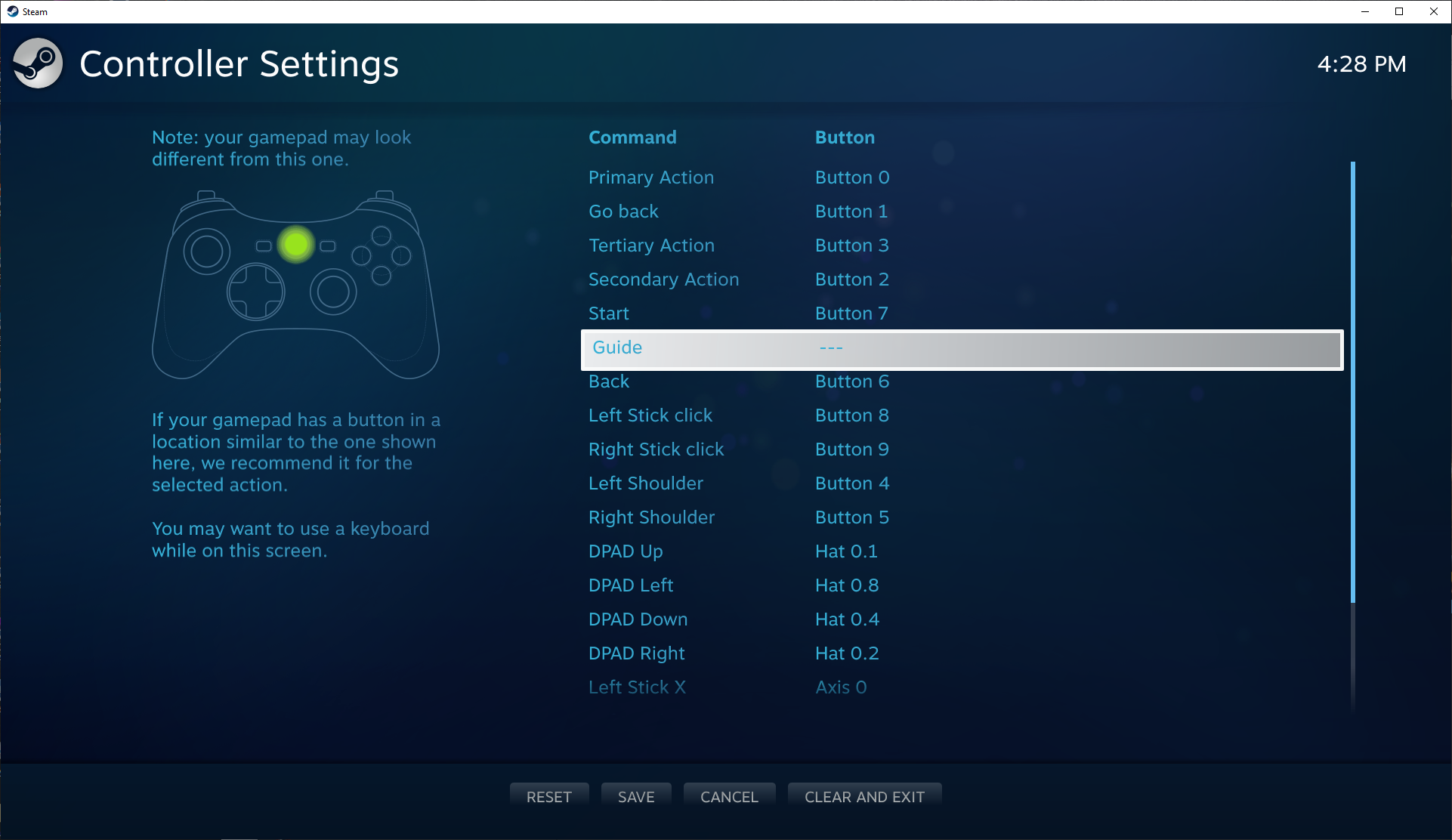
- Press
Yto save and thenBto close the controller settings - Test the Guide button now turns off without opening Big Picture.


To add to this, and to look for a cleaner way of doing this, I reset everything (uninstalled Xbox Extended Feature Support, rebooted, re-installed Xbox Extended Feature Support, rebooted), checked the BPM was activated via the Guide button 🤮, it was, then took a clip of the config to the clipboard (as below);
03005d085e040000000b000011056800,*,a:b0,b:b1,back:b4,dpdown:b12,dpleft:b13,dpright:b14,dpup:b11,guide:b5,leftshoulder:b9,leftstick:b7,lefttrigger:a4,leftx:a0,lefty:a1,rightshoulder:b10,rightstick:b8,righttrigger:a5,rightx:a2,righty:a3,start:b6,x:b2,y:b3,paddle1:b15,paddle2:b17,paddle3:b16,paddle4:b18,crc:085d,platform:Windows,Notice the guide:b5 bit - I removed that and and copied the rest back to the clipboard;
03005d085e040000000b000011056800,*,a:b0,b:b1,back:b4,dpdown:b12,dpleft:b13,dpright:b14,dpup:b11,leftshoulder:b9,leftstick:b7,lefttrigger:a4,leftx:a0,lefty:a1,rightshoulder:b10,rightstick:b8,righttrigger:a5,rightx:a2,righty:a3,start:b6,x:b2,y:b3,paddle1:b15,paddle2:b17,paddle3:b16,paddle4:b18,crc:085d,platform:Windows,I then clicked 'Setup Device Inputs' and 'Paste From Clipboard', and that's worked a charm.
The nice thing about this method is that it retains all of the other defaults and only addresses (removes) the Guide button from the config.
By doing the previous way (just tapping out the buttons and skipping the Guide button, the config looks like this;
03005d085e040000000b000011056800,Xbox One Elite 2 Controller,crc:085d,platform:Windows,a:b0,b:b1,x:b2,y:b3,dpleft:b13,dpright:b14,dpup:b11,dpdown:b12,leftx:a0,lefty:a1,leftstick:b7,rightx:a2,righty:a3,rightstick:b8,leftshoulder:b9,lefttrigger:+a4,rightshoulder:b10,righttrigger:a5,back:b4,start:b6,paddle1:b15,paddle2:b17,paddle3:b16,paddle4:b18,steam:1,Without delving into the differences, I think it's just a cleaner way to retain any and all functionality; by only targeting the actual problem and not creating potential new, different issues.
The 32 characters at the start of the config are (probably) specific to my controller (like some form of UUID), so you'll need to copy your own config to get that (if you give this a go), otherwise it (almost definitely) won't work! 👍🏻